
Audient ORIA mini Review
At its core, the Audient ORIA mini is about its “spatial correction system.” It’s not merely a standalone device; it’s a comprehensive package that includes the Sonarworks SoundID Reference calibration software and an add-on kit complete with a measurement microphone.
Originally conceived for integration between audio interfaces and studio monitors, it performs multi-point testing around the listening position to achieve a flat frequency response and neutral sound, ensuring musicians hear their work as intended.
Bringing Pro-Level Correction Home
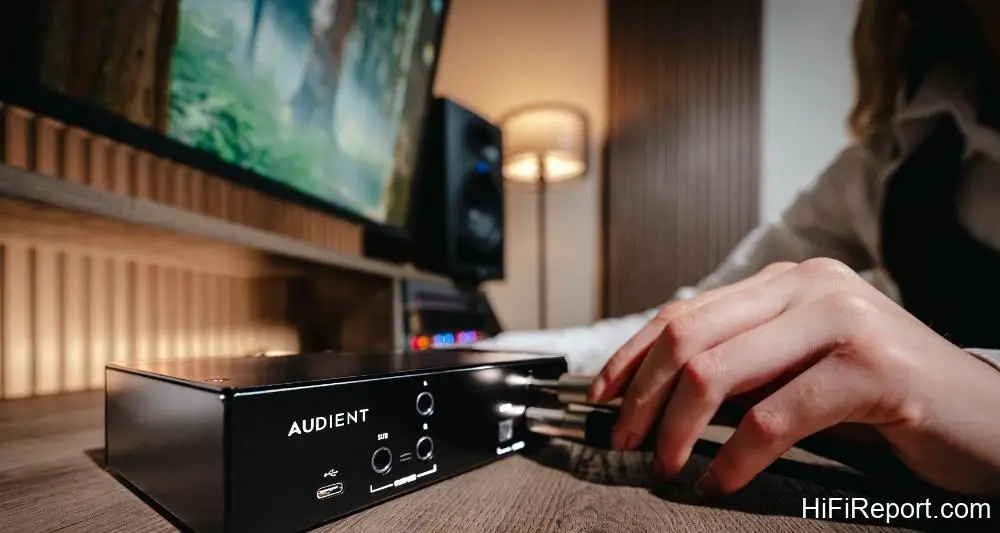
But how does a professional-grade unit like the ORIA mini integrate into a two-channel Hi-Fi system? For music playback originating from a laptop or desktop computer, creating a “personal” audio setup within a room can directly leverage Audient’s accompanying hardware. In this review, I paired the Audient iD4 Stream audio interface with the ORIA mini.
The iD4 Stream served as the microphone preamplifier for the Sonarworks SoundID Reference measurements, while also handling the USB digital audio output from the computer. Simply put, it functions as a USB DAC and headphone amplifier. Priced at a mere $300, it’s an affordable and capable solution. The complete ORIA mini spatial correction system, encompassing software, hardware, and the measurement kit, comes in at just $495.
This package, combined with a pair of active monitor speakers, forms a fully functional two-channel system. The ORIA mini can even accommodate active subwoofers, offering customizable crossover points and incorporating the subwoofer into the DRC testing and correction along with the main left and right speakers.
Bridging the Gap: Connecting to Home Audio
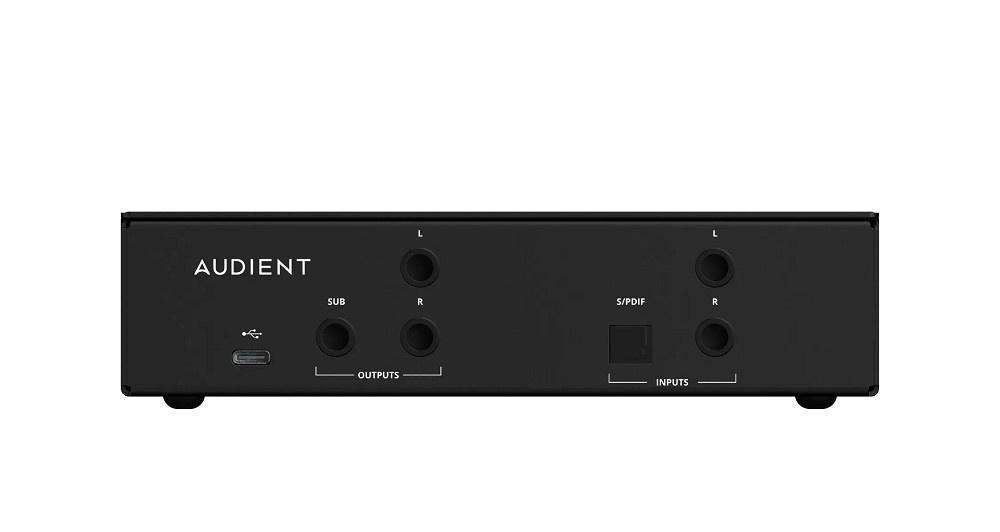
While the aforementioned setup is geared towards professional monitoring, the question remains: how does the Audient ORIA mini seamlessly integrate into a “home” audio system? The ORIA mini features 2-channel analog balanced inputs and 2.1-channel analog balanced outputs. Audiophiles might find the TRS connectors instead of XLRs unfamiliar, but this is easily managed.
A pair of “XLR female to 6.3mm TRS signal cables” can be used for connecting home audio components to the ORIA mini’s inputs, and a pair of “TRS to XLR male signal cables” will handle the ORIA mini’s outputs.
Strategic Placement in Your System
Where should the ORIA mini reside within your audio chain? If you’re using a streamer as a preamplifier (or a streamer doubling as a preamp) feeding directly into a power amplifier (or active speakers), the ORIA mini should be placed between the streamer and the power amplifier. Similarly, if you have a separate preamplifier and power amplifier setup, the ORIA mini slots in between them.
For systems comprising a “digital source + integrated amplifier,” the ORIA mini is typically positioned between the primary digital source’s analog output (e.g., from a DAC or streamer) and the integrated amplifier’s inputs. If your integrated amplifier allows for the preamplifier output and power amplifier input to be disconnected, you can install the ORIA mini between the integrated amplifier’s PRE OUT and MAIN IN, much like with separate components.
Beyond its analog inputs, the ORIA mini also offers a Toslink optical input (supporting PCM digital audio). However, for ease of use, digital inputs require a computer or iPad connection via USB-C to adjust volume through the application. Therefore, for integration into a living room audio system, analog inputs are generally preferred.
A Glimpse Inside: Circuitry and Components
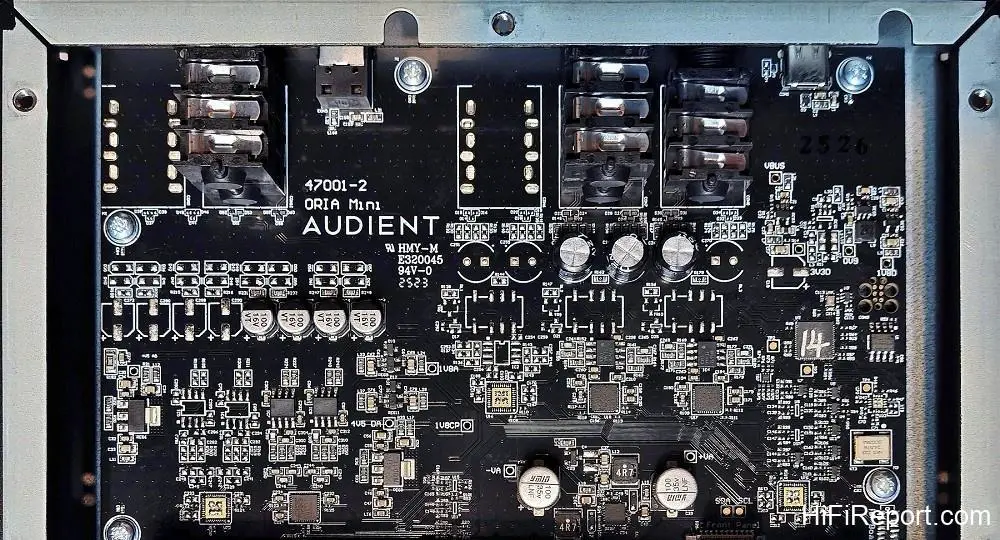
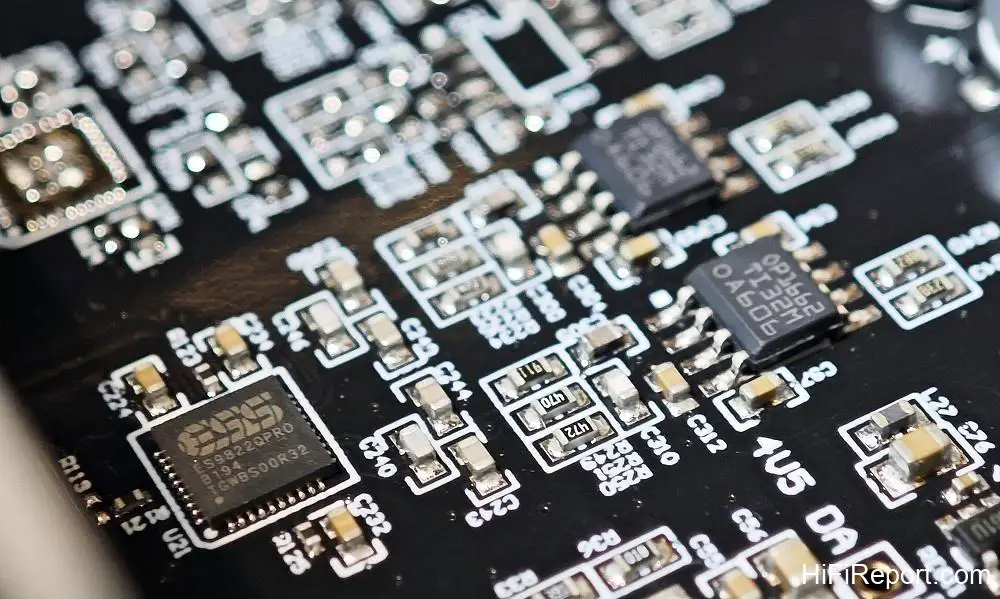
Let’s delve into the ORIA mini’s internal circuitry. For its analog audio balanced input buffering, it utilizes wide-bandwidth, low-noise, and low-distortion dual op-amp chips, specifically the TI OPA1662 (one per channel). Following this, the A/D conversion is handled by the ESS ES9822QPRO, a high-dynamic-range, low-distortion, high-performance 32-bit stereo ADC chip. After converting analog audio to digital, all processing is conducted with 32-bit precision.
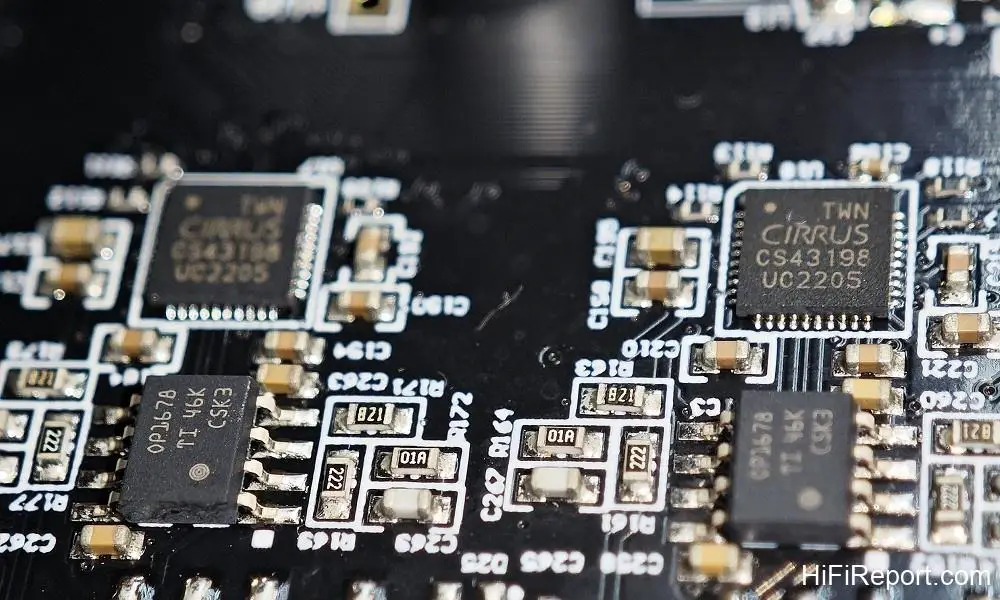
For the output stage, each channel employs a high-dynamic-range (130 dB) 32-bit stereo DAC chip, the Cirrus Logic CS43198. Utilizing a separate DAC for each channel’s balanced (in-phase and out-of-phase) digital-to-analog conversion not only provides independent processing for higher dynamics but also minimizes crosstalk between the left and right channels, enhancing separation.
Finally, each channel is amplified by a low-distortion, low-noise JFET dual op-amp chip, the OPA1678, in the output stage.
Balancing Fidelity and Correction: The 32-bit Advantage
For music enthusiasts seeking room correction to achieve accurate frequency response and faithfully reproduce the original recording, the primary concern is whether the correction process compromises audio quality. While it’s theoretically impossible to achieve *zero* sonic compromise, it is certainly possible to achieve a level of degradation “so small it’s inaudible.” Objectively speaking, the ORIA mini has a strong chance of accomplishing this.
Most surround receivers and preamplifiers currently employ 24-bit digital audio processing. While acceptable for movie soundtracks, the difference in sound quality and dynamics when listening to music, with or without DRC engaged, is often readily apparent. The ORIA mini’s spatial correction processing, encompassing EQ, delay, and bass management, operates at a “full 32-bit” precision.
This ensures both sonic accuracy and a dynamic range of up to 127 dB, offering a significant and discernible advantage.
The Calibration Process: A Detailed Approach
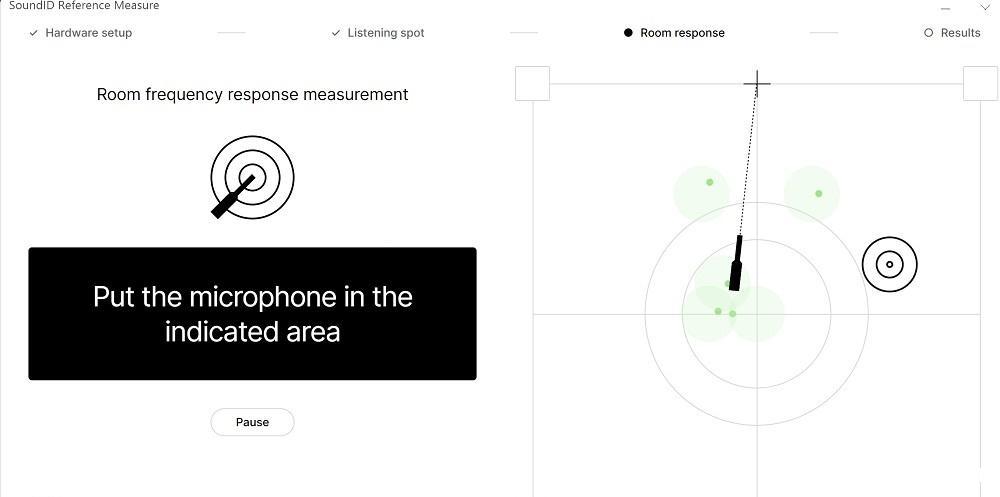
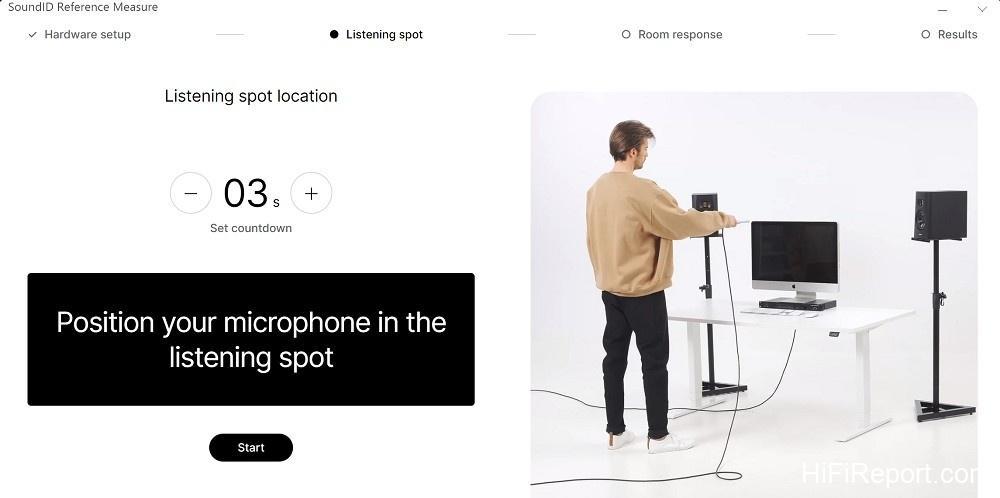
Before embarking on listening tests, the first step involves connecting the ORIA mini to your audio interface via a laptop. The “ORIA Control” software is used to configure speaker settings: either 2-channel or 2.1-channel. If selecting 2.1, the subwoofer crossover point must be set. Then, connect the audio interface with the measurement microphone plugged in to the ORIA mini’s input and initiate the Sonarworks SoundID measurement procedure.
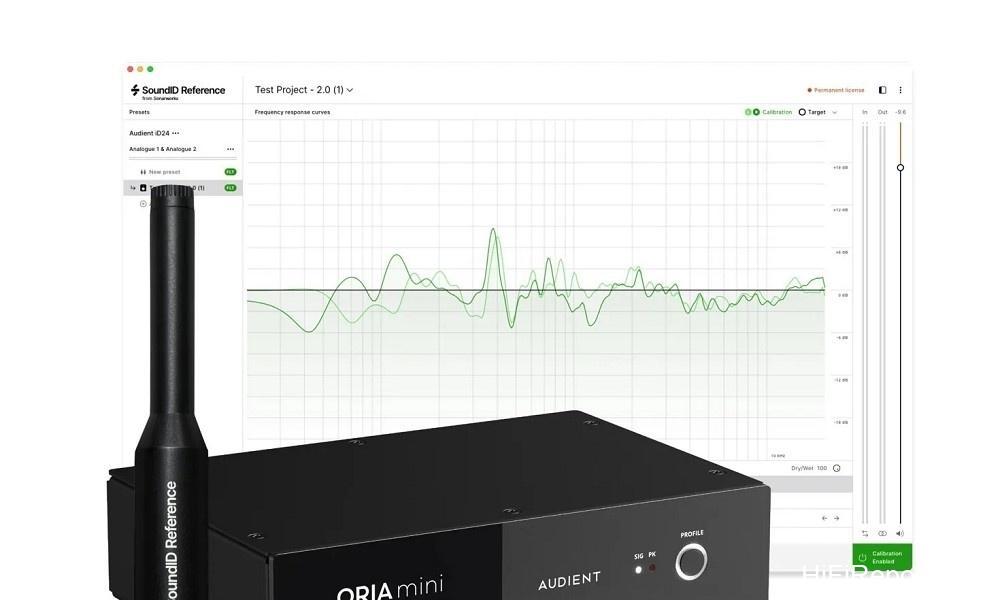
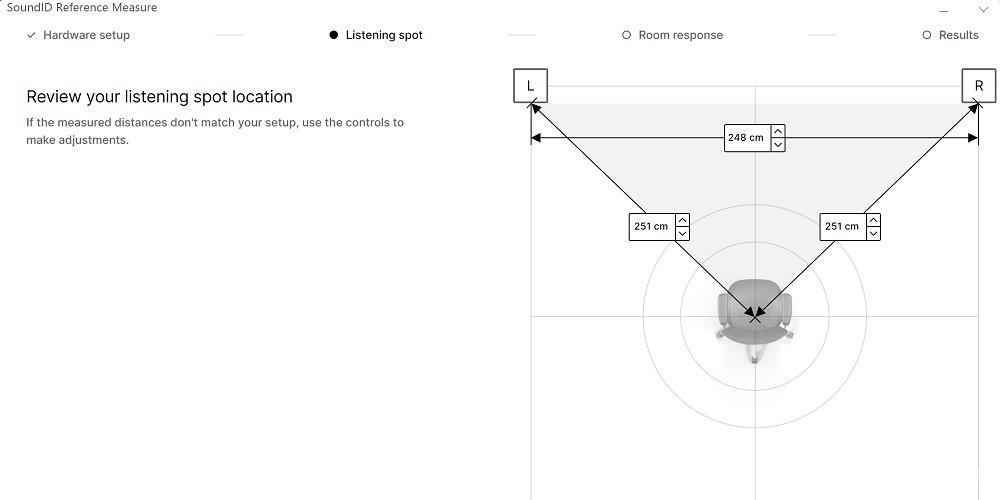
During the test, the SoundID software will prompt you to reposition the measurement microphone. Starting from the listening position, you’ll move it to locations very close to the left and right channel speakers, specifically in front of the midrange drivers. This allows the software to accurately capture the distance between the left and right speakers, as well as the distance between the speakers and the listening position.
As it emits test tones, the software is aware of the microphone’s position and will visually guide you on the screen to the next test point. Upon reaching the designated spot, point the microphone forward and towards the center; a test tone will automatically play. After completion, proceed to the next test point. This meticulous process involves over thirty measurement positions and takes approximately 20 minutes to complete.
Sculpting Your Sound: Target Curves and Profiles
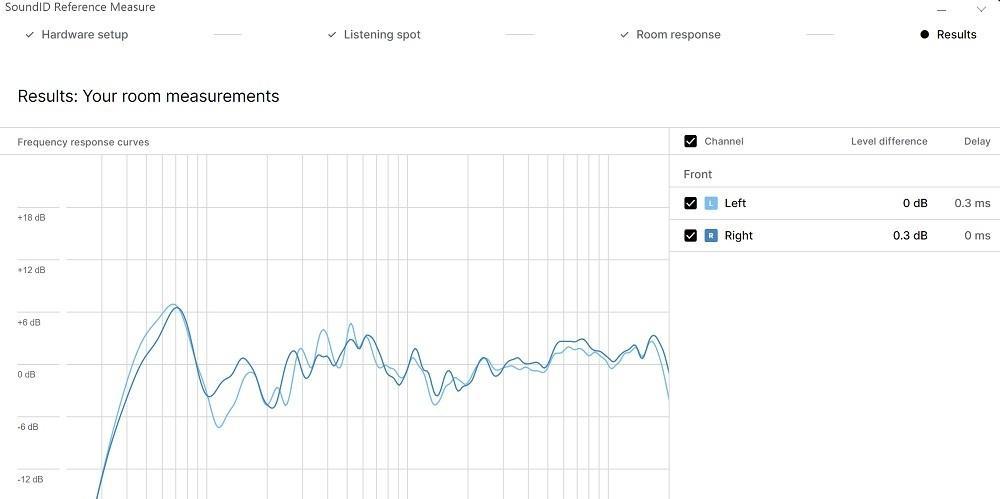
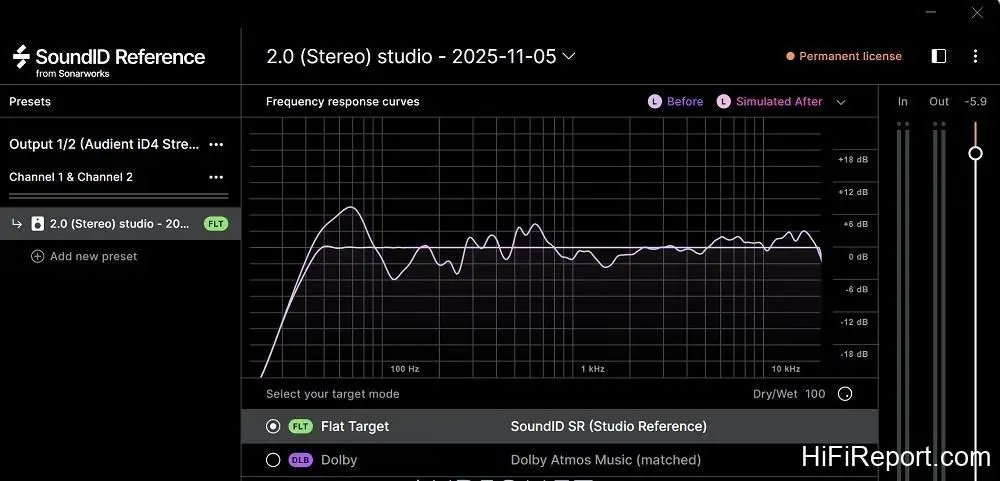
The real magic happens next: after viewing the speaker’s frequency response, you’ll set the “target curve.” The most basic setting, of course, is a perfectly flat target curve. Once the target curve is defined, the SoundID software calculates the corresponding equalization curve based on the measured frequency response of each channel. The results are then exported to the ORIA mini.
The ORIA mini can store up to four distinct profiles, allowing users the freedom to experiment and set up different target curves for tuning. During this tuning process, it’s recommended to play music files from your computer and use the Audient iD4 Stream audio interface as a volume control (acting as a USB DAC/preamp). Dedicate time to adjusting different target curves and comparing the results to select the most pleasing or effective four profiles.
For instance, one profile might include a slight bass boost for enjoyable late-night listening at lower volumes.
Listening Impressions: Phase One
My initial listening phase involved using the Audient iD4 Stream as a USB DAC, paired with the ORIA mini. I experimented with three target curves: the first was a flat response, the second resembled the Harman curve with a very gradual roll-off from low to high frequencies, and the third focused solely on mitigating room modes below 750 Hz, with a modest 1-2 dB boost below 100 Hz for added body. Frequencies above 750 Hz remained uncorrected to preserve the speaker’s inherent sonic character.
Comparing the first profile to bypass, the ORIA mini definitively demonstrated the effective elimination of a low-frequency standing wave around 67 Hz and a noticeable reinforcement of a dip near 110 Hz. The flat response achieved through full-range correction resulted in a more neutral sound. While the “tonality” certainly changed between the corrected and uncorrected states, the “quality” of the sound remained remarkably similar.
Refined Listening: Deeper Dive into Tonality
Further comparison with the second profile revealed a distinctly warmer tonal bias. The equalization of both channels’ frequency responses led to a more precise and stable soundstage, much like with the first setting. Personally, I found the third profile to be the most compelling. It delivered the desired low-frequency response and just the right amount of body.
Crucially, the midrange and treble frequencies were left uncorrected, preserving the Dynaudio BM5 mkIII speakers’ inherent open, lively midrange and treble, along with their exquisite detail.
Elevating the Experience: Streamer Integration
Given the impressive post-correction audio quality of the ORIA mini, I wondered if using a more conventional audiophile streamer (doubling as a preamp) as the source would yield even better results. Thus, I disconnected the computer and audio interface, opting for a familiar streamer. Switching between the ORIA mini’s four pre-set profiles is as simple as pressing the “Profile” button on the unit’s front panel.
A long press of the Profile button engages bypass mode (disabling spatial correction), making it incredibly convenient to compare the sonic differences between “corrected” and “uncorrected.”
The Ultimate Test: Lumin D2 and Sonic Nuances
I integrated the Lumin D2 streamer, utilizing its volume control to act as a digital preamplifier. Once again, I revisited the same tracks listened to previously. The distinct sonic texture and character of the Lumin D2 were immediately apparent and very different from the audio interface. This, I believe, is the sonic quality audiophiles will appreciate.
The differences became even more apparent when adjusting the D2’s upsampling of PCM sample rates or converting to DSD, indicating that the ORIA mini maintains a remarkably high level of audio fidelity and sensitivity even after spatial correction. If the sound remained largely unchanged, it would suggest room for improvement in the processing refinement.
Final Tuning: The Art of Strategic Correction
I revisited the comparison of my three previously described tuning methods against bypass mode. The third profile, which only corrected frequencies below 750 Hz, continued to exhibit the best performance. It effectively addressed spatial anomalies in the low frequencies and achieved an optimal balance between the low and midrange frequencies.
By leaving the midrange and treble entirely uncorrected, it preserved the best possible textural quality and naturalness in the most perceptually sensitive frequency ranges. Therefore, for audiophiles who place a premium on sound quality, even with DRC at their disposal, fundamental setup remains critical: ensure proper speaker toe-in for smooth treble extension rather than relying solely on DRC to artificially boost attenuated off-axis high frequencies.
Achieve good symmetry in the midrange frequencies between the left and right channels *before* DRC correction. This allows spatial correction to focus primarily on frequencies below 1 kHz, resulting in a more natural, lively, uncompressed, and aesthetically pleasing sound after correction.
A Professional’s Tool for the Home: Unbeatable Value
Bringing professional-grade equipment, designed for music creators, into a home audio system offers a distinct advantage: their inherent neutrality and lack of coloration more accurately reflect the original recording. While they may lack flashy aesthetics, they almost invariably boast sophisticated circuitry and technology.
The Audient ORIA mini, a 32-bit spatial correction system bundled with the Sonarworks SoundID Reference professional calibration software and measurement kit, retails for under $495. This remarkable affordability is largely thanks to its professional origins; at the typical pricing standards for home audio products, it would be virtually impossible to find such a capable unit at this price.
Considering its performance, sound quality, and cost, it represents exceptional value and earns our highest recommendation.
Specifications
* Type: Professional Spatial Correction System
* Input Terminals: 2-channel analog balanced (TRS) × 1, Toslink optical S/PDIF (44.1kHz to 96kHz support) × 1
* Output Terminals: 2.1-channel analog balanced (TRS) × 1
* Maximum Input Level: +18dBu
* Maximum Output Level: +18dBu
* System Sample Rate: 96kHz
* Frequency Response: 20Hz – 40kHz (±2dB)
* Dynamic Range (A-weighted): 127dB
* Signal-to-Noise Ratio: 127dB (A-weighted)
* THD+N (-1dBFS): -105dB / 0.0005%
* Crosstalk (1kHz): ≦123dB