
Audio Technica AT-SP3X Review
Finally, Audio Technica from Japan has taken a significant step towards “advanced desktop listening”! Before the AT-SP3X, Audio Technica did offer desktop audio products, but they were more akin to computer speakers or lightweight conference call speakers. They lacked a more serious, dedicated two-channel active speaker. Now, with the arrival of the AT-SP3X, it’s clear Audio Technica is making a strong move into the desktop audio market!
Stepping Into Desktop Audio
Prior to the AT-SP3X, Audio Technica had the AT-SP105 and AT-SP95 speakers. The AT-SP105 featured a USB input, while the smaller AT-SP95 only had analog inputs. Both were positioned more as multimedia speakers for computers. Additionally, the AT-CSP-1 and AT-CSP5 (the main difference being the presence of a USB input) were designed as conference call speakers, suitable for remote meetings, and not really aimed at critical audio listening.
However, the industrial design of the AT-SP3X aligns closely with most near-field active monitors. It boasts a straightforward two-way active design, featuring a 1.1-inch silk dome tweeter and a 3-inch mid-woofer driver, powered by a 30-watt amplifier module and tuned with DSP processing. Audio Technica emphasizes that the AT-SP3X “delivers smooth, clear, and well-balanced sound, faithfully reproducing the original timbre.”
Okay, that’s Audio Technica’s official “marketing speak.” We’ll take note for now and see how well they live up to that claim once we’ve had a chance to listen.

Price Point Advantage
With an official retail price of ¥6,980 NTD (approximately $216 USD), and even a 7% discount on the official Audio Technica website bringing it down to ¥6,500 NTD (approximately $201 USD), the AT-SP3X’s price alone positions it aggressively against many small near-field active speakers.
Who’s cheaper? The PreSonus Eris 3.5 I bought for my son is about ¥1,000 NTD (approximately $31 USD) less, intended to enhance his gaming audio. As a “dutiful father,” I set them up for him, and listening to them revealed they were clearly a “Boom Box” – plenty of bass, but not very controlled. I even added IsoAcoustic speaker stands to achieve better balance. In contrast, the AT-SP3X, right out of the box, immediately demonstrated significantly better overall performance than the budget PreSonus.
In a similar price range, the Fostex PM0.4C is a competitor, but it costs about ¥2,000 NTD (approximately $62 USD) more than the AT-SP3X. I haven’t heard the PM0.4C, so I can’t comment on which sounds better. However, the PM0.4C follows a professional monitoring route, featuring only RCA analog input, whereas the AT-SP3X adds convenient wireless Bluetooth 5.3 connectivity alongside RCA analog input. This offers greater flexibility – you can effortlessly connect your phone to listen to music or plug in other analog sources.
MDF Enclosures for Two-Way Design
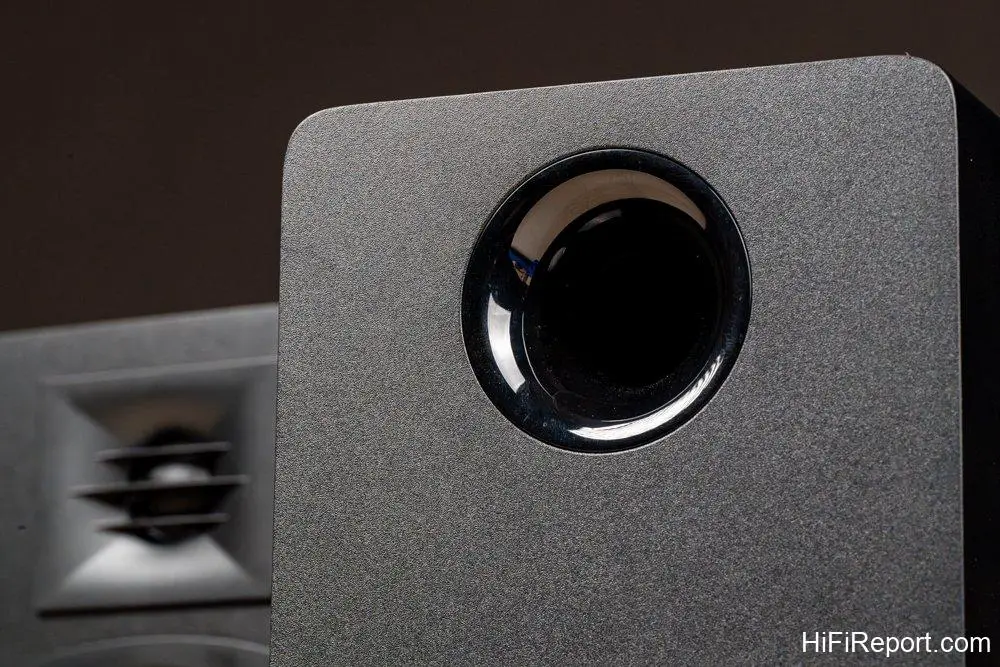
From an acoustic design perspective, the AT-SP3X features a 1.1-inch silk dome tweeter mounted within a shallow waveguide, complemented by a grille cover in front of the driver diaphragm. This design helps improve high-frequency dispersion. The bass-reflex enclosure design helps enhance the bass quantity and extension of the small mid-woofer driver.
Compared to typical computer multimedia speakers, the biggest difference with the AT-SP3X is the use of MDF (Medium-Density Fiberboard) for the speaker cabinets. Most multimedia speakers are made from molded plastic. Building speaker cabinets from MDF results in better enclosure damping, providing solid support for the speaker drivers, and better resonance characteristics than plastic enclosures. However, this comes at a relatively higher cost, which is why the AT-SP3X is more than twice the price of some of Audio Technica’s other computer multimedia speakers.
Bluetooth for Phone, Analog for Turntable
Looking at the input options, the AT-SP3X offers RCA and Bluetooth 5.3 but notably lacks a USB input. This suggests Audio Technica’s intention to pair these speakers with their own line of turntables. In fact, promotional photos on their official website show the AT-SP3X paired with Audio Technica turntables.
Audio Technica currently has two turntables that are well-suited to pair with the AT-SP3X: the AT-LP70X and the AT-LP70XBT. As the model names suggest, the main difference is the Bluetooth functionality on the AT-LP70XBT. The AT-LP70X would require a wired RCA connection, using its built-in phono preamp, creating an affordable analog audio system. If you pair it with the AT-LP70XBT, you can connect wirelessly via Bluetooth 5.3.
Wireless Bluetooth Turntable Playback Possible
It’s important to note that the AT-SP3X’s RCA input only supports line-level signals. Therefore, if you want to use it with other turntables, they must have a built-in phono preamp, or you’ll need to add a separate phono preamp.
If you haven’t invested in an AT-LP70XBT turntable to indulge in the analog audio system favored by literati, the simplest way to connect wirelessly is by pairing your smartphone with the AT-SP3X via Bluetooth.

Here’s the key point: Audio Technica deliberately chose Bluetooth transmission with Multi-Point specification, meaning the AT-SP3X can connect to two Bluetooth devices simultaneously.
This means if you purchase the Bluetooth version of the AT-LP70XBT, you can connect both the turntable and your smartphone concurrently. The AT-SP3X will play whichever device is currently playing music, without needing to switch Bluetooth pairings or inputs. This allows for seamless switching between analog and digital music sources.
Multi-Point Bluetooth Handles Two Wireless Devices
I didn’t have the AT-LP70XBT on hand for this review, so when testing the Multi-Point Bluetooth dual device connection, I paired both my iPhone and Macbook Air simultaneously with the AT-SP3X. While two devices can potentially “compete,” essentially, whichever device starts playing music, the AT-SP3X will reproduce it. This functionality is quite convenient; most importantly, you don’t need to stop playback on one device and manually reconfigure the pairing for the other. The Multi-Point Bluetooth connection automatically detects the active source.
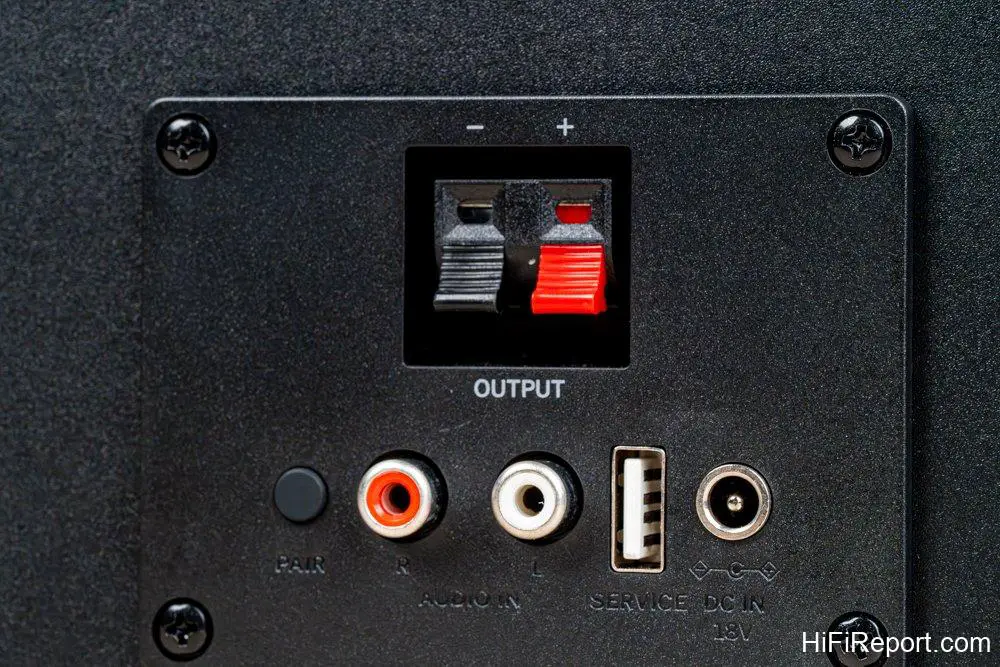
As mentioned earlier, the AT-SP3X does not have a USB *audio* input. However, you might notice a USB Type-A port on the rear panel. That port is for maintenance purposes only, likely used for firmware updates, and is not a USB audio input. This port also doesn’t provide power, so you can essentially ignore it for everyday use.
Right Speaker is Powered
Regarding the setup of the AT-SP3X, there’s one critical detail: the left and right channels are distinct! The main, powered speaker is the **right** channel. This is very important! Don’t connect them incorrectly. The powered speaker is the right channel, while the left channel connects via speaker wire and is the lighter of the two. When setting up the AT-SP3X, be absolutely sure not to mix up the left and right channels.
Another crucial aspect of using the AT-SP3X is the included 3M rubber pads. You absolutely must use them. During my listening test, I didn’t stick the 3M pads onto the speakers, as they were review units and I didn’t want to use up the standard accessories. Instead, I used the editor’s own carbon fiber cylinder footers to elevate the AT-SP3X from the desk.

Why are the 3M rubber pads important? If the bottom of the AT-SP3X speakers rests directly on the desk surface, they will resonate with the desk, causing the bass to become muddy. The 3M rubber pads slightly elevate the AT-SP3X and provide some damping to suppress resonance between the speakers and the desk.
If you find that the 3M rubber pads aren’t sufficient, you can use isolation cones or spikes to further reduce resonance interference between the speaker and the desk.
Exceptional Value in Active Speakers
Regarding the operation of the AT-SP3X, besides noting that the right channel is the powered speaker, there’s really no need to consult the manual. The Bluetooth pairing button is located on the back of the main speaker; simply press it, and AT-SP3X will appear on your phone or computer for pairing. Switching between RCA and Bluetooth input is done by simply pressing the single button again to cycle through the inputs. A green light indicates the wired input, while a blue light signifies Bluetooth wireless input. Turning the speaker on and off also uses this “single” button; press and hold for 3 seconds to turn it off.

So, how does the AT-SP3X sound? If I told you it delivered earth-shattering performance, it would be dishonest. For a pair of miniature bookshelf speakers costing only ¥6,500 NTD (approximately $201 USD) with 30 watts of built-in power, light enough to hold in one hand, it’s unrealistic to expect vast bandwidth or explosive dynamics. However, within its limited cost, Audio Technica has created a desktop bookshelf speaker that offers excellent value, perhaps even exceeding expectations. That would be a fair assessment of the AT-SP3X.
Three Tips for Two-Channel Fun
How can you get the best possible sound from the AT-SP3X within its budget constraints? There are three key things to pay attention to. First is the AT-SP3X’s volume setting. As you turn the volume knob from minimum to maximum, there’s a noticeable detent right in the middle, at the 12 o’clock position. Try to keep the volume set at or near this position and avoid going beyond it. If you increase the volume past this point, the AT-SP3X is prone to distortion (overdrive).
Whether using Bluetooth or analog input, the input levels can vary. Setting the AT-SP3X’s volume at the 12 o’clock position allows it to utilize its full 30 watts to deliver rich mid-bass frequencies. Then, control the listening volume using your source device, such as your phone’s music player app. When using my iPhone to play Apple Music, I set the AT-SP3X’s volume at the 12 o’clock position. This ensures that even if I turn the AirPlay volume up to maximum, the AT-SP3X won’t distort. However, pushing the AT-SP3X’s volume higher will definitely cause distortion when listening to rock music – you’ll hear the speakers distorting, not just the electric guitar’s overdrive effect.

The second tip for getting good sound from the AT-SP3X is ensuring correct left/right channel placement. The powered speaker is the right channel, and the unpowered speaker connected by speaker wire is the left channel. Don’t mix this up! Initially, I wasn’t paying close attention and placed the powered speaker on the left side so I could easily see the AT-SP3X’s status and adjust the volume. The soundstage felt off. Upon checking, I realized I had reversed the channels, which naturally resulted in a strange soundstage.
Speaker Placement Shapes Soundstage
The third crucial factor for getting great sound from the AT-SP3X, and what I mean by “unlocking the fun of two-channel audio,” is placement! Because the AT-SP3X is small and easy to move, when placed on a desk, you can engage in “super near-field listening” to create a detailed, miniature 3D soundstage.
Pay attention to the distance between the left and right speakers and their placement height. Experimenting with these will definitely be enjoyable.

The distance between the left and right AT-SP3X speakers on your desk determines the width of the soundstage. This will also influence the focus and density of vocals and instruments. However, there’s no standard width for speaker separation. By experimenting yourself, you can discover the fun of how the AT-SP3X reproduces the soundstage.
Regarding speaker height, there’s a more standard approach. If you play music directly from a laptop on your desk, the height is likely insufficient. This setup will cause the AT-SP3X’s tweeters to be aimed towards your shoulders, resulting in a soundstage that’s too low, like being in the nosebleed section at a concert where the stage feels below the laptop. For proper placement on a desk, elevate the speakers so the tweeters are roughly at eye level, or so the mid-woofer drivers are aimed towards your ears. This will guarantee that the sense of the stage is “right in front of you.”
Volume at 12 O’Clock for Fullness
By setting the appropriate height and left/right distance for the AT-SP3X, correctly placing the channels, and setting the volume knob to the 12 o’clock position, you’re ready to truly enjoy your music! Of course, the compact AT-SP3X isn’t going to produce pants-flapping bass or roof-raising sound pressure levels. However, with “super near-field listening,” positioned less than 50cm away, you can still experience music with plenty of excitement and energy! Listening to AC/DC’s classic “Highway To Hell,” with a well-setup AT-SP3X, the first electric guitar enters clearly in the right channel. The overdriven guitar has good weight and thickness. When the drums kick in, the kick drum is squarely in the center, the snare drum is slightly to the left, and the lead vocal is focused in the middle. At this point, the left side of the soundstage might feel a bit empty, but as the chorus comes in with backing vocals, the AT-SP3X fills out the sound, rendering “Highway to Hell” with fullness and breadth.
Controlled Bass Delivers Punchy Rock
I want to say that the AT-SP3X might be the most accessible active speaker for engaging in “super near-field listening.” I’ve tried cheaper options, but few can deliver bass as solid as the AT-SP3X. Listening to the drums on AC/DC tracks, the impact is quite impressive. If I hadn’t already bought the cheaper PreSonus for my son, I would seriously consider upgrading him to these. Compared to the PreSonus, the AT-SP3X’s bass is far more controlled, making rock music sound punchier and more energetic.
The AT-SP3X also offers excellent value in terms of mid-high frequency focus and clarity. I’d like to highlight John Mayer’s live album “Where The Light Is: Live in Los Angeles.” Listening to “Free Fallin’,” John Mayer’s fingerpicked steel-string guitar arpeggios are clear and dynamic. The two guitars are positioned on the stage – John Mayer playing and singing in the center, with another playing decorative parts on the left. You can clearly hear the difference in tone between the slide work and fingerpicking. Beyond just tone, with proper setup, the AT-SP3X truly presents a “detailed, miniature” soundstage right before your eyes.
Super Near-Field Brings Miniature Soundstage to Life
Why can the AT-SP3X unlock the fun of two-channel audio and present a “detailed, miniature” soundstage? The answer is simple: super near-field listening. Because you’re close, the AT-SP3X doesn’t need immense volume to provide sufficient sound pressure up close. It’s the same principle as a desktop computer monitor: a 27-inch 16:9 display looks like a 100-inch projection screen. Or consider a head-mounted display; even with a small built-in screen, because it’s directly in front of your eyes, it can simulate the effect of a nearly 120-inch screen.
Because of the proximity, the AT-SP3X makes it effortless to enjoy two-channel audio. You can simply move the speakers around to immediately hear the changes in how the AT-SP3X reproduces the soundstage. In contrast, when the HiFiReport editorial team listens to large systems, moving the Wilson Audio Alexia V speakers – even with wheels underneath – would likely strain our backs! With the AT-SP3X, adjusting speaker positions is truly a breeze.
Unlocking Endless Two-Channel Fun
Starting your two-channel journey with the AT-SP3X is appealing not only because of its affordable price point, making it easy to dive in, but primarily because the AT-SP3X delivers exceptional musical performance within that limited budget. It allows you to experiment with super near-field listening on your desk, playing with left/right speaker distance and height differences to shape the soundstage. Buying a set of AT-SP3X to experiment with will give you a valuable understanding of how to achieve your preferred audio experience, preparing you if you decide to upgrade to a larger system later. Recommended for anyone who wants to start exploring audio but doesn’t know where to begin – the AT-SP3X is inexpensive, but the enjoyment of two-channel audio is endless.
Specifications
* Type: 2-way, 2-driver bass-reflex active bookshelf speaker
* Drivers: 27 mm silk dome tweeter x 1, 76 mm mid-woofer x 1
* Frequency Response: 55 Hz ~ 20 kHz
* Built-in Amplifier: 30 watts
* Bluetooth Specification: Bluetooth Ver.5.1
* Communication Frequency Band: 2.4 GHz
* Input Terminals: RCA x 2
* Dimensions: H 200 x W 125 x D 136 (mm)
* Weight: 1.5 kg (L channel), 1.6 kg (R channel)