
Nexum TuneBox 3 Wireless Streaming Player Review
The TuneBox 3 is a wireless streaming player that originated from a crowdfunding campaign. It was initially launched on the Taiwanese crowdfunding platform, Zeczec, on July 2nd of this year. Remarkably, it achieved its fundraising goal of NTD 300,000 within just three hours. By the time the campaign concluded on September 3rd, it had reached a staggering 668% of its target, amassing over NTD 2 million in funding. This clearly demonstrates the strong consumer appeal of the TuneBox 3.
So, what kind of player is this exactly? Allow me to elaborate.
Two Models, Different Needs
This innovative TuneBox 3 wireless player comes from Nexum, a technology company specializing in audio solutions. For those interested in the background of Nexum and the inception of the TuneBox series, HiFiReport editor, Mr. Cai Chengrong, previously interviewed the founder, Mr. Zhang Zhiyao. You can find more details in the article: “Effortlessly Integrating Digital Streaming into Your Audio System: An Interview with Nexum Founder, Zhang Zhiyao.”
The TuneBox 3, as the name suggests, is the third iteration of the TuneBox line. Its primary design objective was to bridge the gap between traditional home audio systems and the convenience of wireless streaming. The goal was to enable existing, conventional audio setups to embrace modern wireless streaming capabilities. To cater to diverse user preferences, Nexum introduced two distinct models: the “TuneBox 3 Pure Digital Version” and the “TuneBox 3 384K Analog Version.”
The TuneBox 3 incorporates an upsampling and re-sampling function, allowing users to switch output sampling rates. Pictured here is the Pure Digital Version, which offers selectable output options of 48K/96K/192K.
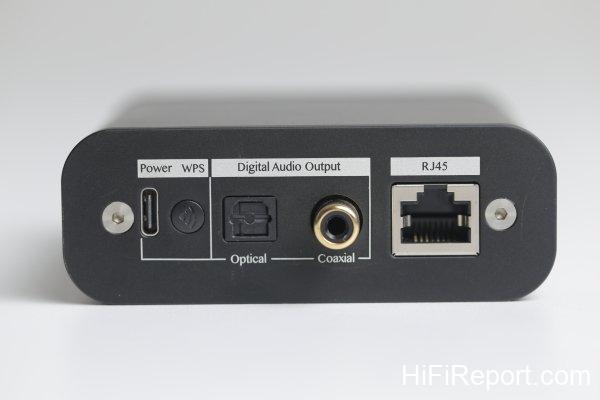
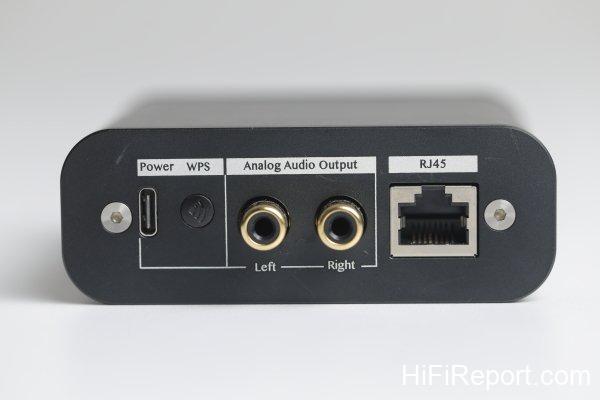
The “Pure Digital Version,” as the name implies, is designed solely for digital signal output. It features both optical and RCA coaxial output interfaces for connecting to an external DAC (Digital-to-Analog Converter). Conversely, the “384K Analog Version” provides a single set of RCA stereo outputs, intended for direct connection to an amplifier.
You might wonder why Nexum didn’t simply create a single unit with both digital and analog outputs. The most likely reason is to maintain the device’s compact and diminutive form factor. Accommodating a wider array of interfaces on the rear panel would have compromised its size. By offering two distinct versions, consumers can choose the model that best suits their specific needs.
In my experience, most users typically utilize only one type of output interface. It’s rare to simultaneously employ both digital and analog outputs. Therefore, I find the TuneBox 3’s design approach quite sensible. Furthermore, focusing on a single function can often enhance sonic performance, which is likely to be more appealing to users who prioritize audio quality. This is the “Pure Digital Version” of the TuneBox 3, offering optical and coaxial digital output interfaces.
Upsampling and Re-sampling Function
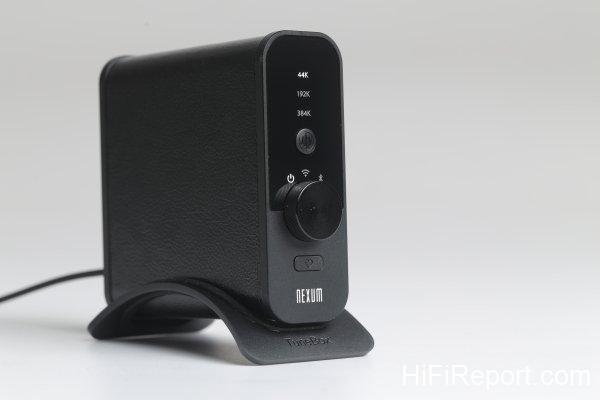
Pictured here is the front panel of the 384K Analog Version, allowing selection between 44K/192K/384K sampling rates.
Regardless of whether you choose the “Pure Digital Version” or the “384K Analog Version,” both models offer versatile input options, including Wi-Fi wireless input, RJ45 Ethernet input, and Bluetooth input. Input selection is easily managed via the rotary knob on the front panel. Rotating it to the far left position powers off the device. The middle position selects network input, while the rightmost position selects Bluetooth input.
A key difference between the two models lies in the labels above the front panel. The “Pure Digital Version” displays 44K/96K/192K, while the “384K Analog Version” shows 44K/192K/384K. This distinction is due to the TuneBox 3’s built-in DSP (Digital Signal Processor) featuring high-precision re-sampling functionality. This allows the device to upsample incoming signals before output, offering different sonic characteristics. The “384K Analog Version” incorporates a CS4313x DAC chip, which supports decoding up to 384kHz. Consequently, the “384K Analog Version” provides 44K/192K/384K upsampling options, allowing users to experiment and select their preferred sonic signature.
However, the “Pure Digital Version,” with its optical and coaxial outputs, is limited to a maximum transmission format of 192kHz. Therefore, its upsampling options are set to 44K/96K/192K.
Switching between sampling rates is straightforward. The TuneBox 3 features a button in the center of the front panel. A single press advances to the next sampling rate setting.
This is the “384K Analog Version” of the TuneBox 3, equipped with a set of RCA stereo outputs.
What content can you enjoy through the TuneBox 3? Firstly, it supports AirPlay, enabling seamless playback of music from Apple devices. Additionally, with Bluetooth connectivity, audio content from Android devices, including streaming video soundtracks, can be wirelessly transmitted to the TuneBox 3.
Furthermore, the TuneBox 3 is DLNA compliant, allowing you to effortlessly stream music files stored on your NAS (Network Attached Storage) devices or computers.

Beyond local files, the TuneBox 3 supports a wide range of music streaming services and internet radio platforms, including Spotify, Tidal, TuneIn, KKbox, iHeart Radio, Apple Music, QQ Music, Himalaya, Dragonfly FM, and many more, providing an inexhaustible source of musical entertainment.
Addictive Quick Playlist Button
During my time with the TuneBox 3, I found its most outstanding feature to be the incredibly convenient “Quick Playlist Button.”
Located at the bottom of the front panel, this button can store up to six playlists or streaming music platform channels. To listen, simply press the button, and playback commences instantly, without even needing to unlock your phone.
As a Spotify subscriber, my typical usage involves listening to its curated playlists, categorized by genre or artist, allowing for continuous enjoyment of my preferred music styles.
By saving my frequently listened-to Spotify playlists to the TuneBox 3, a single press of the “Quick Playlist Button” immediately starts playback.
Setting it up is incredibly easy. While a playlist is playing, simply press and hold the “Quick Playlist Button” until you hear a voice prompt confirming the setting is complete. This playlist is now assigned to preset one. To listen, just press the quick play button once, and the TuneBox 3 will immediately start playing that playlist.
To set preset two, briefly press the quick play button once, then press and hold it until the confirmation voice prompt is heard. To listen to preset two, simply press the quick play button twice.
Setting preset three follows the same pattern: briefly press the button twice, then press and hold. This process is repeated, allowing you to configure a total of six playlists or internet radio stations.
Easy Wireless Network Setup
As a wireless streaming player, a crucial initial step is setting up the Wi-Fi wireless network (of course, this is unnecessary if you only use a wired Ethernet connection). If the setup process is convoluted or frustratingly unsuccessful, the initial user experience can be negatively impacted.
To address this, the TuneBox 3 thoughtfully includes a WPS button on the rear panel. If your wireless router also has a WPS button, simply press the WPS buttons on both the TuneBox 3 and your router. They will automatically pair and connect to the network.
If your router lacks WPS functionality, you can easily configure the Wi-Fi connection through the TuneBox 3 app. Just follow the on-screen instructions in the app, and Wi-Fi connectivity can be established in a matter of moments.
Speaking of the TuneBox 3 app, I consider it to be an exceptionally well-designed streaming player remote control application. It operates with remarkable stability and fluidity, featuring a clean and intuitive interface. It’s so user-friendly that it’s practically effortless to master. It’s evident that Nexum has invested considerable effort in this aspect, likely drawing inspiration from numerous remote control apps to create such an intuitive user experience.
Left Image: You can retain the TuneBox 3’s original device number or assign it a custom name for easy identification within the app.
Right Image: I opted not to rename it, so the original device number appears in the device list.
If multiple TuneBox 3 units are on the network, they will all be displayed on this page.
Left Image: The TuneBox 3 supports a variety of streaming services, including Spotify, Tidal, TuneIn, and more.
Right Image: To play music from your phone, select “My Music” () which will bring you to this screen.
Music stored on a NAS can be accessed through “Home Music Sharing.”
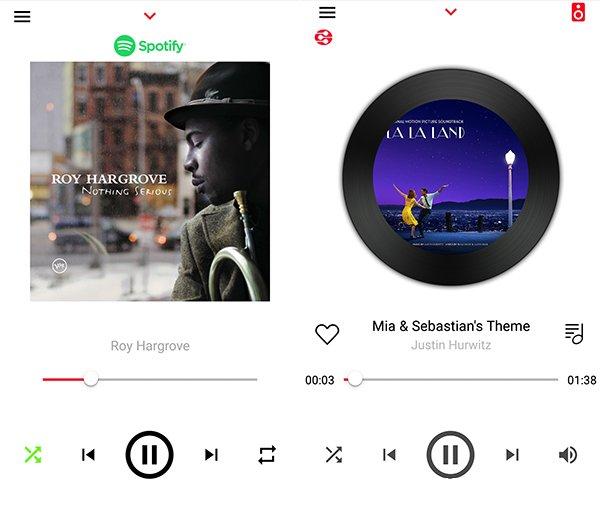
Left Image: When playing Spotify, the TuneBox 3 app’s playback screen displays the album art and track information.
Right Image: This is playback of the La La Land movie soundtrack via DLNA from a NAS.
Left Image: The TuneBox 3 allows you to configure six “Quick Playlists.” The app displays which six are set. In this image, I have configured presets one and two.
Right Image: The TuneBox 3 also includes an alarm clock function and even a sleep timer, further enhancing its convenience.
High Value Streaming Transport
Now, let’s move on to the listening experience.
Nexum kindly provided both the “Pure Digital Version” and the “384K Analog Version” for review, allowing me to evaluate both models.
From an audiophile perspective, it’s natural to first assess the TuneBox 3 as a wireless streaming transport. I began by using the “Pure Digital Version” paired with an external DAC.
As a transport, the digital cable becomes a critical component. Nexum thoughtfully collaborated with a manufacturer to develop a low-loss optical fiber cable, which was also included for testing.
This optical cable boasts a light loss of less than 2.8dB and is “claimed” to reliably transmit 192kHz signals. Is this claim substantiated? I connected this optical cable between the TuneBox 3 and an Auralic Vega G1 streaming DAC. During playback, regardless of whether I set the TuneBox 3’s output to 48K, 96K, or 192K, the Vega G1’s display accurately reflected the selected sampling rate. Furthermore, 192K playback was consistently stable, confirming the cable’s sufficient bandwidth. Although it’s an optional accessory, it’s available for a modest additional cost of USD 15.6 (NTD 500).
To simplify cable matching, Nexum specifically commissioned the production of RCA signal cables and optical digital cables, available as affordable optional upgrades.
On the left is an OFC (Oxygen-Free Copper) RCA cable, and on the right is the low-loss optical fiber cable.
For the listening evaluation, in addition to the Vega G1 DAC, I utilized a Linear Acoustic LAV-60 MKII integrated amplifier and Dynaudio Contour 60 loudspeakers.
Upon initial listening, the “Pure Digital Version” presented a remarkably clean and transparent sonic character, without sacrificing body and fullness – truly living up to its “Pure” designation. However, as I continued listening, I perceived a slight tightness in the sound, and the soundstage seemed somewhat constrained, suggesting room for improvement.
How to unlock further potential? Often, addressing the power supply can yield significant benefits. Therefore, I replaced the TuneBox 3’s included 1A power supply with a 12W iPad power adapter, rated at 2.4A.
Don’t ask me why I chose this particular adapter; it was simply readily available, and with a higher current rating than the stock unit, I decided to give it a try.
The change in power supply immediately brought about a greater sense of ease and relaxation in the sound. The tightness diminished, fluidity improved, and the texture became more refined. Furthermore, the soundstage gained in openness and spaciousness, allowing for higher listening volumes without any sense of strain.
However, it’s important to note that a power supply with a higher amperage or wattage doesn’t automatically guarantee superior sound quality. For instance, I also tested a power adapter from an Asus ZenFone 4, which surprisingly sounded inferior to the stock power supply. Therefore, I recommend users experiment with different power supplies, but ideally within the realm of readily available options without incurring additional expense.
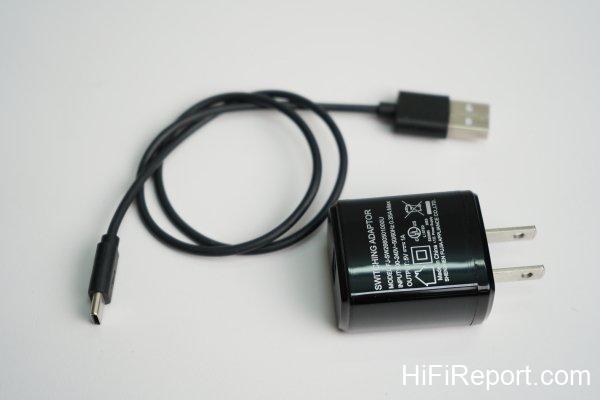
The included 5V power supply and USB 3.0 cable.
Effortlessly Explore the Boundless World of Online Music
Throughout the listening sessions, I primarily played 44.1kHz FLAC files stored on my NAS, streamed wirelessly over Wi-Fi.
Across various musical selections, I observed that the TuneBox 3 Digital Version exhibited natural and smooth high and low frequency extension. Its sonic foundation was sufficiently clean, contributing to an open and stable soundstage, and accurately conveying the nuances of the recording. For instance, listening to Sarah McLachlan’s iconic “Angel” through the TuneBox 3 Digital Version, I could fully appreciate the song’s inherent quietude, depth, and serenity. The sound also possessed appropriate body and fullness, transparent yet retaining a sense of warmth. The frequency balance was even and rich, with a clear and organized structure, inviting listeners to relax, immerse themselves, and savor the joy of high-fidelity audio reproduction.
As for the TuneBox 3 Analog Version, I believe it serves as a convenient option for enjoying streaming music services or expanding the audio capabilities of mobile devices. It effectively acts as a streamlined intermediary between online audio sources and traditional audio systems, granting effortless access to the vast universe of online music with remarkable affordability.
Product Information
TuneBox 3 Wireless Streaming Player
* Pure Digital Version: Suggested Retail Price: USD 156 (NTD 4,980)
* 384K Analog Version: Suggested Retail Price: USD 156 (NTD 4,980)