
SPEC RMP-UB1 Review
Back in the days before the ubiquity of the USB interface, computers and high-end audio were largely parallel worlds. It wasn’t until the incredibly convenient and user-friendly USB became the dominant computer interface that we started seeing numerous computer speakers connected via USB. Eventually, high-end audio manufacturers began incorporating USB as a source input method, slowly bridging the gap between computers and serious audio systems.
Today, USB input is a very common interface on DACs.
When DACs first started including USB inputs, audiophiles generally viewed this as prioritizing convenience over sound quality. After all, computers weren’t designed specifically for audio performance, nor was USB designed specifically for transmitting audio. This issue persisted until various manufacturers began releasing solutions, and even developed specialized computers dedicated solely to audio output – what we now commonly recognize as network streamers and music servers.
Only then did the sound quality of USB transmission gradually catch up to traditional sources. While today’s streamers and music servers deliver excellent sound, their function is specialized for music playback. They lack the versatility of a computer, which can also be used for watching videos, playing games, and other forms of entertainment that still benefit from a high-quality audio system.
Consequently, many people still use computers as their primary audio source, employing various software and hardware tweaks to optimize computer audio performance. This approach is commonly known as CAS (Computer as Source). CAS enthusiasts often possess a DIY spirit, willing to experiment extensively with their systems; however, there’s also the risk of accidentally crashing their computer, which some might consider part of the CAS “flavor.”
But do you absolutely *have* to modify your computer to enjoy high-quality sound? That might have been true in the past, but with SPEC’s introduction of the RMP-UB1, CAS users now have a different option.
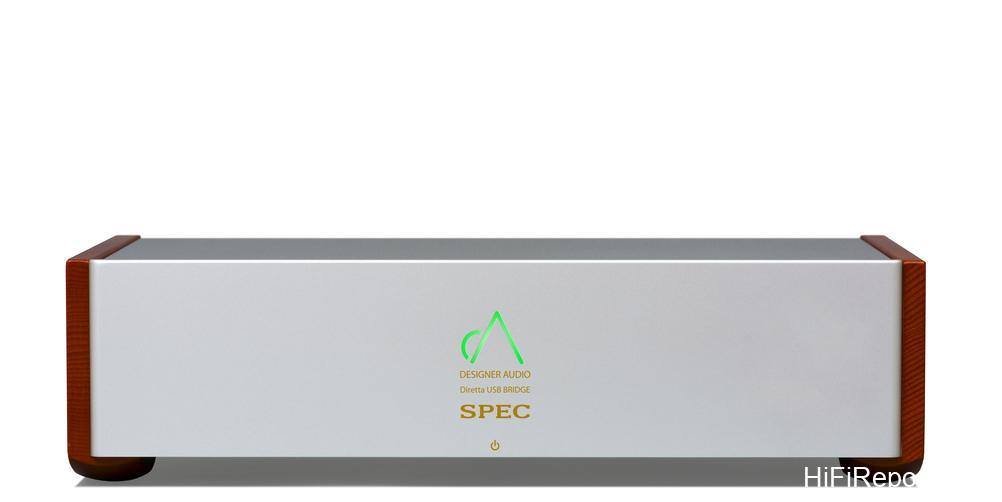
Unique Approach
The RMP-UB1 is an exceptionally rare product on the market, both in terms of function and usage. Looking at its input and output interfaces, the RMP-UB1 features an Ethernet input and a USB output. At first glance, this resembles a typical network streamer. However, it contains no internal operating system and cannot be controlled via an app. It doesn’t support UPnP, nor can it access streaming platforms like Tidal or Spotify. So how is the RMP-UB1 used?
It’s simple: install the specialized driver provided by SPEC on your computer, and then use specific music playback software to send audio to the RMP-UB1. If we were to classify it functionally, the RMP-UB1 is closer to a USB DDC, but with an Ethernet input instead of USB.
This capability is made possible thanks to Diretta, a new transmission technology developed by the Japanese company Megatech. It’s a completely new computer transmission protocol, much like the long-established UPnP. The key characteristic of Diretta is that it’s a transmission technology specifically optimized for audio performance. It aims to minimize noise by controlling transmission speed and frequency.
Furthermore, its mechanism is straightforward, resulting in a simpler receiver architecture compared to traditional network transmission. And because transmission occurs over an Ethernet cable, it can effectively reduce the influence of the sending device.
Currently, RMP-UB1 drivers can be installed on all Windows systems. As for existing network streamers on the market, they must also support Diretta to transmit audio to the RMP-UB1. Audio brands currently confirmed to work successfully with the RMP-UB1 include I-O Data Soundgenic, Fidata, and Pachanko Labs. Roon also successfully recognizes the RMP-UB1.
Design Details
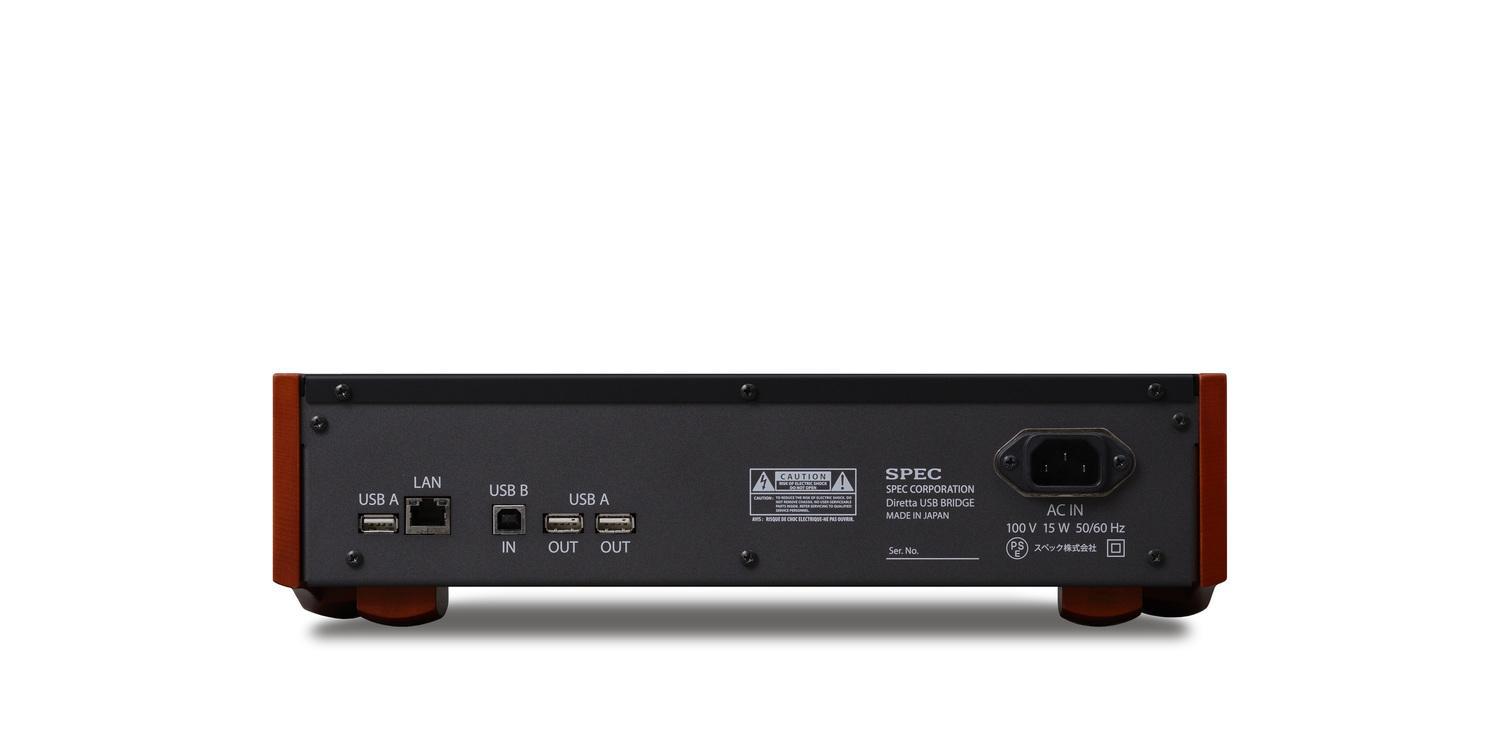
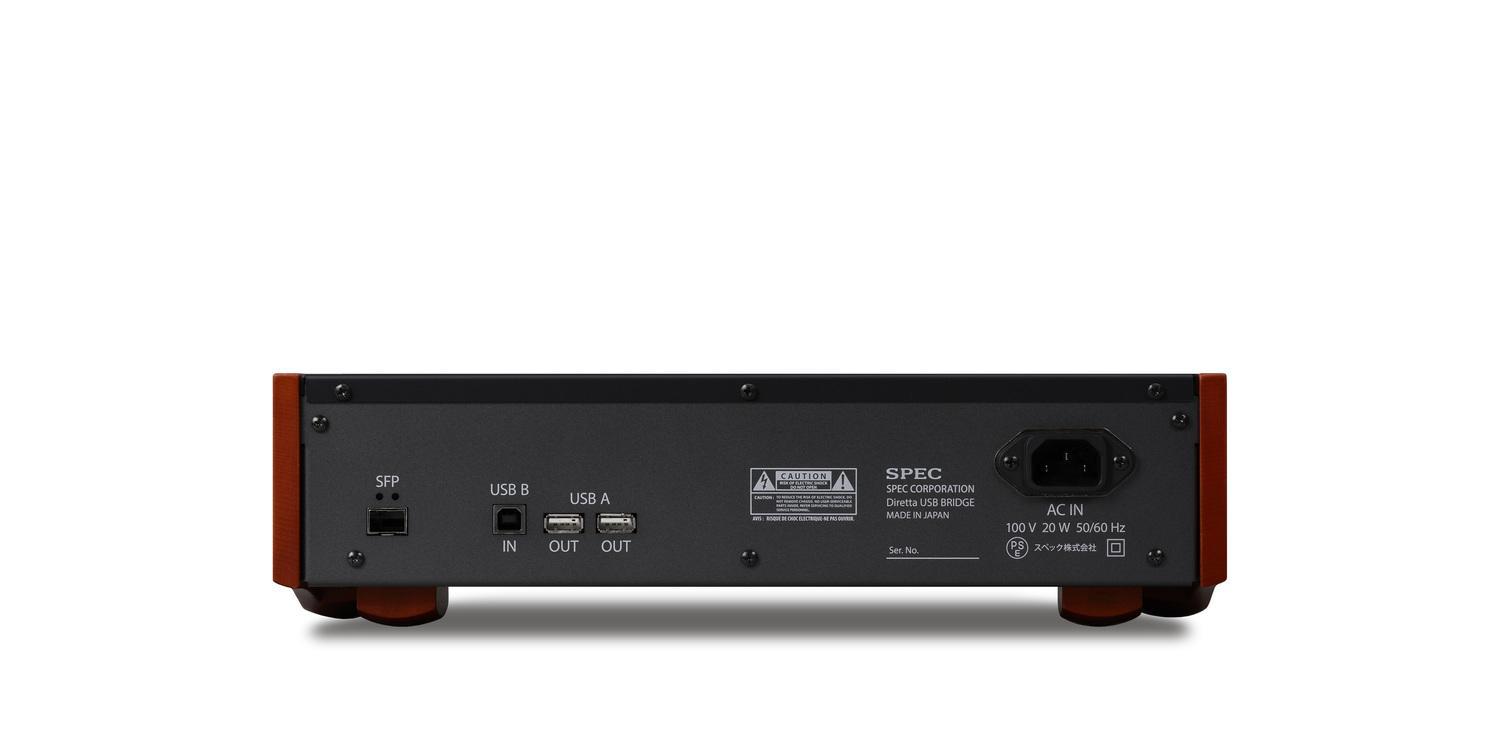
To maximize sound quality, the RMP-UB1 adheres to SPEC’s standards, using the same electrolytic capacitors and their proprietary mica capacitors as found in other SPEC equipment. The chassis also employs SPEC’s signature combination of aluminum alloy and spruce wood. Additionally, for users employing SFP fiber optic network cables, SPEC offers an RMP-UB1SFP version with an SFP input.
For wireless transmission, the standard RJ45 version includes a USB Type-A port next to the network connector, allowing users to plug in an external Wi-Fi adapter for wireless communication between the computer and RMP-UB1. There are also two USB output ports, which are simultaneously active, meaning users can connect two DACs. The USB Type-B port currently has no function.
Setup and Usage
Setting up the RMP-UB1 is not complicated. After connecting the power cable and Ethernet cable to the RMP-UB1, turn on a Windows computer on the same network domain. Download the latest driver from the SPEC official website (refer to the manual or website for the link).
Once the installation or upgrade is complete, the RMP-UB1 can already receive audio transmission from any Windows computer within the same network domain, or from Diretta-compatible NAS drives. However, Windows users should note that currently, only four software applications can transmit audio to the RMP-UB1: Audirvana, JRiver, Roon, and Foobar2000.
Taking Foobar2000 as an example: after the driver installation is finished, an “ASIO: SPEC Diretta” option will appear in Foobar2000’s output settings. Selecting this setting allows Foobar2000 to transmit music from your playlist to the RMP-UB1.
If you’re using an audiophile-grade NAS that supports the RMP-UB1, such as the Soundgenic, although driver installation for software upgrades still requires a Windows computer, for playback, you simply need to enable Diretta support in the Soundgenic’s settings. The RMP-UB1 will then appear as a playback device, which is actually more convenient than using a Windows computer.
Listening Impressions: Laptop
I conducted the listening tests in my own home. For playback, I used Foobar2000 with a RAM Disk plugin. The DAC was an RME ADI-2 DAC, and the speakers were PSI A-14m. Perhaps because the laptop’s power supply was connected to an audio-grade power conditioner, the direct USB output from the laptop, when listened to in isolation, was surprisingly decent. However, after rerouting the audio to the RMP-UB1, it became clear that direct transmission from the laptop still had significant issues.
The level of impurities was simply in a different league. With the laptop’s direct output, the soundstage felt chaotic and riddled with various noises; during the comparison, I even incidentally discovered a fixed-frequency noise present in the direct laptop output. Using the RMP-UB1 resulted in significantly purer music. The soundstage depth began to emerge, and the musical lines became softer and less rigid, with sharp edges smoothed out and refined.
To use a direct analogy, violins played through the laptop’s direct output sounded like they were strung with steel, while using the RMP-UB1 made them sound like nylon strings.
This result isn’t entirely unexpected, as simply preventing noise from a noise-generating device like a laptop from entering the audio system will significantly benefit sound quality. But what if the source is an audiophile-grade NAS designed specifically for music playback? Such products are inherently focused on noise suppression because they are engineered purely for music. Would adding the RMP-UB1 still improve their sound quality?
To investigate, I switched to using a Diretta-compatible Soundgenic NAS for music playback and compared the Soundgenic’s direct output against its output transmitted to the RMP-UB1.
Listening Impressions: NAS
Contrary to my pre-listening expectations, the difference between these two configurations was even more pronounced than with the laptop. The most significant difference was the richer harmonics. Using the RMP-UB1 brought out faint reverberations lingering in the space. Furthermore, the shapes of instruments and vocals became more focused and solidified, evolving from a somewhat loose but vaguely contoured state to much more precise positioning and clearer outlines.
Based on my experience, the gap between the Soundgenic’s direct output and adding the RMP-UB1 was no less significant than changing to a higher-tier DAC; crucially, it achieved this without the potential drawback of altering the system’s fundamental sound character.
Source Influence
Does this mean that even when using the RMP-UB1, the front-end source still affects playback quality? To verify this, the next comparison was the sound difference between the laptop and the NAS, both transmitting to the RMP-UB1. As a side note, Diretta doesn’t enforce a one-to-one transmission; as long as they are not transmitting simultaneously, any Diretta-compatible sender can transmit directly without special binding.
The comparison results showed that even with both sources routed through the RMP-UB1, the Soundgenic setup still yielded better sound quality. The main difference was that the laptop’s sound was thinner, colder, and harder. For instance, the impact of the jazz drum lacked solidity, and the warmth in human voices was diminished. In short, a clearly audible difference remained. Theoretically, using the RMP-UB1 should minimize the front-end influence, but in practice, it is still affected.
My personal guess is that this is due to OS tuning, i.e., software differences, but this is just speculation; the listening result simply confirms there is a difference.
Okay, so a better front-end improves the RMP-UB1’s performance. Naturally, the optimal combination would be an audiophile-grade NAS paired with the RMP-UB1. However, I was curious: if a user who previously only used a laptop’s direct output wanted to upgrade by choosing either the Soundgenic or the RMP-UB1, which should they pick? After comparing the Soundgenic against the laptop + RMP-UB1 combination, I found that the improvement brought by the RMP-UB1 was still more noticeable.
The laptop + RMP-UB1 pairing offered superior resolution and clearer positional imaging. Furthermore, the subtle, delicate quality of female vocals with the RMP-UB1 was particularly captivating.
Interestingly, regardless of the comparison setup, anytime the RMP-UB1 was used, vocals sounded more emotional and engaging. Thinking back, I recall a similar tendency when listening to SPEC amplifiers. Perhaps this is why SPEC chose to build the RMP-UB1 to the same standards as their amplifiers?
From a price-to-performance perspective, it’s reasonable that the higher-priced RMP-UB1 delivers better sound. If the comparison involved an even higher-end audiophile NAS, the outcome might have been reversed. However, it at least demonstrates that using the RMP-UB1 allows even a laptop to bridge, or at least significantly narrow, the gap with an audiophile-grade NAS.
Conclusion
If you already own an audiophile-grade NAS from I-O Data Soundgenic, Fidata, or Pachanko Labs, the RMP-UB1 is undoubtedly a choice for further enhancing sound performance. However, I believe readers who use a computer as their source should particularly consider the RMP-UB1. After all, in the past, if you wanted to improve sound quality without extensively modifying your computer – especially difficult with a laptop – the most direct route was to transition to a network streamer.
But the operational modes of computers and streamers are different, and based on usage habits, some users definitely prefer the computer side, which is why CAS remains popular. Now, with SPEC’s RMP-UB1, computer users have a new option they’ve never had before.
Specifications
* Product Type: USB Bridge
* Input Terminals: RJ45 × 1, USB × 1
* Output Terminals: USB Type A × 2
* Weight: 3.8 kg