
Antipodes EX Music Server Review
Over the years, due to my work writing reviews, I have tested quite a few music servers. Among them, some emphasize ease of use, some focus on comprehensive functions, some pursue audiophile-grade sound quality, some boast powerful specifications, some seriously deal with power supplies, and others highlight chassis structure…
Among the multitude of products, is there one that has impressed me? Yes, it is this Antipodes EX music server from New Zealand, which almost possesses all of the above qualities and is highly recommendable.
Antipodes is an emerging brand specializing in music servers. Currently, it has two server products, one is the EX, the protagonist of this review, and the other is the higher-end CX. Both have the same appearance and similar functions, with the main difference being the CPU level.
The EX uses an Intel Celeron quad-core CPU, while the CX is equipped with a high-performance Intel i7 six-core CPU.
Who needs the CX? If you use Roon’s DSP functions, then you need the CX. Otherwise, the EX is more than capable. In other words, the EX can already meet the needs of the vast majority of audiophiles.
Next, let me describe the various advantages of the EX one by one! The EX has only two switches in the entire unit: one is the main power switch next to the power socket on the back, and the other is the power button on the front panel.
When the switch on the back is turned on, the button on the front panel lights up orange, indicating that power is supplied. Press the button lightly to turn it on, and the button turns green.
To turn it off, press the round button again, and the EX will shut down by itself.
It is very simple to use.
Versatile Software Options
First and foremost, the biggest advantage of the EX is its rich features.
Seeing this, you might say that the functions of a music server are just a few, including file storage, building a music library, music playback, supporting music streaming service platforms, supporting Roon Server, ripping CDs, data backup, etc. Other music servers also have these functions. Even if the EX’s functions are strong, it is impossible to go beyond these, right? Yes, the functions of the EX are also within these categories, but the difference is that the EX provides many “options”.
For example, for the most important media server software for a music server, the EX has built-in MinimServer, BubbleUPnP Server, Roon Server, Squeezebox Server, Plex, etc. Although their purposes are the same, the settings, smoothness of operation, and user experience are slightly different. Users can choose the server software they are familiar with.
In terms of playback, EX also provides multiple options, allowing users to use the most suitable method for their needs.
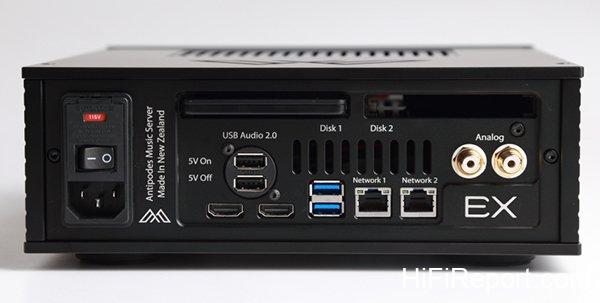
The EX has two sets of USB Audio 2.0 outputs that can be connected to USB DACs. The first set has 5V power supply, and the second set does not. If your USB DAC can supply 5V power by itself, you can use the second set. It also has two RJ45 network ports, and the second set can be directly connected to a streaming player to achieve the best results. In addition, it also provides RCA analog output, which can be connected to an amplifier for listening, further increasing ease of use.
In terms of playback software, in addition to supporting DLNA, Roon, Spotify Connect, and AirPlay, the EX is also compatible with the SONOS system, so the SONOS wireless speakers at home can also play music files stored on the EX.
The EX has two sets of USB Audio 2.0 outputs. The first set has 5V power supply, and the second set does not. If your USB DAC can supply 5V power by itself, you can use the second set.
There are also two RJ45 network ports. The second set can be directly connected to a streaming player to achieve the best results.
HQPlayer Support
The most special feature is that the EX can actually support HQPlayer.
This is a powerful playback software designed specifically for audiophiles. When you use the EX to connect to a USB DAC for listening, you can use HQPlayer to achieve better listening results.
The HQPlayer included with the EX is a trial version, with the same functions as the full version, but it can only be listened to for 30 minutes. After 30 minutes, it will automatically mute. You need to restart it to continue listening, but this should be enough for you to decide whether to buy the full version.
In addition, you can also use the HQPlayer NAA function to implement the “CX+EX” ultimate solution recommended by Antipodes. This uses a CX purely as a server, and an EX as a streaming player. The two are connected by a network cable, and signals are transmitted through the HQPlayer NAA format. This method separates the Server and Renderer, thereby completely isolating noise, and then uses the unique format of HQPlayer NAA to transmit signals, achieving the best playback quality.
The biggest advantage of the EX is that you can use it in the way you are accustomed to, and it provides flexibility for hardware and software upgrades, making it highly versatile.
However, the advantages also form disadvantages, because with rich functions, in the initial use, some setting processes must be completed to set the EX to the operating mode you want. Fortunately, Antipodes has written complete instructions for use on its website and attached detailed illustrations. The language can also be switched immediately at the top of the webpage. Therefore, as long as you read carefully and spend some time, you should be able to complete the settings yourself.
All settings of the EX are operated through a web interface. Just enter myantipodes.com in the browser address bar of a computer or tablet, and you will find the Antipodes device in your home local area network.
The screenshot shows the “Apps” settings page, where you can see many apps that are already pre-installed in the EX.
This is the “Settings” page, where you can enable/disable and fine-tune different functions.
Complete operating instructions are detailed on the Antipodes official website. You don’t have to worry about not knowing how to use it after purchasing.
The EX supports playback of various software, so there is a dedicated page to switch different output interfaces. For example, if you want to use a DLNA player for playback, select MPD/DLNA. If you want to use a Roon Ready player, select RoonReady.
Linear Power Supply Design
The above is about the software side. Now let’s talk about the hardware advantages of the EX.
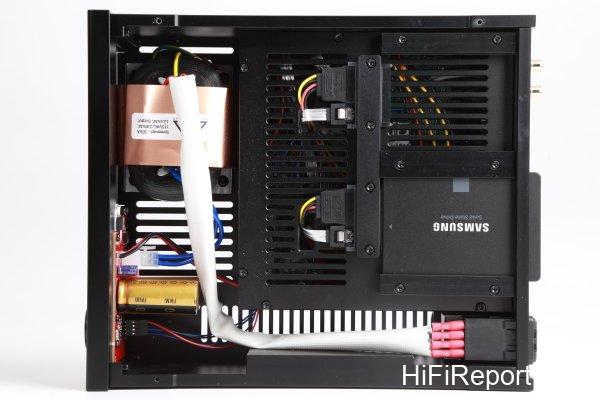
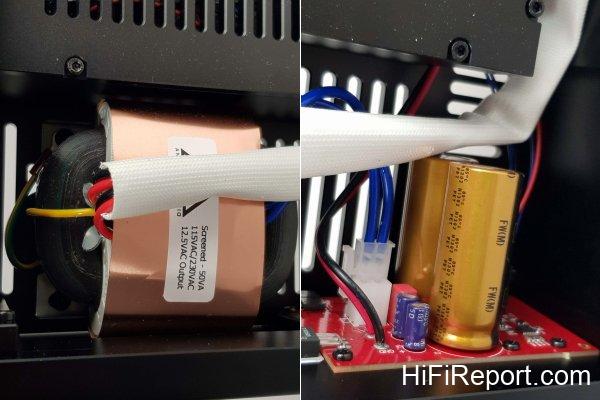
The EX pays great attention to the power supply, and all of them adopt linear power supplies. Therefore, when you open the top cover, you can see that the front third of the cabinet is occupied by the power supply, and one R-core transformer is particularly eye-catching. R-core transformers have the characteristics of small size, low noise, low magnetic leakage, and high efficiency, and are very suitable for use in electronic equipment.
Linear power supplies can provide lower noise, cleaner soundstage, and better sound density. These advantages can also be found in the EX.
The chassis is also meticulously crafted. All six sides are made of very thick metal plates, forming an extremely solid structure that is not prone to resonance.
In order to maintain a compact size, the EX adopts a “stacked” design inside.
The EX can install up to 2 2.5-inch SATA SSD or HDD hard drives, with a total capacity limit of 8TB, which is quite sufficient.
The hard drive slots are arranged above the motherboard. The hard drives can be directly removed from the back panel through the hard drive rack, so there is no need to remove the top cover to replace the hard drives.
The motherboard is mounted in a metal “cage”, which is like a box within a box.
In addition to the 2 sets of USB Audio 2.0 jacks mentioned earlier, the back panel also provides 2 sets of USB 3.0 jacks, which can be used to connect USB storage devices or USB optical drives.
There are also 2 sets of RJ45 network ports, which can be connected to both a router and a streaming player at the same time.
The EX adopts a linear power supply and uses an R-core transformer.
R-core transformers have the characteristics of small size, low noise, low magnetic leakage, and high efficiency, and are very suitable for use in electronic equipment.
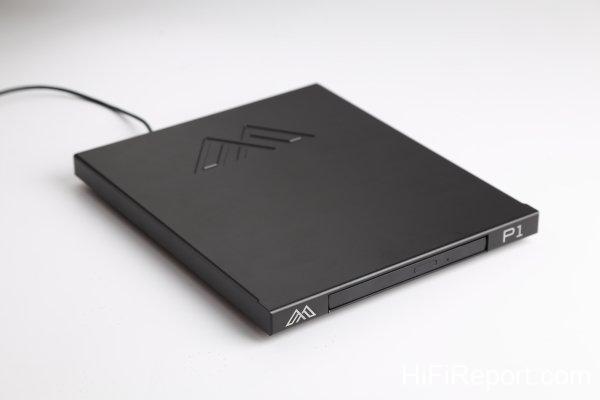
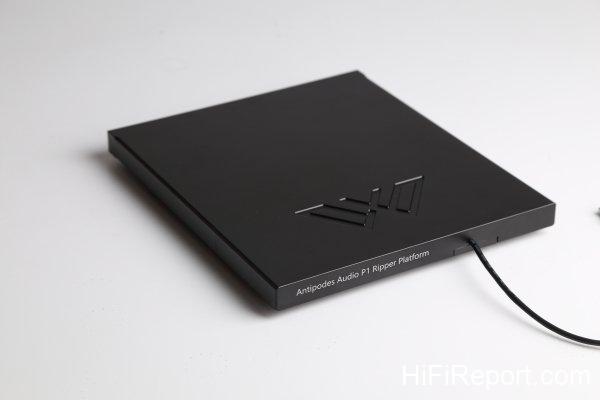
This is Antipodes’ P1 turntable, which needs to be purchased separately and is not standard equipment for the EX.
The P1 is specially designed for ripping CDs and can also be used as a vibration isolation pad for the EX, serving two purposes in one.
The P1 is connected to the EX via a USB cable and does not require a separate power cord.
Inserting a CD will automatically start ripping, requiring no manual operation at all.
Top-Tier CD Ripping Quality
Next, let’s talk about another excellent feature of the EX, which is ripping CDs.
To make it easier for EX users to rip CDs and obtain better audio track extraction quality, Antipodes has also launched its own USB optical drive P1. Its appearance is like a flat metal platform. If you don’t look carefully, you might think it’s just a vibration isolation pad. However, Antipodes cleverly combines a CD ripper and a vibration isolation pad into one.
When in use, placing the P1 under the EX not only looks good but also has the effect of isolating vibration. More importantly, the effect of using the P1 to extract CD audio tracks is very good.
I dare to say this after actually comparing them.
I usually use a dedicated computer with EAC software to rip CDs. In my experience, the file quality ripped by commercially available music servers with external USB optical drives is not better than “computer + EAC”. However, “EX+P1” is an exception. After carefully listening to and comparing the same CD ripped by both, “EX+P1” sounds more concrete in terms of image solidity, soundstage three-dimensionality, sound source positioning, and spatial presentation… These are usually characteristics of higher file accuracy.
The optical drive used in the P1 is specially selected and has high-precision servo and reading performance. When reading, each sector is read twice. When the data read twice is consistent, the next sector is read. If they are inconsistent, the speed is reduced and read twice again until consistent.
Antipodes states that although this reading method takes longer, about 6 to 10 minutes or even longer for a CD, and some CDs in poor condition may not be successfully extracted, it can ensure the best ripping quality.
Conveniently, the P1 is very easy to use. Just connect the P1 to the EX, insert a CD, and you don’t need to worry about it. It will automatically retrieve track information and cover art online, and then start ripping. After reading, the disc tray will automatically eject, done!
Direct Connection to Streamer Recommended
The listening test was conducted at my home.
The EX has a built-in basic DAC and provides a set of RCA analog outputs, but that is just an additional convenience function, and the sound quality can only be considered average. To fully utilize the performance of the EX, the manufacturer recommends pairing it with a USB DAC or streaming player to obtain better playback results.
Among them, I would especially recommend using a streaming player and directly connecting it through the second set of RJ45 network ports on the EX, letting the EX act as a pure server and directly transmit data to the renderer (streaming player) without routing through a router. This not only shortens the transmission path but also isolates a lot of noise, resulting in the best playback effect.
Fortunately, I had an Auralic Vega G1 streaming player on hand during the listening test, and Antipodes also lent me two Tiglon MGL-L1-HSE network cables. So I used one of them to connect the EX to the network switch, and the other one to connect between the EX and Vega G1, forming the shortest path server + renderer system.
Hardware confirmed, what software to use? I have a Roon membership, and Vega G1 also has Roon Ready function, so I can use the Roon Server function of EX to play through the beautiful and convenient Roon interface.
What if you don’t have Roon membership? No problem, then enable the MinimServer media server software already installed in the EX, and then install Auralic’s Lightning DS remote control app on your tablet or mobile phone. You can still play conveniently and smoothly.
If not, you can use a general UPnP/DLNA compatible app, and you can also play smoothly.
Orchestrating Streaming Playback
Finally, let’s talk about the sound performance of the EX.
Although the sound I heard came from the Vega G1, I could still feel the sonic characteristics of the EX, which is the vividness possessed by high-end equipment, as natural as an analog source.
From an absolute perspective, I think the sound of the EX already possesses the strength of a first-class music server, capable of being paired with first-class streaming players or DACs. Considering its price, I think the EX is not only worthwhile but also very cost-effective. Many higher-priced music servers not only have fewer functions than it, but their sound may not be comparable to it.
You might think that a music server is just a computer device that stores data and sends data. Will it affect the sound? The answer is yes, and the impact is not small, and the EX does do this very well.
Vivid and natural sound is difficult to describe in words, because it is not just about good high frequencies, good mid-frequencies, or good low frequencies, nor is it just about good dynamics, good contours, or good separation. But it sounds light, lively, and refreshing, and there is no barrier between music and the listener. All the details can be presented very easily without losing precision and clarity.
If you are determined to invest in file and network streaming playback, and you hope to listen to it for a long time, you will need a music server of sufficient quality, and the EX can meet this condition. It will play the role of conductor, leading you to easily enjoy high-standard playback quality.
It is recommended that you also invest in a streaming player to complement the EX, making it even more powerful.
Specifications
**Antipodes EX**
* Type: Music Server
* Digital Output: USB Audio (up to 32bit/768kHz PCM, Native DSD512)
* Analog Output: RCA
* Storage Space: 0-8TB (can install 2 2.5-inch SATA hard drives)
* CD Ripping: Built-in audio track extraction software (requires external USB optical drive)
* CPU: Intel Celeron quad-core CPU
* Dimensions: 240×90×290 mm (W×H×D)
* Weight: 7.5Kg