
Audionet DNP Streaming DAC Preamplifier Review
In the realm of high-end audio, the pursuit of sonic perfection often leads to a philosophy of separation. Preamplifiers are divorced from power amplifiers, power supplies are externalized from main units, left and right channels are isolated, and CD transports operate independently from DACs. Some audiophiles even opt for separate word clocks. This relentless quest for isolation, while potentially beneficial, can result in a complex web of interconnects, a multitude of power cords demanding numerous outlets, and an audio rack overflowing with components. Starting a listening session becomes an elaborate ritual of switch-flipping, and powering down requires a similar sequence in reverse.
But must achieving exceptional sound quality always be such an arduous undertaking? Not necessarily. Consider the Audionet DNP, a single chassis marvel that seamlessly integrates digital streaming, DAC, and preamplifier functionalities. During my time with the DNP, my daily listening experience transformed into a more relaxed and intuitive affair, without compromising sonic excellence in the slightest.
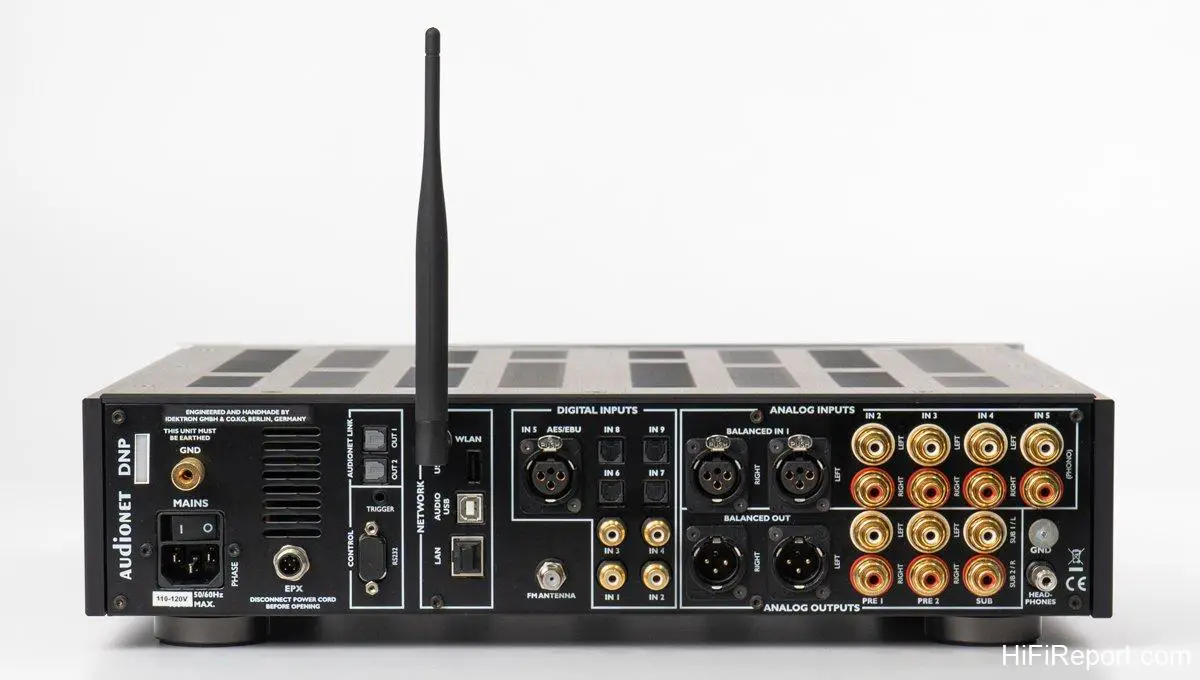
Feature Rich Functionality
DNP, an acronym for Digital Network Preamplifier, aptly describes its multifaceted nature. It’s not just a preamplifier; it’s also a sophisticated digital-to-analog converter and a versatile network streaming device.
The preamplifier section of the DNP operates purely in the analog domain. It accommodates both RCA and XLR analog inputs, and volume control remains entirely analog, mirroring the architecture of conventional preamps.
On the digital front, the DNP is generously equipped with a comprehensive array of digital input interfaces, including USB, optical, coaxial RCA, and AES/EBU. These connections readily accept digital signals from external sources. Furthermore, the DNP can directly access music files stored on USB mass storage devices, allowing for effortless playback from USB drives or hard disks.
For streaming capabilities, the DNP connects via Ethernet cable or Wi-Fi. Beyond accessing music files stored on NAS devices or computers, it seamlessly integrates with popular streaming music services such as Tidal, Qobuz, Deezer, Podcast, and internet radio. A dedicated mobile app, developed in-house by Audionet, provides intuitive remote control over playback, preamplifier output volume, and input source selection.
Adding to its versatility, the DNP even includes an FM radio tuner, offering a nostalgic touch and a different listening experience.
A standout feature of the DNP is Audionet’s proprietary CARMA (Computer Aided Room Analyser) room acoustics analysis and correction. This sophisticated system analyzes the frequency response of your listening space and applies digital equalization via internal DSP to compensate for acoustic imperfections.
Expanding its system integration capabilities, the DNP features two RCA subwoofer outputs. Its built-in bass management system allows for precise configuration and adjustment of subwoofer crossover frequency, Q factor, and phase. This empowers users to effortlessly construct high-quality 2.1 or 2.2 channel systems with up to two active subwoofers, all under precise control.
For those seeking even greater performance, the DNP offers upgrade potential through the optional external EPX power supply. Connecting the EPX elevates the DNP’s already formidable performance to new heights by providing an even cleaner and more stable power source.
Having outlined the extensive feature set of the DNP, let’s delve into the key aspects in greater detail.
Internally Jam-Packed Design
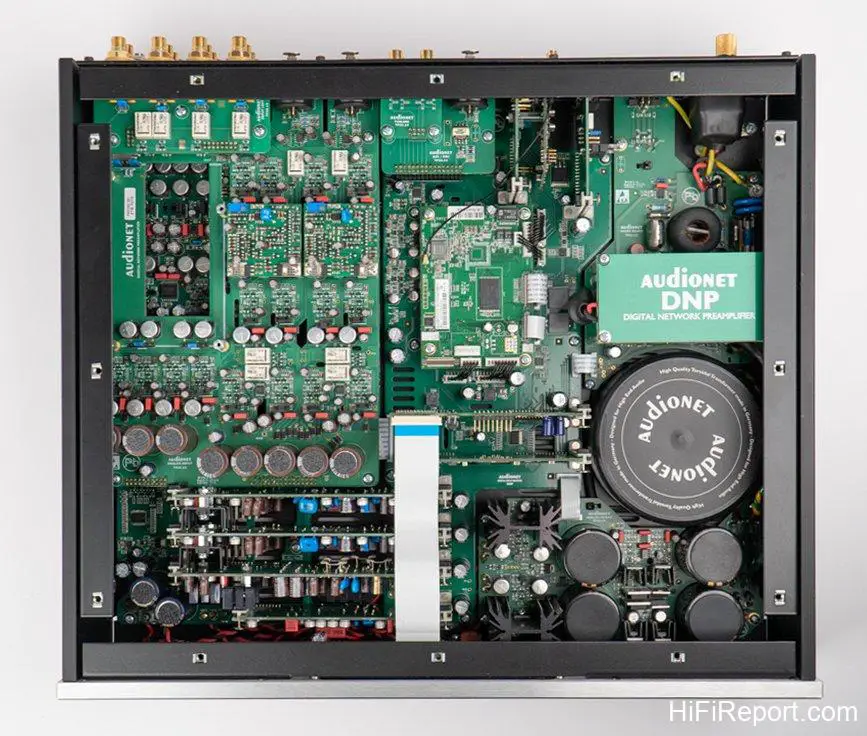
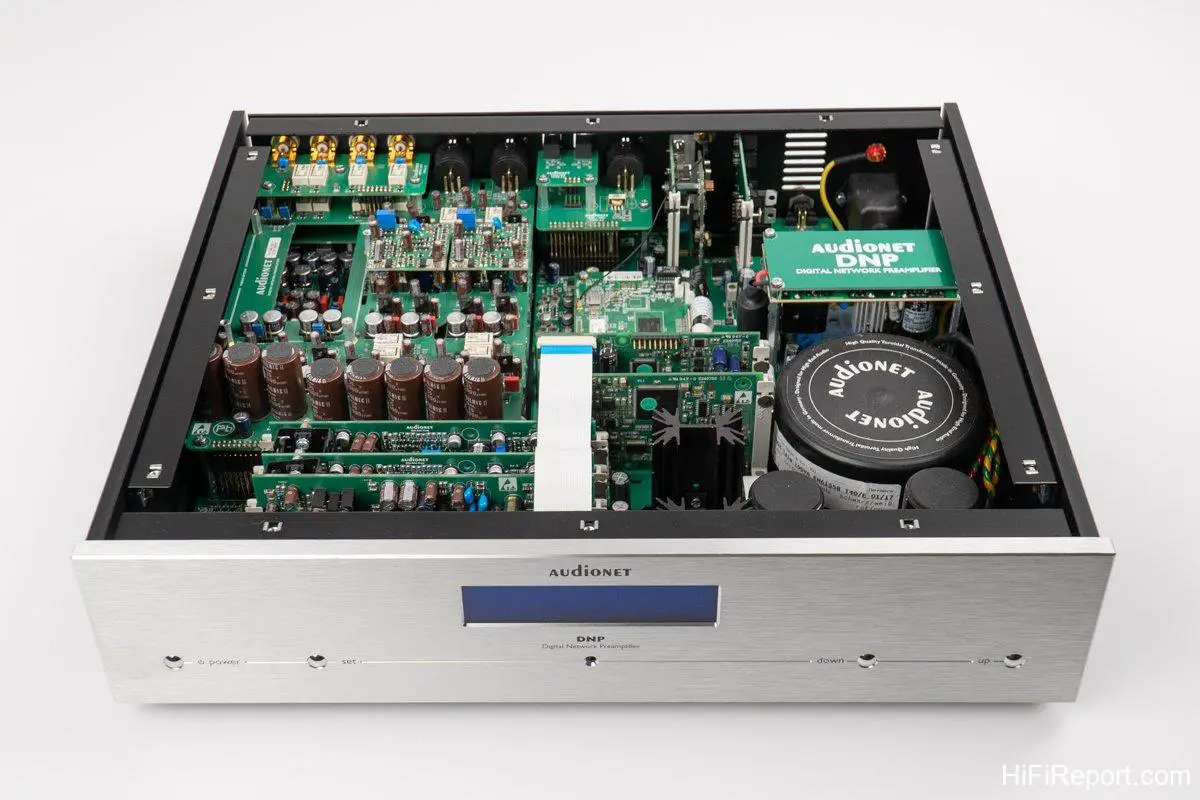
Removing the top cover of the DNP reveals a truly astonishing sight – an interior densely populated with components. Countless circuit boards, large and small, are layered and interwoven, completely filling the chassis, which is by no means small. It’s possibly the most densely packed component interior I’ve ever encountered! Why such a high component density? Closer inspection reveals that the digital circuitry occupies only a small fraction of the space. The vast majority of the internal volume is dedicated to two primary areas: power supply circuitry and analog amplification circuitry.
Audionet places immense emphasis on power supply, particularly for the analog amplification stages.
The DNP’s analog circuitry boasts its own dedicated, substantial 100 VA toroidal transformer, coupled with a massive 62,000 uf of filter capacitance and meticulously designed voltage regulation circuits composed of numerous discrete components. This robust power supply ensures an abundant, stable, rapid, and clean power delivery to the analog circuits, guaranteeing maximum dynamic range and sonic purity.
Furthermore, all operational amplifier (OP amp) circuits undergo a secondary filtering stage with an additional 8,000 uf of filter capacitance, further minimizing noise and crosstalk interference.
Audionet emphasizes the complete isolation of analog and digital power supplies within the DNP, preventing mutual interference. This necessitates dedicated power supplies and voltage regulation for the extensive digital and logic control circuitry, explaining the sheer volume of components.
Beyond power supply, analog amplification is another area of intense focus in the DNP’s design, accounting for a significant portion of the internal space.
The DNP incorporates two of Audionet’s exclusive analog technologies: ULA (Ultra Linear Amplifier) circuitry and the aforementioned OP (Operation Amplifier) circuits.
ULA technology, originally developed for medical equipment, excels at maintaining circuit linearity. Audionet has adapted it for audio applications, ensuring exceptionally low distortion even when the amplifier operates under extreme conditions.
The “OP” circuits are not conventional integrated circuit op-amps. Instead, Audionet constructs these amplifier circuits using 86 discrete components. Each OP is a small, square circuit board. The DNP utilizes these custom OP circuits throughout its analog stages to achieve Audionet’s stringent performance and specification targets.
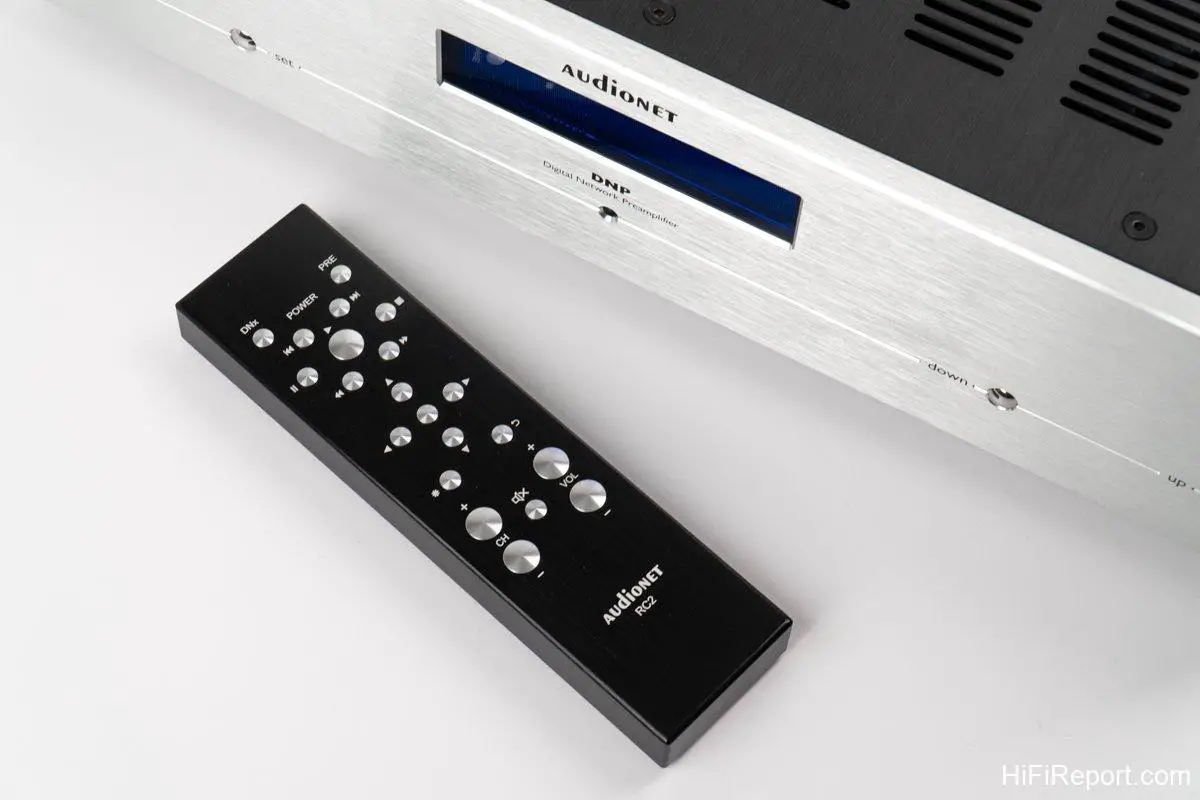
The DNP’s volume control is equally uncompromising, employing a purely analog system based on relay switches and a precision resistor network. This design ensures exceptional linearity and accuracy. Volume adjustments can be made with precision using the included aluminum remote control or via the mobile app.
With such meticulous design and engineering, it’s no wonder Audionet confidently asserts that the DNP can rival the world’s best preamplifiers, including their own flagship PRE G2 preamplifier.
Proprietary DAC Technology
In its DAC section, the DNP prioritizes minimizing jitter to the greatest extent possible. To achieve this, Audionet developed their Intelligent Sampling Technology. This proprietary technology employs custom software and a powerful processor to perform synchronous upsampling and re-clocking of the incoming digital signal. The signal is upsampled to 24 bit / 192 kHz format and then re-clocked using a high-precision clock oscillator before being fed to two independent DAC chips for digital-to-analog conversion. This process, according to Audionet, effectively minimizes jitter to an absolute minimum.
Moving on to the DNP’s unique “special ability” – the 5-stage MPE (Minimum Phase Equalizers) digital equalizer. Each stage allows for individual selection of filter type, frequency range adjustment, gain/cut in the selected frequency band, Q-factor adjustment, and more. This powerful tool enables users to correct or compensate for undesirable acoustic characteristics of their listening environment, ultimately enhancing sound quality.
How is it used? Audionet’s CARMA (Computer Aided Room Analyser) software, in conjunction with a microphone and computer, performs in-room measurements of the frequency response. The software displays the measured frequency response curve in a graphical interface, allowing for intuitive adjustment. The customized parameters are then uploaded back to the DNP to implement the correction.
CARMA is a versatile tool, capable of measuring not only two-channel systems but also mono, multi-channel (up to 7.1), and separate subwoofers (up to 2).
Furthermore, the DNP can store up to 20 sets of parameter settings, which can be switched at any time. This means the DNP’s MPE digital equalizer can be used not only for room correction but also to create different sonic “profiles” for varied listening preferences, adding a layer of enjoyment and customization.
Let’s briefly introduce how to use CARMA.
Graphical Digital EQ Adjustment
CARMA, short for Computer Aided RooM Analyser, necessitates the use of a computer (Windows PC or Apple Mac). Laptops are convenient, but desktops are also viable, provided they have a sound card capable of microphone input.
A quality microphone is also essential, ideally an omnidirectional microphone. The manufacturer recommends the Behringer ECM 8000, along with a microphone preamplifier equipped with phantom power.
Next, download two items from the Audionet website: first, the CARMA software. Unzip and save it on your computer. It’s an executable (.exe) file that runs directly without installation. Second, download the test tones. These can be stored on a USB drive and inserted into the USB A port on the DNP’s rear panel for playback, or they can be stored on your usual music storage device and streamed over the network.
CARMA only requires measurement at a single listening position – the “sweet spot.”
Position the microphone horizontally, pointing forward towards the center point between the two speakers. The tip of the microphone should be at the same height as your ears when seated, essentially measuring at the midpoint between your ears.
The test tones will play twice, first for the left channel and then for the right channel, measured separately.
After measurement, remember to save the data.
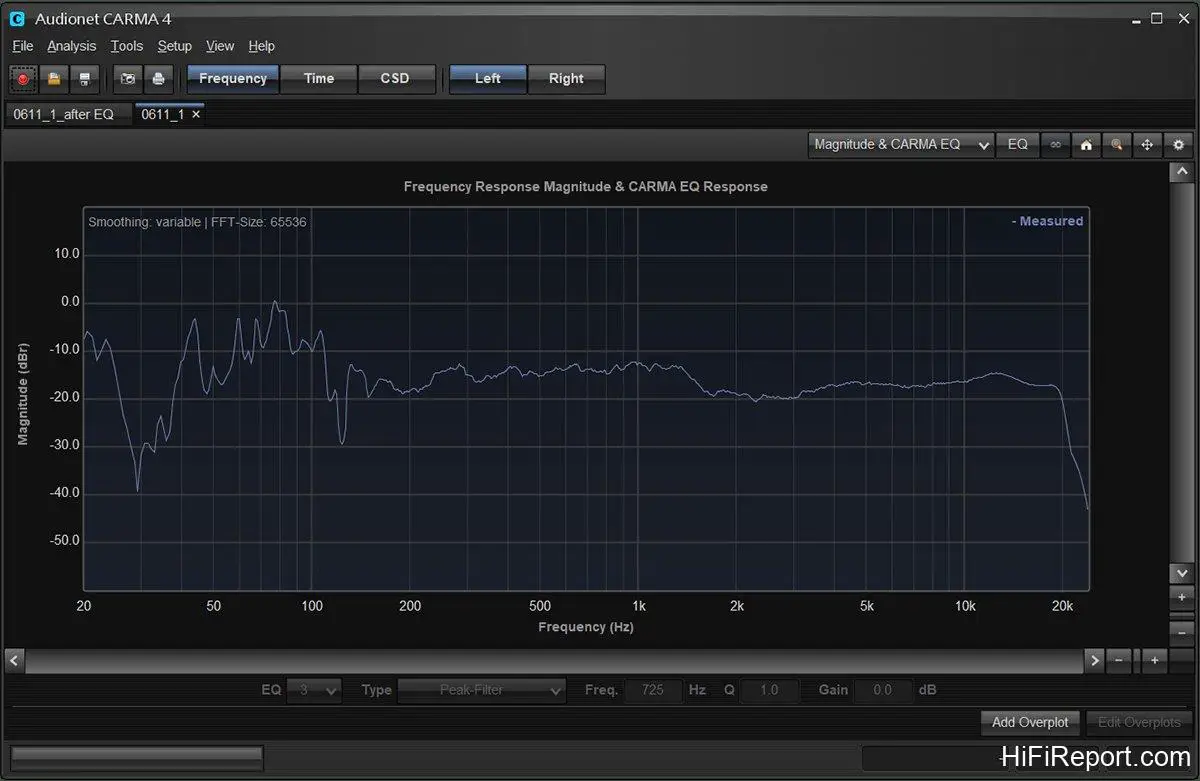
Figure 1 shows the measurement process in my listening room, and the resulting frequency response curve is displayed.
The graph shows the frequency response curve for the left channel. The right channel curve was slightly flatter, so I’ve omitted it for brevity, showing only the left channel.
Two aspects of the measurement surprised me.
Firstly, my speakers are Aurum Cantus Grand Harmony, specified by the manufacturer to have a frequency response from 30Hz to 40kHz. However, the graph shows signal down to 20Hz, indicating my Grand Harmony speakers can indeed reach that low, which is gratifying.
Secondly, there are significant fluctuations below approximately 150Hz, indicating substantial low-frequency room mode issues in my space, particularly a major dip around 30Hz, which is concerning.
However, the frequency response above 150Hz is reasonably flat.
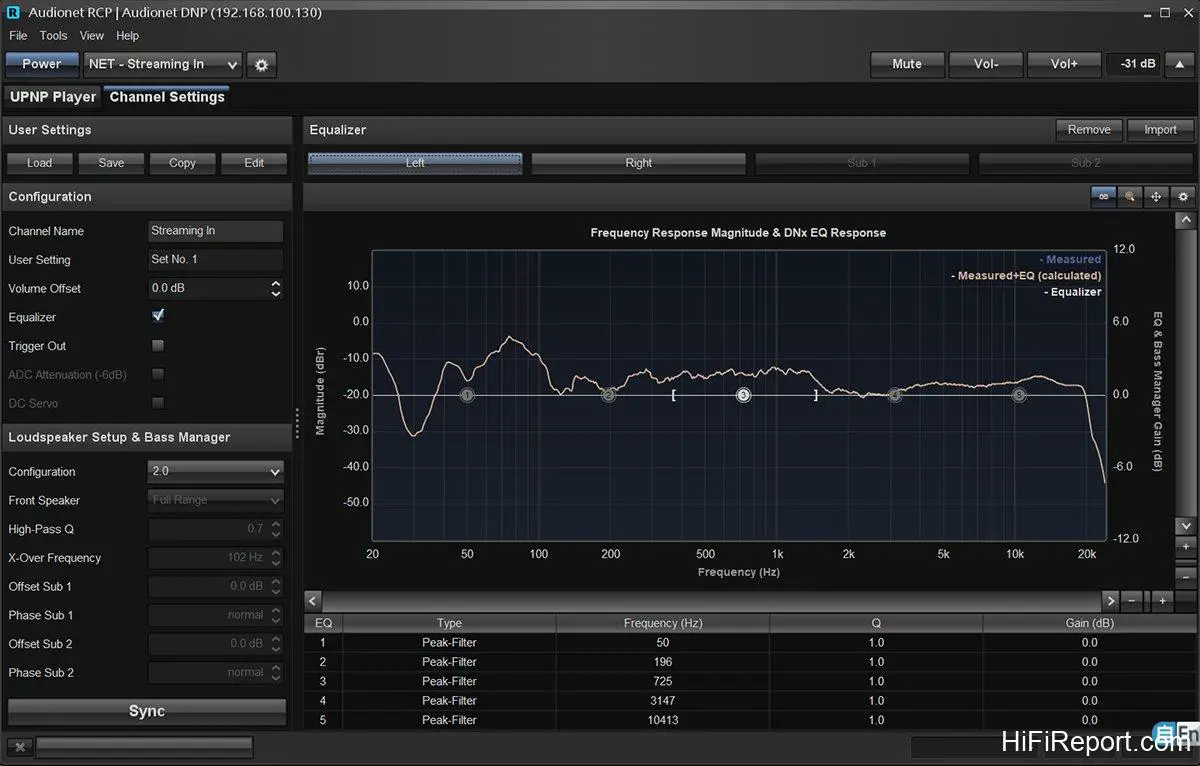
Figure 2 CARMA is purely an analysis tool; it displays measurement results but does not provide EQ adjustment capabilities. For that, we need another piece of software – RCP (Audionet Remote Control Point). RCP allows for graphical audio equalization adjustments and is also used to configure and operate many of the DNP’s functions. It also serves as a remote control for streaming playback.
RCP is also an executable (.exe) application that runs directly after download, without installation.
After launching RCP, import the spectrum curve data saved from CARMA. You’ll see a display similar to Figure 2 (again, showing the left channel).
This time, the graph includes points labeled 1-5. Each point represents an adjustable equalization band. By clicking and dragging these points with the mouse, you can make adjustments.
I haven’t started making adjustments yet, so the points in the figure are still in their original positions.
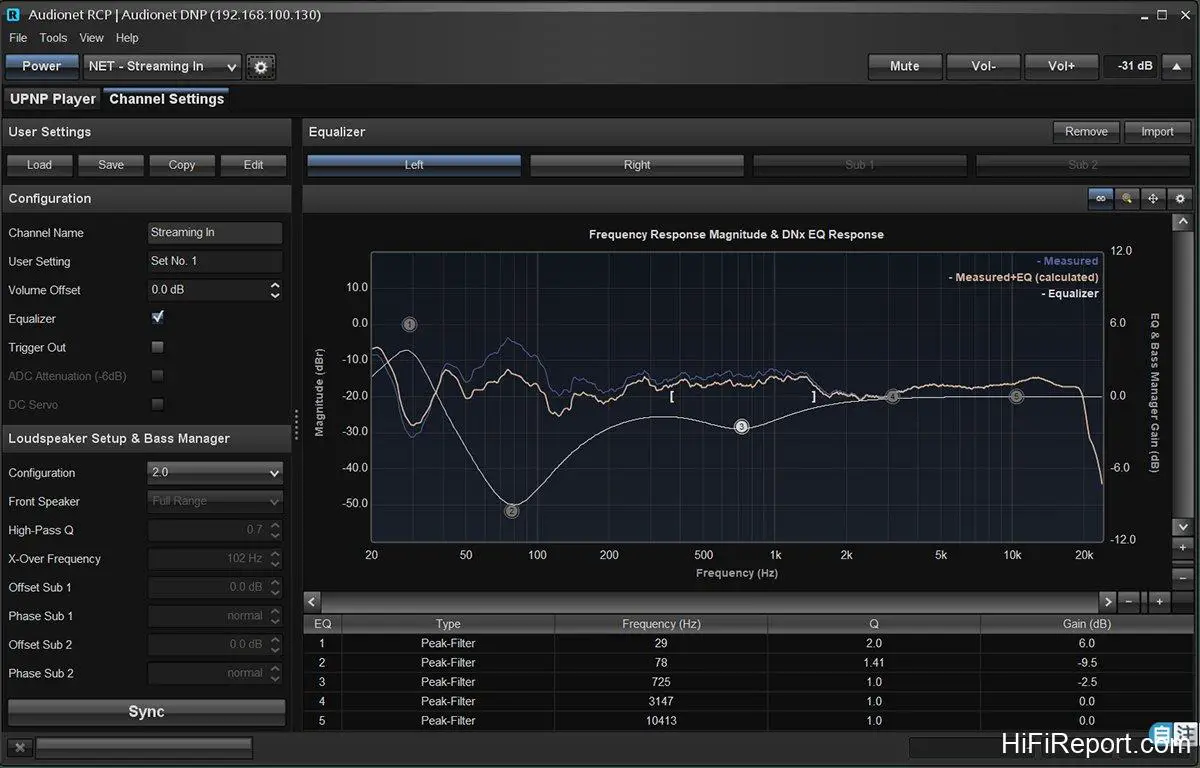
Figure 3 In Figure 3, I’ve dragged points 1, 2, and 3.
I’ve raised point 1, lowered point 2, and also lowered point 3, though to a lesser extent than point 2. You can now see both a blue line and an orange line on the graph. The blue line represents the original frequency response of the room, while the orange line is the target curve that RCP estimates will be achieved after the adjustments I’ve made to points 1, 2, and 3.
Next, in the “User Setting” section on the left, select the parameter preset slot you want to save to, and then click “Sync” at the bottom left. RCP will then transmit the equalization parameters to the DNP.
The DNP can store up to 20 parameter presets, and these presets can be switched directly using the buttons on the front panel, without requiring a computer.
The adjusted parameter set can also be saved as a file on your computer, with no limit to the number of files you can save, depending on your hard drive capacity. If further adjustments are needed later, you can simply load the saved file, make modifications, and upload it again.
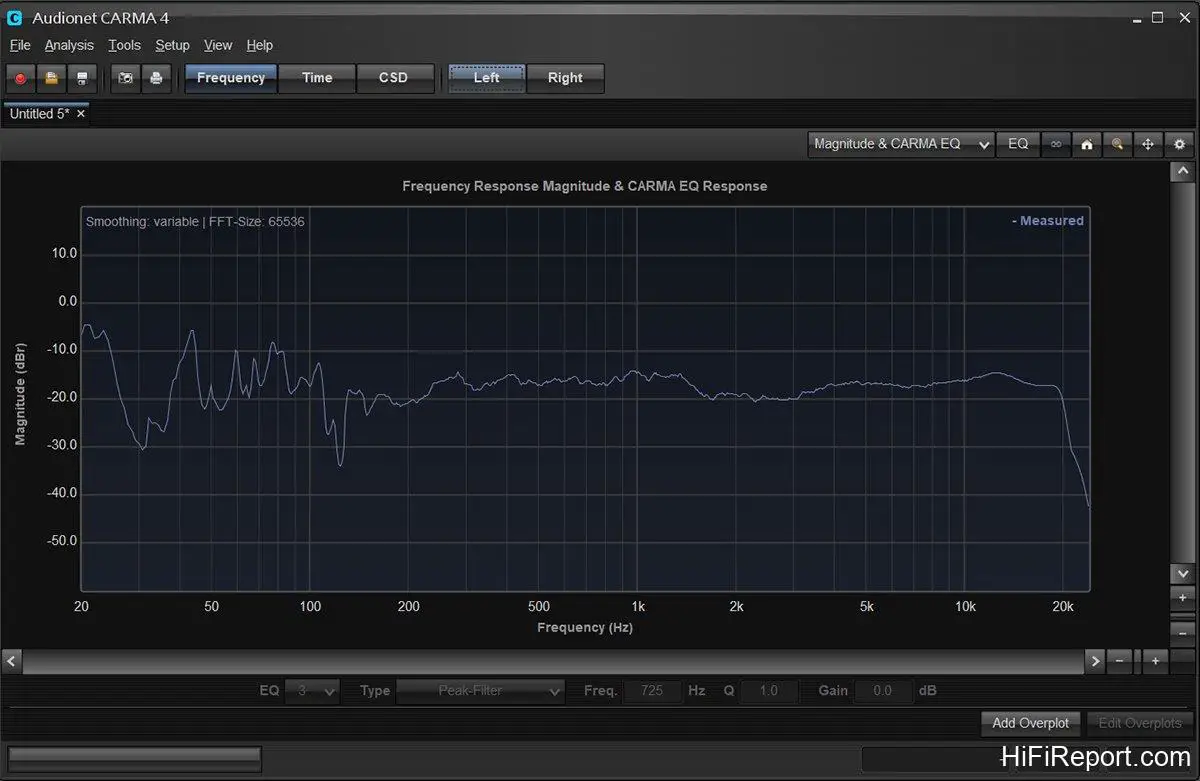
Figure 4 After applying digital equalization within the DNP, does the sound change? After uploading the parameters, I remeasured with CARMA, obtaining the frequency response curve shown in Figure 4.
Comparing it to Figure 1, the three frequency bands I adjusted have become flatter, especially around 30Hz. Originally at -40dB, a severe dip, it’s now at -30dB after equalization. While still a dip, it’s significantly improved.
Microphones and curves don’t lie. The DNP’s digital equalizer demonstrably has a corrective effect. As for how it sounds, I’ll elaborate on that in the sound performance description shortly.
iMM / aMM App Remote Control
Another aspect of the DNP that prospective buyers are keenly interested in is the streaming playback control interface. Audionet addressed this early on by developing their own remote control apps for mobile devices. iOS users can download the iMM app, and Android users can download the aMM app, both available for free.
iMM and aMM not only control streaming playback but also operate basic DNP functions like volume adjustment and input source selection.
Here are a few screenshots of the app for a brief overview.
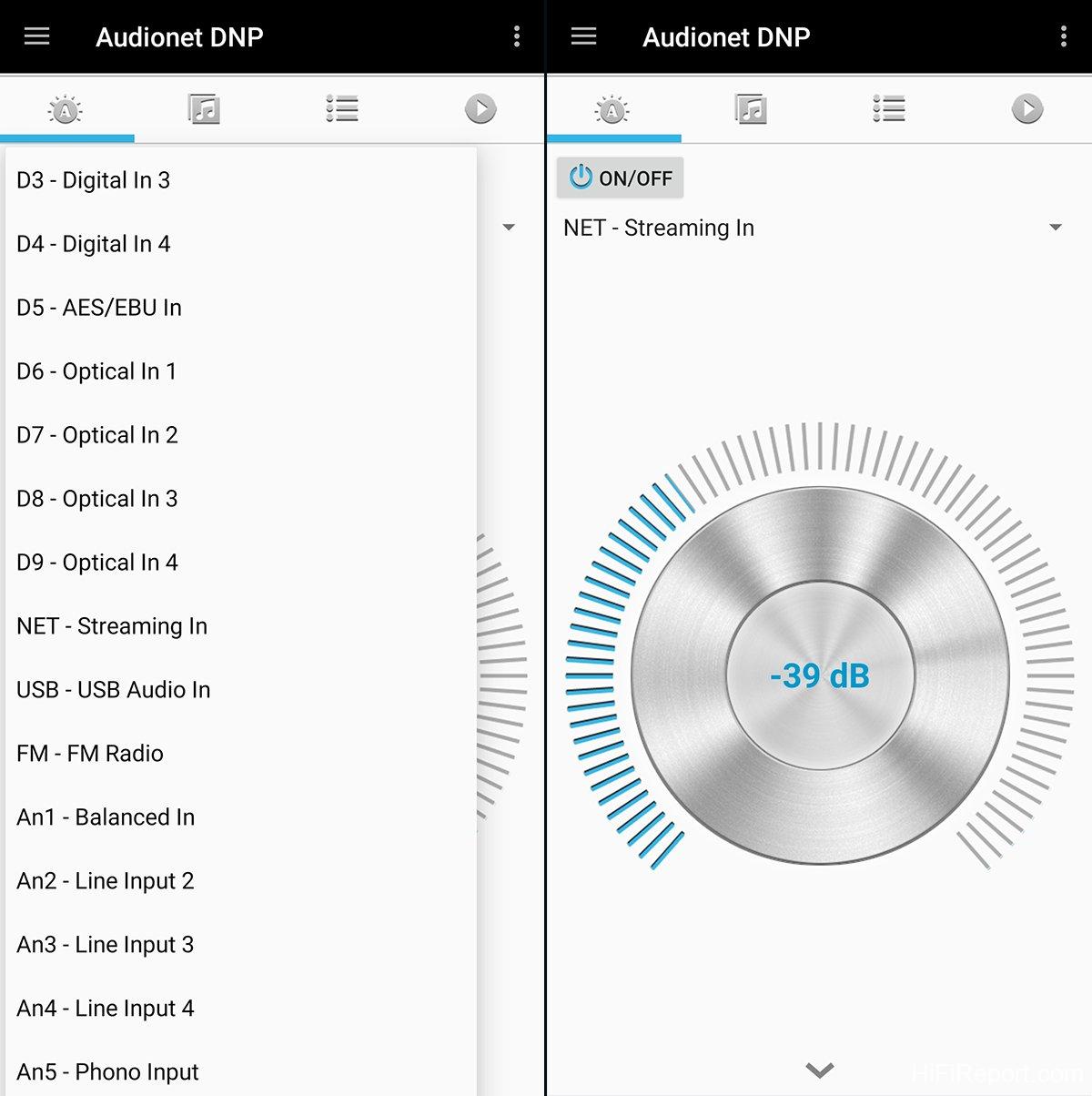
Left image: The DNP boasts a rich array of input interfaces, including analog RCA, analog XLR, optical, coaxial, AES/EBU, USB audio, USB storage devices, streaming, and FM. Switching between these using the remote control or front panel buttons can sometimes require multiple presses to reach the desired input. The app offers much greater convenience. Right image: The app also allows for volume adjustment. Simply rotate your finger in a circle on the phone screen to adjust the volume, which is more intuitive than using a remote control.
Therefore, even if you’re not streaming, connecting the DNP to the network enables volume control via your smartphone.
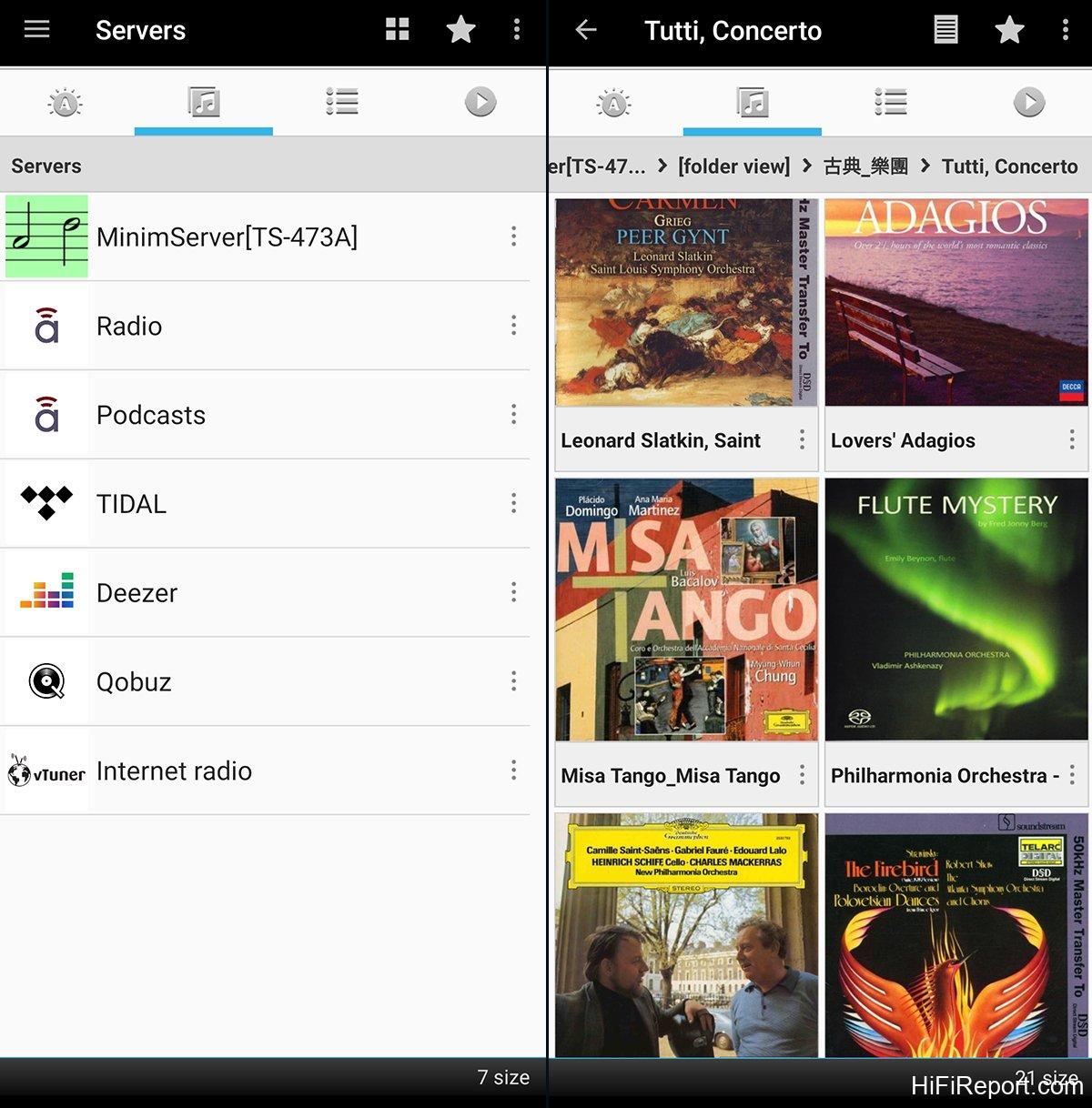
Left image: The DNP supports UPnP. While not Roon Ready, it can still stream high-resolution music services like Tidal and Qobuz via UPnP. Internet radio, vTuner, and Podcasts are also accessible. Right image: Music files stored on a NAS are displayed with clear album art in the iMM app.
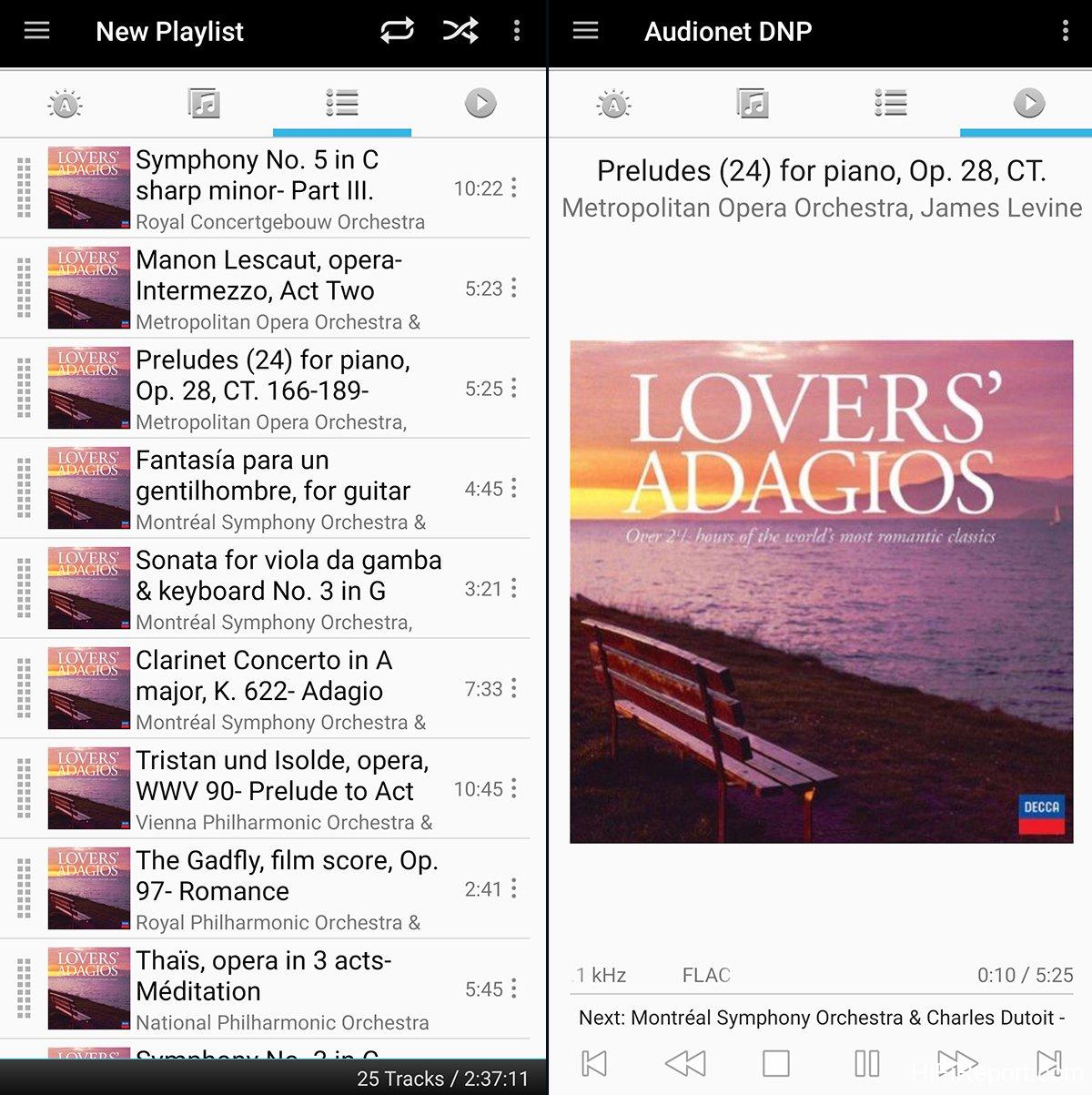
Left image: The iMM app interface is clean and straightforward, adopting a traditional tab-based layout with Control, Database, Playlist, and Playback page tabs. Music must be added to the playlist before playback can begin. Right image: The playback page.
Digital EQ: A Soundstage Master
Now for the listening impressions.
During the listening sessions, I aimed for the simplest configuration to maximize the DNP’s potential, using it as a streamer and preamplifier, playing music files from my NAS or streaming Tidal.
The power amplifier was a NuPrime Evolution One, and the speakers were Aurum Cantus Grand Harmony.
Let’s first discuss the sonic changes introduced by the DNP’s digital EQ.
The DNP’s digital EQ can be toggled on or off via the front panel buttons or through the menu using the remote control. The process is quick, allowing for rapid A/B comparisons and immediate discernment of the differences.
With digital EQ engaged, the most noticeable changes were in the soundstage. The soundstage not only narrowed and deepened but also receded, creating a greater sense of depth to the performance. Sound images became more focused and appeared smaller, with enhanced density and solidity. The sense of presence and tangibility was heightened, and the overall image clarity improved.
Taking the “Blue Coast Collection” sampler as an example, which primarily features folk guitar and vocal performances, with simple instrumentation, engaging the digital EQ immediately sharpened the image of the guitar and vocals, improving localization. The relationship between them became clearer, defining the hierarchy between the lead vocals and accompanying guitar. Disengaging the digital EQ broadened the guitar’s image, pushed the soundstage forward, and made the guitar slightly more prominent, almost competing with the vocals for attention.
Moving to Kunzel’s Cincinnati Pops Orchestra’s performance of Henry Mancini’s greatest hits, specifically track 4, “It had better be tonight,” a dynamic and energetic piece, engaging the digital EQ resulted in an even more pronounced recession and deepening of the soundstage compared to the “Blue Coast Collection.” The sonic image and depth layering were exceptionally precise, sure to please soundstage-focused audiophiles.
I also observed that the digital EQ tightened the low frequencies in my system, resulting in improved clarity.
Without EQ, my system, when playing the Kunzel recording, exhibited an excess of low frequencies in a certain band, causing room resonance, leading to boominess and muddiness. Engaging the EQ significantly mitigated this issue. Low-frequency definition and layering improved, and the overall frequency balance became more appropriate. The sound became more precise, leaner, and tighter, eliminating any excess flabbiness. Furthermore, instrument separation and layering improved, especially in the low frequencies.
Beyond soundstage depth, the digital EQ also introduced tonal changes.
With digital EQ engaged, images became tighter and slightly leaner, and the overall sonic character became drier, slightly reducing smoothness and roundness.
Essentially, I perceive the DNP’s EQ as offering different sonic flavors rather than just correction. It provides an additional function and more diverse listening enjoyment. Moreover, the DNP’s EQ curves are infinitely adjustable. If an adjustment doesn’t sound pleasing, it can be easily deleted and re-adjusted.
Excellent Streamer + Superb DAC + Fantastic Preamplifier = DNP
Subsequent listening sessions were conducted without digital EQ, comparing the DNP to my reference system to identify its inherent sonic characteristics.
My reference system comprises a computer source, Audiobyte Black Dragon DAC, and EC4.8 preamplifier. The DNP, in a single unit, rivals my entire stack in performance and surpasses it in convenience.
Playing the “Blue Coast Collection” sampler again, the micro-dynamics were exceptional. Subtle variations in volume were vividly rendered, adding expressiveness and realism to the music without overemphasizing resolution or detail. Everything was balanced and just right.
The DNP never felt like it was trying to deliberately emphasize or portray anything. Instead, it presented a sound that was natural, fluid, and engaging, with an unbiased precision and confidence.
Its frequency balance is superb. In comparison, my reference system exhibited slightly more low-frequency energy, leaning towards a heavier presentation. The DNP, in contrast, was solid, focused, and remarkably dense, imbuing the sound with substantial weight and substance. This resulted in clear and defined guitar plucks, each note full and impactful. Vocals were powerful yet retained excellent textural nuance and dynamic range. My reference system, in comparison, sounded flatter and less emotionally engaging.
Next, I played RR’s “Reveries” album, featuring Eiji Oue conducting the Minnesota Orchestra in a selection of beautiful, lyrical pieces, including slow movements from symphonies and piano transcriptions.
Through the DNP, the string tone was both smooth and warm, clean without being sterile. The layered instrumental sections were densely interwoven, creating a flowing, linear progression, like silk fluttering in the wind, without any hint of harshness or jaggedness.
Even at low volumes, the low frequencies remained substantial and full, providing a solid foundation. This ensured that even the quietest passages retained weight, further emphasizing the intensity and dynamic power of louder sections.
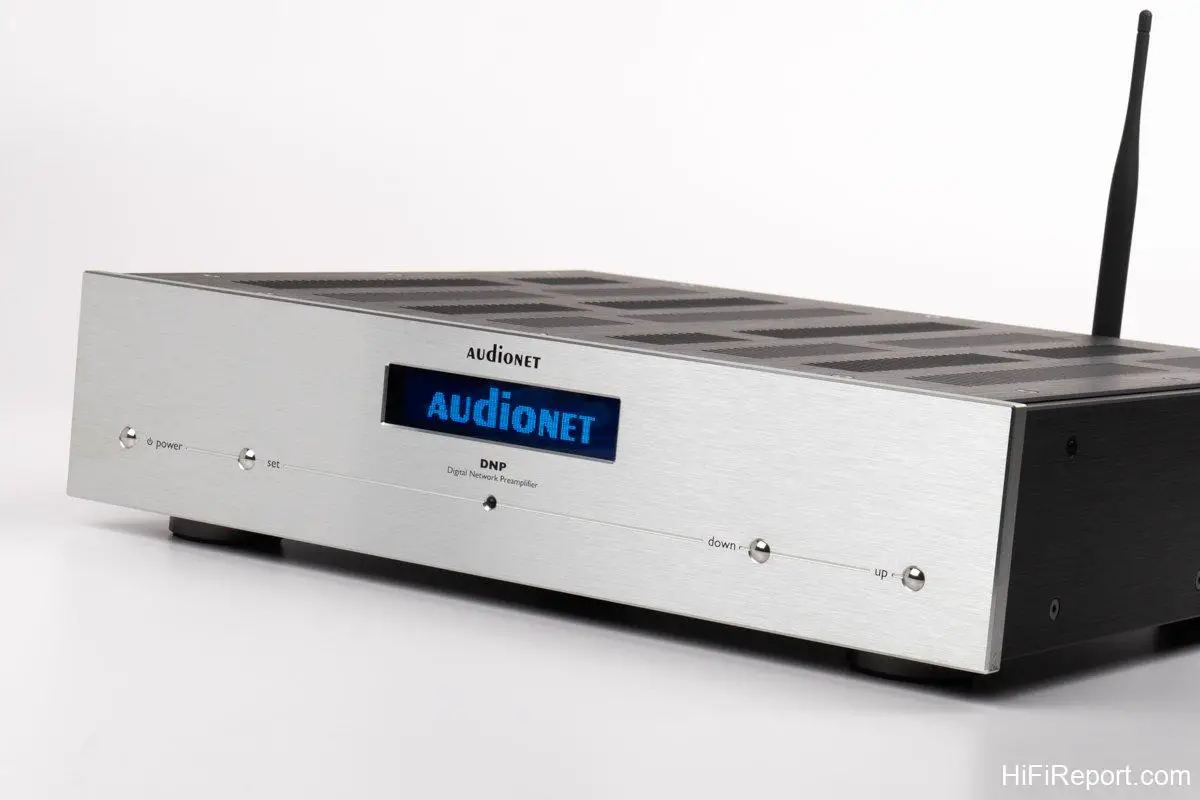
Like its appearance, the DNP is built upon a foundation of instrument-grade scientific rationality, boasting rich functionality, exceptional specifications, powerful performance, and an incredibly reliable user experience. In essence, “Excellent streamer + superb DAC + fantastic preamplifier = DNP” – this equation aptly summarizes its essence.
Specifications
* Type: Streaming DAC Preamplifier
* Analog Inputs: RCA × 4, XLR × 1
* Digital Inputs: S/PDIF RCA × 4, Toslink × 4, AES/EBU × 1, USB B × 1, USB A × 1, RJ45 × 1, Wi-Fi, FM
* Analog Outputs: RCA × 2, XLR × 1, RCA Subwoofer Output × 2, 6.3 mm Headphone Output × 1
* Frequency Response: 0Hz – 1MHz/-3dB (DC coupled), 2Hz – 1MHz/-3dB (AC coupled)
* Maximum Output: RCA 6 Vrms, XLR 12 Vrms
* Total Harmonic Distortion (Analog Input): < -108 dB / 20Hz ~ 20kHz
* Dimensions: 430 × 110 × 360 mm (W×H×D)
* Weight: 12 kg