
Linn Klimax DSM Review
Linn first introduced the Klimax DS (Digital Stream) in 2007. At the time, it was a pioneering piece of equipment, emphasizing its choice of using an Ethernet network as the path for digital streaming, unlike the then-common USB interface. In 2011, the DS range was fully upgraded to DSM (Digital Streaming Media).
There were, of course, many differences between the DS and DSM, the most obvious being the latter’s inclusion of HDMI terminals, preamplifier functionality, and built-in Space Optimisation.
Subsequently, Linn launched the Klimax DSM, Akurate DSM, and Majik DSM, all following the previous design philosophy. It wasn’t until September 2018 that Linn released the Selekt DSM, featuring a completely different aesthetic. Its main characteristics included an illuminated multi-function dial on the top cover, six Pin Buttons (shortcut keys) along the front edge of the top panel, and the addition of a USB Audio terminal.
In March 2021, Linn underwent another significant transformation, giving the Klimax DSM a chassis twice the height of its predecessor. It also added the illuminated dial and six shortcut buttons to the top. Despite such a major change, its official model name remains Klimax DSM, with no indication of generation or MK XX.
Perhaps Linn believes that only audio reviewers care about generations or revisions, while average consumers identify products by price and appearance, hence the lack of such markings.
However, as an audio reviewer, I must detail the Klimax DSM from start to finish. The first generation, launched in 2007, was called Klimax DS. From 2016-2018, it was known as Klimax DSM, featuring the traditional flat, slim Linn product design with a quarter-circle display on the front panel. The latest Klimax DSM shares the Selekt DSM’s appearance, with a circular dial on top that is so prominent it could be considered Linn’s new trademark. The entire front panel looks like a black mirror.
Once powered on and in use, about three-fifths of the panel becomes a display screen, much larger than before, capable of showing comprehensive text information.
The Linn Ecosystem and Klimax DSM Versions
What are the differences between the 2021 Klimax DSM and the previous 2018 generation? These will be explained in detail below, but let’s start from the beginning. Linn’s iconic turntable is the LP12, which has stood firm since its creation in 1973, though its internal details have evolved significantly despite the unchanging exterior. While there’s only one turntable model, Linn consistently offers its own tonearms and cartridges to meet the needs of vinyl enthusiasts.
In the realm of digital sources, Linn offers Network Music Players across four tiers: the most affordable is the Majik DSM, followed by the Selekt DSM, then the Akurate DSM, and the flagship Klimax DSM. However, with the introduction of the new Klimax DSM, the previous generation is differentiated by adding “Katalyst,” referring to the internal digital-to-analog conversion mechanism used.
Among the current five network players, only the Selekt DSM and the new Klimax DSM feature the multi-function illuminated dial on top; the others do not, although I believe they will likely adopt this design sequentially in the future.
The Klimax DSM is currently available in three versions: Audio, AV, and Hub. These versions differ in their rear panel connectors. The Hub version lacks analog output terminals, while the Audio version lacks HDMI terminals, designed purely for music listening. The AV version boasts five HDMI terminals and a full array of connectors.
Interestingly, the Audio and AV versions are priced identically, so the Taiwanese distributor naturally imports only the AV version, as having the extra five HDMI terminals available for use is a clear advantage. The Hub version is half the price, but is likely of less interest to audiophiles in Taiwan.
Linn does not offer separate preamplifiers because the preamplifier function is integrated into their network players. Power amplifiers are available in three tiers: Majik, Akurate, and Klimax. The Klimax power amplifiers are further divided into Twin (stereo) and Solo (monoblock). Linn’s speaker range is the most extensive, with nine different models, which I won’t detail here.
Linn also offers “Full System” packages, comprising a complete source with active speakers, totaling eight configurations, which I also won’t describe in detail.
Design and Connectivity
The Klimax DSM has a distinctive appearance. While not large, it looks refined and solid, constructed from several thick, CNC-machined aluminum plates. In particular, the entire black front panel resembles a mirror and is made of OLED, which automatically turns black shortly after displaying information to prevent screen burn-in. The top cover, besides featuring the multi-function illuminated dial and six shortcut buttons, is covered in beautiful, intricate fine lines.
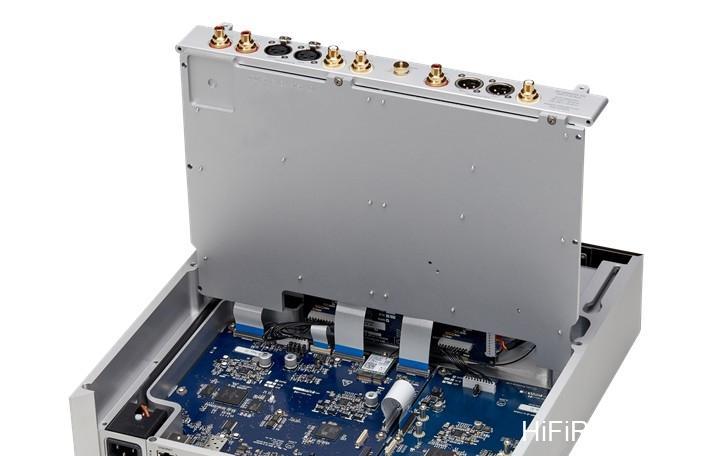
Most notably, the chassis is divided into upper and lower layers. The upper layer houses the analog input/output terminals and related circuitry, while the lower layer contains the network, wireless transmission, digital input/output terminals, and related circuitry. These two layers are not simply separated by a thin metal plate; the upper layer can be completely lifted open, resembling a separate chassis. The lower layer is effectively another independent chassis.
The base plate of the upper layer serves as the isolation boundary with the lower layer’s chassis. You can see a hint of this structure from the separating gap in the center of the rear panel.

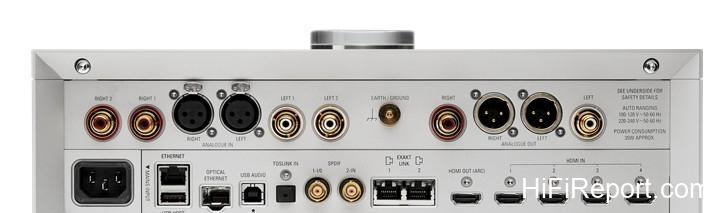
The upper half of the rear panel includes one set of XLR analog inputs and two sets of RCA analog inputs, with one set each of XLR and RCA analog outputs. The lower half houses the digital terminals: Ethernet, USB Host (for maintenance/upgrades), Optical Ethernet (for fiber optic network connection), USB Audio, Toslink, two sets of S/PDIF coaxial RCA, two sets of Exakt Link, an HDMI eARC output, and four HDMI inputs.
Below the USB Audio terminal, there is a very small black dot labeled “FB” (Fall Back). This is used for uploading software. Before uploading, you must press this small black dot. After pressing, a small light on the front panel will flash, indicating that the upload function has been activated. Users do not need to concern themselves with this function; it is designed to be very small and inconspicuous. If needed, contact a dealer or distributor.
Also, the Klimax DSM has eARC functionality for connecting to a TV. Connecting to a TV might cause synchronization issues between video and audio, so the Klimax DSM includes a Lip Sync adjustment function. This requires using the circular dial to enter the menu and make adjustments.
The 2018 version of the Klimax DSM already had four HDMI input terminals; this generation adds an eARC HDMI output terminal. The previous generation had only one Ethernet port; this generation adds an Optical Ethernet port. The previous generation lacked a USB Audio terminal; this generation finally includes one, following user feedback. Both generations have one set each of XLR and RCA analog outputs.
However, for analog inputs, the previous generation had only one set of XLR inputs, while this generation adds two sets of RCA inputs in addition to the XLR input. The previous generation had two TosLink optical input terminals; this generation reduces that to one.
Organik DAC Explained
The differences mentioned above are only in the exterior and terminals. In fact, the biggest difference between the Klimax DSM and the previous generation is the internal use of a self-designed digital-to-analog conversion mechanism called Organik DAC, replacing the previous Katalyst DAC. The Katalyst DAC process involved digital signals entering, being upsampled to 768kHz, and then sent as 32-bit data to an AKM AK4497 DAC chip for decoding.
Now, the Organik DAC no longer uses off-the-shelf DAC chips but employs a discrete circuit design combined with custom FPGA programming to handle upsampling, digital-to-analog conversion, and volume control. The FPGA upsampling achieves a massive 2048 times the native 44kHz rate, with a depth of 48 bits. For DSD decoding, the FPGA converts the signal into a 5-bit PWM stream, which is then converted into an analog output by an AFIR DAC composed of 32 flip-flops.
This approach is entirely different from other manufacturers’ methods, which typically involve chip conversion to DSD followed by low-pass filtering.
You might wonder if the reaction time of 32 flip-flops can be perfectly consistent. If there are discrepancies in their reaction times, wouldn’t that introduce jitter? Linn, of course, has considered this issue, and uses a femtosecond-level clock to synchronize these 32 flip-flops. Furthermore, the Organik DAC is constructed on an eight-layer circuit board.
While four-layer boards are impressive for typical audio equipment, the Organik DAC specifically uses an eight-layer board to minimize the length of the music signal path and ensure that the signal input and output lengths for all 32 flip-flops are perfectly identical.
User Interface and Control
Having understood the impressive internal workings of the Klimax DSM, let’s turn it on and listen to music. When you first get the Klimax DSM, I believe many audiophiles will be puzzled. There’s nothing on the front panel except six small keys along the front edge and the multi-function illuminated circular dial on top. You might not even know how to turn it on. Ah, this is Linn’s aesthetic! The power switch is hidden on the underside, towards the front edge on the right side.
Just reach underneath, and you’ll find it.
Once powered on, the black mirror-like panel will light up and display text. However, I must remind you that before turning on the power switch, you should connect the network cable. This ensures the Klimax DSM responds correctly upon startup. Also, after connecting the network cable, you’ll need to download Linn’s Kazoo App and Konfig App on your smartphone or iPad, as you’ll use them immediately. Most operations of the Klimax DSM are controlled via Kazoo.
After flipping the power switch on the bottom, the panel will display some text. The model name will appear on the lower right, with an arrow to its right. This arrow actually indicates the current playback status (play, stop, pause, buffering). On the lower left, a speaker icon shows the volume level, next to which is a download icon. If new software is available for download, this icon will appear.
When this icon is displayed, you can choose to start the software upgrade, or ignore it; it does not force the user to upgrade. By the way, the Klimax DSM’s display does not show the currently playing album cover, only text information. This is Linn’s consistent approach; they believe the cover art is displayed on your phone or iPad, and the device’s display doesn’t need to duplicate this function.
Even after seeing the text on the panel, you might still be confused: how do you switch input sources? How do you access settings? How do you adjust the volume? Actually, as long as you’ve connected the network cable, the Klimax DSM will automatically search for NAS drives or other sources on your network as soon as it boots up, and these will be displayed in Kazoo. If you’ve used a network stream player before, just follow the instructions in Kazoo.
If you’ve never used a network streamer or an app before, you’ll need to ask your dealer to teach you the basics of operation.
More importantly, you need to understand how to use the multi-function illuminated dial. This beautiful, glowing dial might seem mysterious, but its operation is quite simple. The circular dial can be rotated and also pressed in five directions: up, down, left, right, and center. You can think of these as the up, down, left, and right arrow keys, and the center press as the Standby key. This makes it easy to understand. To operate, press the ‘up’ arrow ↑ to enter the menu.
The panel display will then show the menu. Rotate the dial to find the sub-menu you want to enter, then press the ‘right’ arrow → to select it. You will then rotate the dial again to choose your desired option, and press the ‘right’ arrow → to confirm. To exit a menu, press the ‘left’ arrow ←. See, it’s that simple.
There are four main menu options. The first is Software Update, the second is Properties, the third is Settings, and the fourth is Connect. Entering the first option will show the current software version and if an upgrade is needed. The second option leads to Device and Network details, showing information about your current equipment or network addresses. Settings also has four sub-menus: Lip Sync (for audio-visual sync), Balance, Surround, and Analog Output.
If you haven’t connected an HDMI cable, the Lip Sync option will show nothing (i.e., it’s not active).
If you haven’t connected a surround sound system, the Surround option will also be empty, leaving only Balance and Analog Output adjustable. Analog Output allows you to choose whether to activate the RCA terminals, the XLR terminals, or both. The final option, Connect, leads to three sub-menus: Wi-Fi (WPS, Wi-Fi Protected Setup), Wi-Fi Reset, and Bluetooth Pair.
To select an input source, simply press the ‘down’ arrow ↓. The display will cycle through options like USB, Spotify, Playlist, Radio, Songcast (Linn’s multi-room feature), Balanced, Analog 1, Analog 2, S/PDIF 1, S/PDIF 2, TosLink, HDMI 1, HDMI 2, HDMI 3, HDMI 4, eARC HDMI, etc. The Klimax DSM supports PCM up to 24-bit/384kHz and DSD up to DSD256, which is sufficient for most needs.
During actual listening, I played my DSD256 files and various high-resolution music formats, and the sound performance was excellent.
The Klimax DSM is compatible with ROON, though it’s not ROON Ready, but rather ROON Tested. The difference is that the former has built-in ROON Advanced Audio Transport (RAAT), ROON’s core system for distributing and integrating audio functions, supporting various software and hardware to free players from format limitations and integrate display, buttons, volume control, source switching, etc., for optimal performance.
The latter means the manufacturer has sent the equipment to ROON for testing and certification, but it doesn’t necessarily contain ROON’s RAAT internally. My guess is that because Linn has their own method for integrating functions (like Kazoo), they don’t require RAAT.
Besides menu settings, the multi-function dial can also adjust volume (100 steps) and set Standby (Sleep, press the entire dial down for two seconds until the light disappears). To wake the device, press the dial in any direction. To select an input source, just press the ‘down’ arrow ↓, find the input list, then rotate the dial to select the desired input. To Play, Stop, or Pause music, press the center ⊙.
To skip to the next or previous track, use the ‘right’ arrow → and ‘left’ arrow ← respectively.
After turning on the power switch, the entire circular dial will flash for approximately 30-45 seconds, indicating that it’s booting up. It will also flash while upgrading software. If the dial’s light is blinking on and off, it means the device is in Mute state. If the Linn logo in the center of the dial is red, it means the network cable is not connected.
If the Linn logo on the dial is continuously flashing, it means it’s searching for Exakt speakers or is in Fallback state, meaning it’s in software upgrade mode, and you should proceed with the software upgrade. If you don’t want the logo to flash, you can turn off the power, wait for about a minute, and turn it back on, or simply proceed with the software upgrade.
How do you perform a software upgrade? First, you must use a PC or Mac computer. Second, you must download the Linn Konfig App. Third, navigate to Advanced; if downloadable software is available, it will be displayed there. Fourth, press Update, and the new software will be downloaded to the Klimax DSM unit.
Pin Buttons and Wireless Setup
Having understood the multi-function illuminated dial, the next question is how to use the six Pin Buttons (input shortcut keys) along the top edge of the Klimax DSM’s front panel. If you lightly half-press a button, the display will show the name of the input you’ve assigned to it; if you fully press it, it will switch to that input source. How do you assign your favorite input sources to these six shortcut keys? You do this within the Kazoo App.
Open Kazoo, and you’ll see three lines in the upper left corner. Tap this, and a list of options will appear from top to bottom, including My Music, Pins, Tidal, Qobuz, Spotify, Inputs, etc.
Select Inputs. Various input icons will appear, each with a pin icon next to it. For example, if you want to assign USB to a shortcut key, tap the pin next to USB. This will take you to the Assign page, with six boxes numbered 1-6. To place USB in the first slot, tap the first box. This assigns USB to shortcut key 1. Assign the other five in the same manner. Note that the Inputs list mentioned above does not include streaming options.
To play streaming services, simply open, for example, Tidal directly and proceed with playback as usual.
After setting up the shortcut keys, you can consider setting up Wi-Fi or Bluetooth wireless connections. Setting up Bluetooth is straightforward. If you want to use your phone as a Bluetooth player, open your phone’s Bluetooth menu. Simultaneously press the third and fourth shortcut keys (from left to right) on the Klimax DSM. Wait until “Klimax DSM” appears in your phone’s Bluetooth menu and select it. This completes the Bluetooth pairing.
To set up Wi-Fi, first open your router and press the WPS (Wi-Fi Protected Setup) button. Then, press and hold the second and fifth shortcut keys on the Klimax DSM until “WPS Connecting” appears on its display. This completes the Wi-Fi connection. If you want to remove the Wi-Fi connection, simultaneously press the first, second, and fifth keys for a few seconds.
If you prefer not to use the button method to set up Bluetooth and Wi-Fi, you can also use the multi-function illuminated dial. Press the ‘up’ arrow to enter the menu, then rotate the dial to select “Connect,” and press the ‘right’ arrow to confirm. You will then see three options: Wi-Fi (WPS), Wi-Fi Reset (to remove previously configured Wi-Fi connections), and Bluetooth Pair. Select an option by pressing the ‘right’ arrow, and exit the menu by pressing the ‘left’ arrow.
Knowing these two methods for setting up Wi-Fi and Bluetooth pairing is sufficient; I won’t elaborate on the other two methods.
Space Optimisation
At this point, you should be able to happily listen to music. In fact, even without doing any of the settings mentioned above, as long as the network cable is connected and the unit is powered on, you can select music files from your NAS or streaming services like Tidal via Kazoo. The settings described above are considered “advanced actions.” Honestly, figuring out these settings right away is not easy for everyone.
Next, let’s discuss one of the Klimax DSM’s core strengths: Space Optimisation. Some people might not understand why Linn developed its own unique room optimization system.
There are already many digital room correction (DRC) systems on the market that use microphones and test signals, which are convenient to measure and provide immediate correction.
Linn believes that these room correction systems cannot fully account for all conditions of the listening space (they cannot remove negative conditions) nor fully reveal the unique acoustic characteristics of the user’s speakers, let alone achieve optimal matching with the room. Linn identifies several drawbacks of these readily available measurement methods: First, the quality of the digital room correction software itself. Second, the quality of the microphone.
Third, the accuracy of measurements is easily affected by indoor and outdoor noise. Fourth, even a few centimeters difference in microphone placement during testing can lead to different measurement results.
Linn’s Space Optimisation system uses Acoustic Modelling, which is a room optimization performed using the Finite-Difference Time Domain (FDTD) method. After users provide detailed data about their room and speakers, it is uploaded to Linn’s server via the internet, where the Acoustic Modelling calculation is performed. Once completed, the result is transmitted back and downloaded to the user’s equipment.
Its advantages are: First, it is not restricted by non-rectangular spaces, meaning irregular rooms can also yield accurate results. Second, it considers the influence of doors, windows, etc. Third, speaker placement and toe-in angles are taken into account. Fourth, it uses a Time Domain approach to remove energy and timing delay distortions caused by the interaction between speakers and the room, resulting in a better frequency response curve and consistent decay times.
Fifth, it achieves better balance between the mid-range and low frequencies. As you can see, this is yet another example of Linn’s distinctive thinking.
To operate Space Optimisation, there are two methods: one is using Linn’s Konfig App, and the other is accessing your Linn Account on Linn’s official website (or configuring it in the Kazoo App Settings). If you’ve used Linn equipment before, you should already have a registered Linn Account. Open your Linn Account, select Manage Systems, and you can begin. I recommend using the Linn Account Manage Systems method.
Currently, Linn offers two types of Space Optimisation: Space Optimisation and Space Optimisation+. The former is used for scenarios with direct analog output, while the latter is for use with Exakt active speaker systems.
If you don’t yet have a Linn Account, you can enter the necessary information in the Settings dialogue box to register. After registering, click Log in. The equipment you are currently using (e.g., Klimax DSM) will appear. You can choose Add or Remove. For your first registration, naturally select Add.
After registering on the Kazoo App, go to Linn’s official website via Google. Note that before performing Space Optimisation, you must first find what you believe to be the optimal placement for your speakers, as this will enhance the accuracy of the optimization. Next, you must precisely measure the length, width, and height of your room, note any irregular shapes, and detail all decorations. In short, fill in each item as required in the dialogue boxes.
The more detailed you are, the higher the accuracy of the optimization. During the setup process, if you encounter “Sorry, something went wrong,” click the reload icon in the upper left corner of the webpage, then click Account Settings, then click Start.
Linn’s speaker database already contains many common speaker models on the market. If you are using one of these speakers, select it. The Space Optimisation program already has the specifications for these speakers, which can make the optimization results more precise. If your speakers are not listed, you will need to manually enter their specifications and other data. If you are using a subwoofer, you will also need to click Subwoofer and fill in the details in the dialogue box.
Generally, the Space Optimisation setup will be completed by the dealer or distributor for the user, so users don’t need to do it themselves. However, if you wish to set it up yourself, you can visit this webpage for detailed instructions: (Provide conceptual link or describe the process).
For someone who has never set up Space Optimisation before, this process can seem complicated and cumbersome. However, for a dealer or distributor who is already familiar with Space Optimisation, the setup can be completed quickly.
Listening Experience
Having read this far, I know your mind might still be a bit confused. That’s alright, you can digest it slowly. Now, let’s listen to some music! The Klimax DSM is a comprehensive preamplifier and source, featuring not only digital inputs but also analog inputs. So, if you want to listen to vinyl records, you can; there’s even a grounding screw for a turntable on the rear panel.
However, I must remind you that whether it’s digital or analog signals, once they enter the Klimax DSM, they are converted to digital and upsampled. Even if you’re playing a vinyl record, what you hear is still a “digital sound.” Does digital sound bad? Not necessarily!
When listening to the Klimax DSM, I used three systems. The first was a direct connection to the ATC SCM100 ASL dual active speakers. The second system paired it with Audio Valve Baldur 70 monoblock tube amplifiers driving DynamiKKs! Monitor 10.15 speakers. The third was the Audio Valve Baldur 70 driving AER Momentum speakers. To my surprise, the Klimax DSM and the AER were completely incompatible; the sound performance did not meet the minimum standard for me to write a review.
When paired with the DynamiKKs! Monitor 10.15, I felt the high frequencies were not balanced with the mid and low frequencies; the mid-range seemed too prominent, and the low frequencies felt recessed.
Fortunately, the pairing with ATC met my requirements, and I was able to appreciate the Klimax DSM’s outstanding performance. Having listened to audio equipment for decades, I still haven’t figured out any immutable rules for equipment matching; the only method is to “trust your ears.” By the way, when listening to the Klimax DSM for this review, I did not enable Space Optimisation.
Activating Space Optimisation will absolutely only enhance the sonic effect, never degrade it; I’ve experienced this before. The reason I didn’t enable it was to place the Klimax DSM on the same footing as other equipment I’ve tested, allowing me to more clearly discern the differences between the Klimax DSM and other components.
Upon first hearing music from the Klimax DSM, you get a feeling of refreshing elegance, carrying an ethereal quality. This is a very special sonic characteristic of the Klimax DSM. It’s a sound that is very lustrous, very sweet, very refined, with clear lines and shapes, and full of lively agility. Actually, the sound of Linn products has never been like the heavy, fatty pork belly (Dongpo pork); it’s more like the lean, tender Matsusaka pork (pork jowl).
Or to put it another way, Linn’s sound isn’t char siu made from pork belly, but char siu made from Matsusaka pork. I think most people will easily understand this analogy.
Using human analogies, Linn’s sound is like a woman with a well-proportioned figure, not one with overly prominent curves. If it were a man, Linn would be a lean triathlete, not a bulky weightlifter. This sound characteristic hasn’t changed since I started listening to Linn equipment; clearly, the people in charge at Linn favor this kind of sound. As Linn’s flagship model, the Klimax DSM naturally embodies this sonic characteristic and takes it to the extreme.
Overall, the Klimax DSM’s sound performance has the following advantages: exceptionally beautiful timbre, exceptionally clean, exceptionally refreshing, superb transparency, solidity and substance combined with gentle power, exceptionally strong resolution, very fast transient response, and a very balanced sound.
When listening to Keith Jarrett’s performance of Mozart’s “Piano Concerto No. 20,” I felt that both the piano and the orchestra exhibited a clear, pure aesthetic beauty. The soundstage was very transparent and clean. The overall music sounded very balanced, as if without a single excess ounce. When listening to Katia & Marielle Labèque’s performance of Glass’s “Les Enfants Terribles,” the notes from the two pianos were astonishingly beautiful.
The high keys sounded like large and small pearls dropping onto a jade plate, the low keys played lightly were like ripples on water, and when struck forcefully, the energy was astonishingly powerful and impactful. The piano’s timbre was beautiful, and the notes were solid, substantial, yet round and full.
And when I listened to Itzhak Perlman and Oscar Peterson on “Side By Side,” Perlman’s violin was even more supple and delicate, so sweet it seemed drizzled with honey. The piano was gently resonant, unlike the Glass piece which offered many opportunities for prominent low-key performance, but here it was more relaxing to listen to. Although it was just violin, piano, guitar, and drums, the sound was both balanced and relaxed, making it easy to get lost in the music.
When listening to Mozart’s Violin and Viola Duos K423 performed by father and son Oistrakh, with only two string instruments, the beauty of the instruments and the harmony were even clearer. I could almost feel the gentle power of the string instruments, as well as the honey-sweet high register, and the clear bowing texture and resonant body of the mid and low registers. It was a wet, sweet, ethereal beauty of violin and viola that made me want to listen again and again.
And listening to Leonid Kogan’s “Encores by Kogan,” it was similarly full of delicate beauty, without the stiff, rough quality often associated with old recordings. The beauty of the Klimax DSM’s timbre is not artificially added, but rather faithfully reflects the true beautiful sound of the player’s instrument. Listening to Hilary Hahn’s “Encores,” both the violin and piano were extremely soft and beautiful. The timbre enjoyment provided by the Klimax DSM truly makes you want to keep listening.
How important is timbre? It’s like eating steak; if the meat is good quality, you can’t wait to finish it in a few bites; if the meat is poor, it’s truly difficult to swallow. Equipment is the same; if the timbre is bad, you won’t want to keep listening.
Like the violin, the Klimax DSM’s cello sound is not rough or overtly emphasized, but delicate, soft, and warm. When I listened to János Starker’s “Romantic Cello Favorites,” the delicate beauty of the cello was like eating smooth whipped cream, without any graininess. And during the performance, the subtle undulations of his left-hand vibrato were clearly audible.
The beauty of that cello timbre is difficult to describe in words, but it’s the kind of quality that makes you listen all day without fatigue.
How does the Klimax DSM perform with large orchestral music? Listening to Smetana’s “The Moldau” conducted by Stokowski, I found the resolution to be very strong, resolving the five string sections into fine strands that were sweet and delicate. The orchestral layers were excellent, not chaotic, not rough, not hard. It was like eating Matsusaka pork – good texture, not fatty, with a crispness. However, when listening to Shostakovich’s “Symphony No.
4” (conducted by Myung-whun Chung, Philadelphia Orchestra), you might find that the initial powerful passages feel a bit less fierce and massive (though still sufficient). At this point, you might wish you had the “pork belly” sound instead. Nevertheless, whether it’s Matsusaka pork or pork belly, the Klimax DSM can deliver excellent resolution. This high level of resolution is essential, especially when listening to Shostakovich’s symphonies, otherwise, the sound becomes messy.
When listening to large orchestral music, the Klimax DSM is like a comb, styling the hair neatly, smoothly, and brightly.
How does the Klimax DSM handle vocals? Close your eyes and listen; the singer that comes to mind won’t be a muscular bodybuilder, but someone with a well-proportioned figure. For example, when I listened to Marina Rebeka singing “Ave Maria D.839,” the first thing I noticed was the beauty of her vocal texture, the second was the beauty of her voice, sculpted like a chain, the third was the overall beauty of the timbre, and the fourth was the beauty of the sense of space.
The Klimax DSM creates a vast, natural sense of space, much like a concert hall with a suitable distance, neither too close nor too far.
What about pop music? When listening to Leonard Cohen’s “Songs of Love and Hate,” the voice I heard felt like seeing Matsusaka pork with the naked eye. The vocal texture was very clear, not fatty, not greasy, but the magnetic pull of the deep baritone voice was still present.
Listening to another album, “Ten New Songs,” the bass resolution was excellent, and I could clearly hear the differences in the recordings of the two albums – the depth, thickness, and richness of the voice varied, but the refreshing clarity, elasticity, liveliness, and beautiful quality were consistently present.

When listening to Japanese singer Kaori Kouzai singing Koji Tamaki’s “Suki,” I knew the sense of space and transparency I was hearing were crafted by the mixing engineer, but I couldn’t help but praise the wide soundstage and the transparency like a mountain stream. Also, the subtle details of her vocal texture were very apparent and beautiful, details only captured by close-mic recording.
Although the Klimax DSM’s sound is well-proportioned, not like a muscle man, its explosive power and transient response are by no means weak. When listening to Tsuyoshi Yamamoto Trio’s “Speak Low,” the entire music felt injected with an exhilarant, jumping energy. The shapes of the piano, bass, and drums were very cohesive and prominent, every note that burst forth felt incredibly physical and full of power.
And when listening to Michel Jonasz’s “La Fabuleuse Histoire de Mister Swing,” the Klimax DSM presented a very wide sense of space and transparency, with the decay of various instruments lingering for a long time and an abundance of detail. Not only that, the entire music was lively and dynamic, exceptionally clear, but listening for extended periods wasn’t fatiguing. Instead, the sweet sound tightly held my ears, making me want to keep listening.
Considering the Linn Klimax DSM’s price tag exceeding $43,000 USD, it is not a preamplifier/source that everyone can afford. However, when considering its top-tier sound performance, exquisite craftsmanship, and versatile functionality including network streaming, USB DAC, CD (via external transport), vinyl (with external phono stage), internet radio, eARC AV playback, and its exclusive Space Optimisation system, the price doesn’t seem exorbitant on average.
Moreover, it is upgradeable over time, ensuring it won’t become obsolete in a couple of years. This is a piece of equipment filled with an ethereal aura, and I envy the users who can appreciate it.
Specifications
* Product Type: Multifunction Preamplifier Streamer
* Introduced: 2021
* Maximum Decoding: PCM: 24bit/384kHz, DSD: DSD256
* Inputs: Optical x1, SPDIF x2, XLR x1, RCA x2, USB x1, HDMI x4, eARC x1, Wi-Fi, Bluetooth 4.2, RJ45 x1, SFP Optical Network x1
* Outputs: XLR x1, RCA x1, HDMI x1
* Built-in Services: TIDAL, Qobuz, Spotify Connect, Airplay, Roon, TuneIn, Calm Radio
* Weight: 16.4 kg
* Dimensions (WHD): 350x126x350mm