
Melco N1Z EX Music Server
Can a software upgrade alone really improve sound quality? Yes, absolutely.
Melco’s latest EX series models don’t feature significant hardware changes, but with a complete firmware overhaul, the sound performance is noticeably enhanced, especially when directly connecting to a DAC via USB output. The upgrade is particularly significant in this scenario.
Even better, existing Melco users can also enjoy the benefits of this technological advancement by returning their units for a firmware upgrade.
Firmware Revolution
Melco’s product line is broadly categorized into three tiers: N1, N10, and N100, with lower numbers indicating higher-end models.
The N1 series, the earliest to launch, further divides into N1Z and N1A. The N1Z represents the flagship tier, featuring a compact 35cm wide chassis and meticulous craftsmanship. Before the arrival of the N10 and N100, the N1A served as Melco’s entry-level model, now positioned as a mid-range option with a standard 43cm width.
The N10 and N100 are more recent additions, targeting younger users with budget constraints who still desire the Melco experience.
The N1 series has seen two generations, MK1 and MK2, with minimal visual changes. The evolution from MK1 to MK2 primarily focused on hardware enhancements, such as reducing power supply noise, improving power delivery precision, and reinforcing internal structure for enhanced vibration suppression.
Now, MK2 has evolved again. Melco has opted for the EX designation instead of MK3, emphasizing that this upgrade is a firmware “revolution,” jumping from the V3.0 generation to V4.0. Melco terms this new firmware generation the EX platform, hence the “EX” suffix across the new model range.
Do EX versions exist for the N10 and N100? Actually, the N10 and N100, being newer models from the past two years, were already built upon the latest EX platform. Therefore, a simple firmware update is all that’s needed to upgrade them to the EX generation.
Currently, the EX generation comprises five models: N1Z/2EX-S40, N1Z/2EX-H60, N1A/2EX-H60, N10, and N100. The first two are high-end N1Z models, differing in storage: the S40 features dual 2.5-inch SSDs, while the H60 uses dual 2.5-inch HDDs. This review focuses on the latter, the N1Z/2EX-H60.
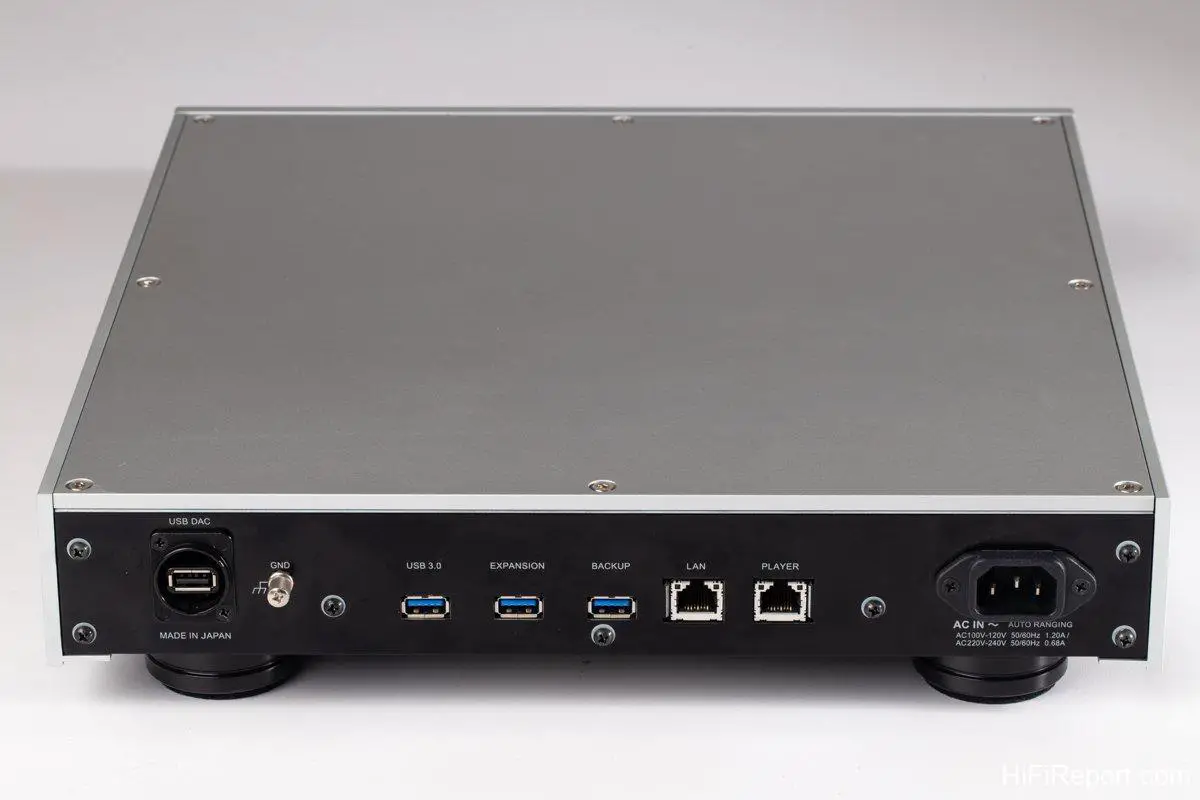
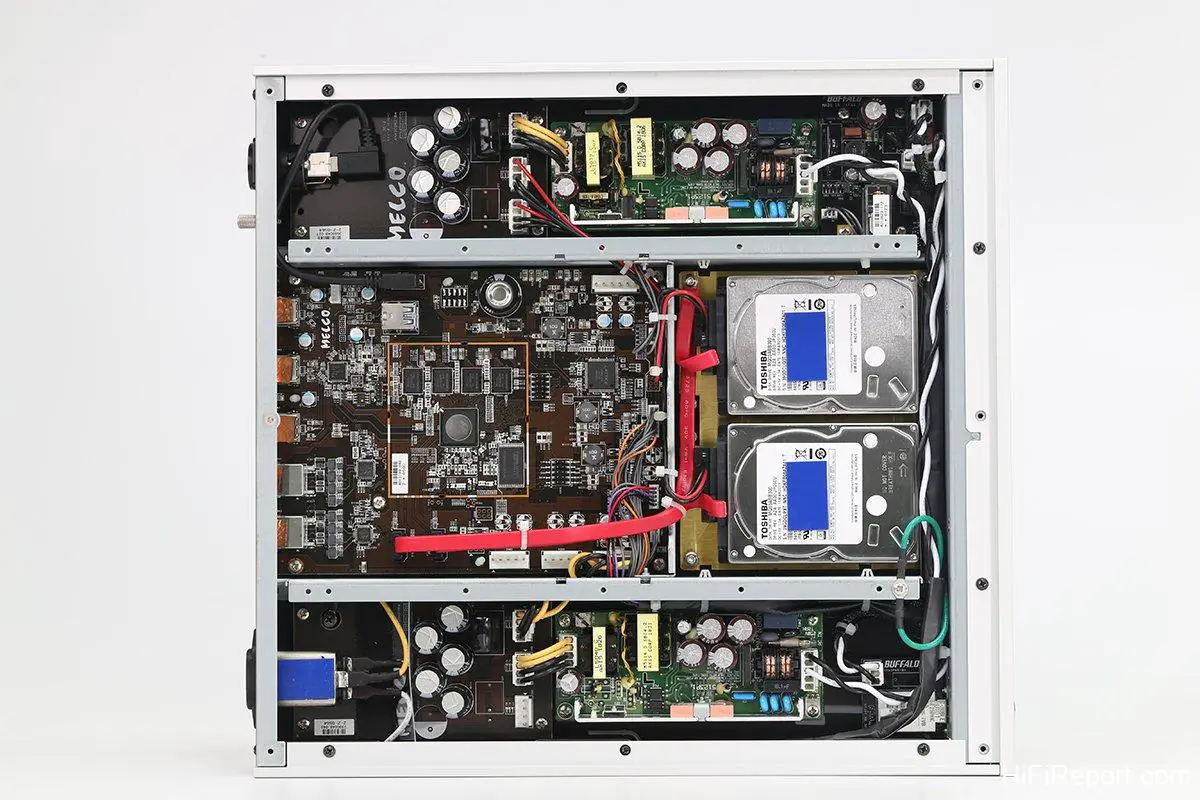
Melco has always prioritized power supply design. The N1Z/2EX-H60 features separate power supplies for the left and right channels, dedicated to the hard drives and server components respectively, laying a solid foundation for superior sound.
Support for SongKong and MinimServer
As mentioned, the new Melco EX platform brings enhanced sound quality, but that’s not the only advantage. The new EX series is not only sonically superior but also more user-friendly, thanks to the EX platform’s support for two key software applications: SongKong and MinimServer.
Let me first introduce SongKong and MinimServer, and then describe the sonic improvements of the N1Z/2EX-H60 through listening tests.
Let’s start with SongKong.
SongKong is a music file tagging software designed to help users manage their existing music files, ensuring metadata within the files is more accurate, correct, and systematic, leading to a more convenient and user-friendly experience.
What are tags and metadata? Metadata refers to the information describing the attributes of a music file, not the file itself. Information such as artist, conductor, orchestra, album title, track name, composer, genre, release year, and more, constitutes the metadata of a music file.
Is metadata important? Absolutely crucial. It’s like the cover art, liner notes, and track listings on a physical CD. Without them, your CD would be a blank disc, difficult to even identify.
When you remotely control music playback from your phone or tablet, the artist names, album titles, track names, and other information displayed on the screen are all metadata. If metadata is missing or incorrect, it will hinder searching and create usability issues. When the number of files grows, even finding the music you want to listen to becomes challenging.
During playback, the N1Z/2EX-H60’s front panel screen displays real-time information such as track name and artist, with excellent support for various languages, as shown here with a Japanese track title.
Playing Jolin Tsai’s “Madiri Wonderland” also displays correctly.
Where does metadata come from? If your music files are ripped from CDs, the ripping software connects to online music databases to retrieve the CD’s metadata and tag it into the music files during the ripping process.
If your music files are from paid downloads or “shared” by friends, they usually already contain metadata.
However, this metadata is often not detailed or complete enough, or inconsistently formatted, leading to a fragmented and difficult-to-search music library, causing usability headaches.
SongKong’s function is to scan your music files, compare them against its music database, and then help you reorganize or enrich metadata and album art. This process is called “re-tagging.” After tagging, your music files will have more complete information and become more organized, making them much easier to use.
SongKong was initially a standalone application for PC, Mac, or Linux servers. In recent years, SongKong has collaborated closely with Melco to develop a dedicated SongKong for Melco music servers. It can be installed via the front panel screen and buttons and works seamlessly with MinimServer 2 music server software to deliver an enhanced user experience.
Enhanced Features for Classical Music Lovers
Music server software is an essential application in a music server. Its function is to transmit music file metadata and album art to the control interface, such as a tablet for remote control, and to stream files to the playback device.
A well-designed music server software will feel responsive and smooth to use, and display high-resolution album art. MinimServer is one such example.
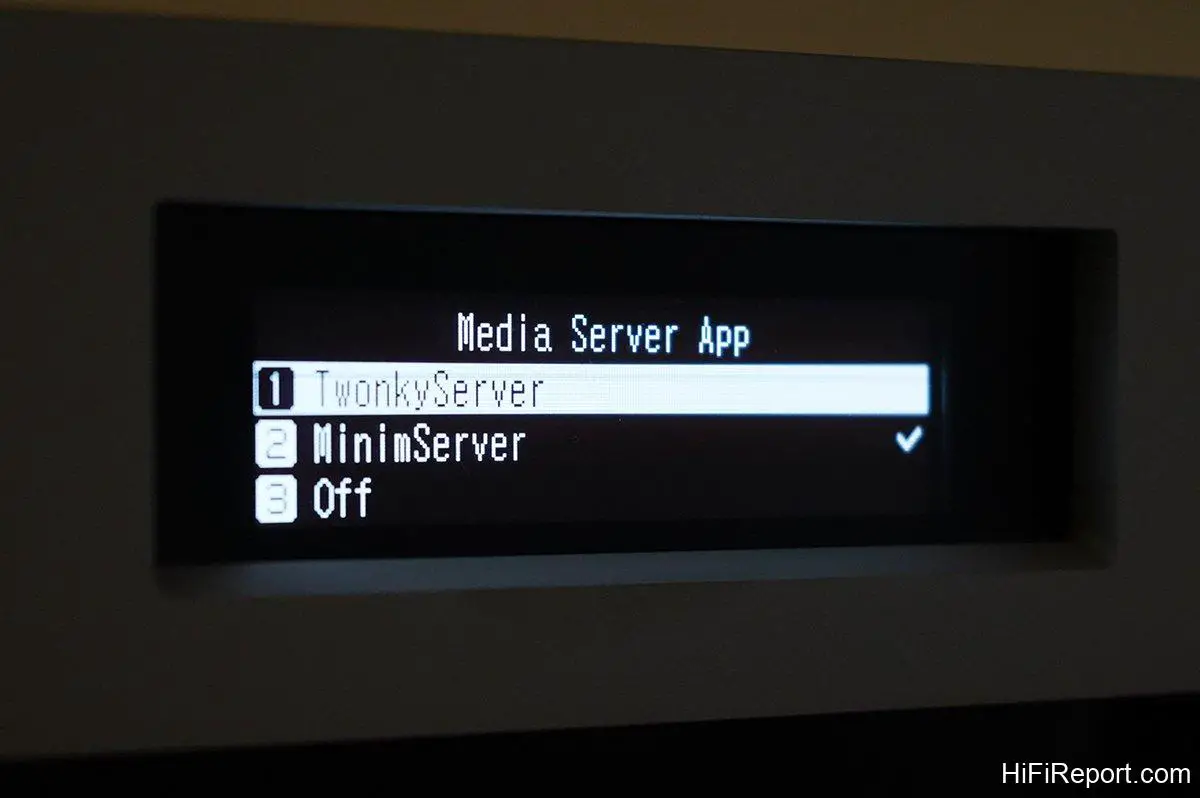
Previously, Melco devices used Twonky Server. The EX series adds MinimServer as an option.
Similarly, MinimServer installation commands are built into the EX series menu. Installation is as simple as pressing a few buttons.
TwonkyServer is pre-installed in the N1Z/2EX-H60. You can also choose to install MinimServer, with the installation option conveniently listed in the menu for one-click installation.
This screenshot shows the options to select the desired server software or to disable it.
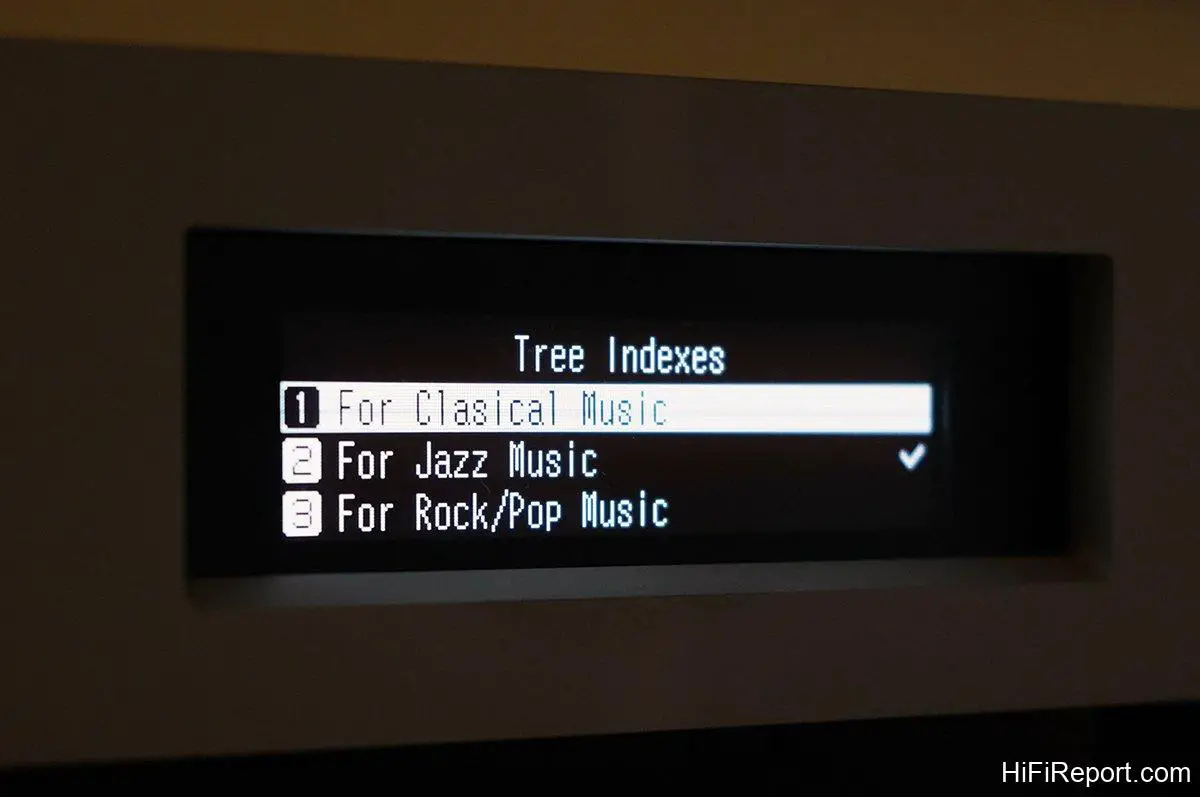
This is a special feature jointly provided by SongKong and MinimServer, allowing users to choose browsing or searching tree structures based on categories like “Classical,” “Rock/Pop,” or “Jazz.”
Notably, the EX series can also offer different search tags tailored to different music genres.
What does this mean? If you are a rock or jazz enthusiast, the browsing and search tags you need would typically include genre, album title, artist/band, performers, etc. However, if you are a classical music lover, in addition to the above, you might also need search tags like composer, conductor, orchestra, or even choir, for more convenient browsing.
The EX series allows switching between four different search tree structures via the front panel: “Default,” “Classical,” “Rock/Pop,” and “Jazz.”
Of course, this feature requires the combined support of powerful tagging software and a robust server software, roles perfectly filled by the dedicated SongKong and MinimServer.
The EX series also adds vTuner internet radio functionality, extending your musical horizons without limits.
However, this feature requires the N1Z/2EX-H60 to be directly connected to a USB DAC and controlled via Melco’s proprietary Melco Music HD remote app, operated on an iPad.
Furthermore, the Melco Music HD app supports streaming services like Tidal and Qobuz, and can also play music from cloud storage spaces like Dropbox, OneDrive, and iCloud Drive, offering comprehensive functionality.
Using the Melco Music HD app to control the N1Z/2EX-H60 enables access to streaming services like Tidal and Qobuz, and playback from cloud storage like Dropbox, OneDrive, and iCloud Drive, enhancing its versatility.
The user experience of the Melco Music HD app is excellent, responsive and smooth. Melco’s adoption of MinimServer is indeed a smart move.
The right column shows my selection of “Album Title” to enter the database, which then lists all albums alphabetically.
The album art displayed on the iPad is of excellent quality, high resolution, and clear. I believe this is thanks to MinimServer, which can quickly transmit full-resolution images to the display device, providing users with a great user experience.
I must commend the Melco Music HD app. It’s incredibly simple and intuitive to use. Its left column prominently displays the currently playing album art, visually appealing, while the right column shows the selected album’s tracks. You can directly play tracks without adding them to a playlist, which is very straightforward.
Since there’s no need to add to a playlist, there’s also no need to delete playlists – isn’t that convenient? Regarding hardware design, the N1Z/2EX-H60 largely carries over the design of the previous N1 MK2, with minimal changes. Interested readers can refer to my previous reviews of the N1ZH/2 and N1ZS/2A, which provide detailed introductions. I won’t elaborate further here.
Superior Sound via Direct DAC Connection
Having discussed the new features of the EX series, let’s delve into its sound performance.
According to Sound Art, the importer, the most significant sound improvement in the EX series models is achieved through a direct USB connection to a DAC. This means using the N1Z/2EX-H60 as a server-equipped streamer. Therefore, I connected my Audiobyte Black Dragon DAC to the N1Z/2EX-H60 via USB and used the Melco Music HD app for remote control.
The listening setup also included the EC 4.8 preamp, NuPrime Evolution One power amp, and Aurum Cantus Grand Harmony speakers. For comparison, I used a Windows computer playback system and a QNAP NAS serving as a Roon Server as reference sources.
From this angle, you can clearly see the thickness of the N1Z/2EX-H60’s top panel. It’s essentially a solid aluminum plate, effectively suppressing unwanted resonance.
My first impression of the N1Z/2EX-H60’s sound was similar to my experience with the N1ZS/2A – natural, smooth, and musical. It immediately conveys the feeling of a high-quality source. However, the N1Z/2EX-H60 adds an extra dimension: a touch of refined elegance in its sonic texture.
This elegance stems from the N1Z/2EX-H60’s pristine and clean sonic background, pure and uncolored tonal quality, and sharply defined image outlines. In comparison, my computer source sounded somewhat hazy, and the musical picture and images were not as sharply focused.
Don’t mistake this “refined elegance” for a sound that is light, delicate, and lacking in weight and power. Not at all.
Fundamentally, the N1Z/2EX-H60’s balance across high, mid, and low frequencies is perfectly judged, like a physically fit yet gracefully elegant woman, pleasing to the eye and approachable.
The N1Z/2EX-H60’s detail retrieval is ample and complete, and its extension at both ends of the frequency spectrum is effortless and unrestricted. Thus, when playing music, where thickness is needed, it’s robust and full-bodied; where delicacy is required, it’s refined and proportionate; where strength is called for, it’s direct and unreserved; where subtlety is present, it remains clearly audible. It’s true to the recording, never “off.”
Essential Qualities of an Excellent Source
Another sonic advantage of the N1Z/2EX-H60 is its precision, a prerequisite for any outstanding source component.
How do you discern precision? By listening to image outlines, localization, and the 3D sense of the soundstage.
The N1Z/2EX-H60 excels in these aspects. For example, track 6, “Rosetta,” from the “Supreme Sessions 2” test disc, a performance by TubaSextetten, features instruments including trumpet, tenor saxophone, trombone, banjo, tuba, and drums. Through the N1Z/2EX-H60, not only can you easily distinguish the timbres of different instruments, but you can also sense the instruments as distinct entities presented before you. Their positions, sizes, and relationships are clearly discernible, allowing me to almost pinpoint the exact placement of these six instruments.
Another example is “Take Five” from the classic jazz album “Time Out.” The opening kick drum is distant, subtle, deep, with a clear outline and precise location, not boomy and diffused. This demonstrates that the N1Z/2EX-H60 reproduces sound accurately and precisely, leaving no room for ambiguity.
The N1Z/2EX-H60 also faithfully conveys the atmosphere present in recordings, another essential attribute of a high-end source.
The “atmosphere” refers to the sense of airiness, reverberation, decay, subtle dynamic variations, and spatial characteristics – aspects closely related to whether the sound is natural, lively, and musical. Essentially, it’s about the presentation of recording details and information. The N1Z/2EX-H60 was already proficient in this area, and with the firmware upgrade, the atmosphere is even richer and more vibrant, making listening a constant delight.
However, Melco’s official website doesn’t specify the exact improvements or optimizations in the V4.0 firmware. But it’s evident that the EX platform indeed brings sonic advancements.
I also observed that the N1Z/2EX-H60 has excellent USB compatibility with the Black Dragon DAC, smoothly playing high-resolution music files like DSD128. I believe it will have good compatibility with other DACs as well.
A No-Brainer Upgrade
If you are an N1 user from the MK1 or MK2 generation, you’re likely concerned about upgrading to the EX platform. Because MK1 and MK2 internal drives need to be rebuilt to install the new firmware, a self-upgrade via the built-in update function is not possible. The unit needs to be returned for processing by specialized technicians, at a cost of approximately $310 USD (NTD 10,000). Interested existing users can inquire with their original dealers.
What if you don’t upgrade the firmware to the V4.0 EX platform? Can MK1 or MK2 still use MinimServer and SongKong? The answer is yes.
Even without upgrading to V4.0 firmware, older models can still enjoy the upgrade support of V3.0 firmware. For example, the current V3.92 firmware includes installation paths for “MinimServer2 Lite” and “SongKong Lite.” Installation is easily done through the front panel operation.
Of course, without upgrading the firmware, you won’t experience the sonic improvements brought by the EX platform. Considering that spending a little money can significantly enhance your music enjoyment, it’s a no-brainer, isn’t it?
“`