
NAD M10 Streaming Amplifier Review
The primary consumer demographic for high-end audio is likely the baby boomer generation. Younger generations are almost exclusively online. How can we attract them to the world of Hi-Fi? NAD, a British company, has launched the M10, aiming squarely at the digital music generation. It utilizes a high-performance Hypex NCore amplifier, incorporates BluOS, and integrates Siri and Alexa voice assistants, along with cloud music services. This approach directly addresses the music listening habits of younger generations by combining smart network applications with an integrated amplifier.
Smart Network Integration
NAD, founded in 1978, emerged during the era of Hi-End audio’s initial growth. However, NAD did not pursue the high-priced Hi-End market. Instead, it championed “New Audio Dimension,” aiming to cultivate the mass audio market with solid technology and practical pricing. The NAD 3020 integrated amplifier was a groundbreaking affordable classic. Even I owned one. However, young people today would likely find it uninteresting. Yet, seasoned audiophiles will undoubtedly feel a strong sense of nostalgia for the 3020.
Today, the newly launched M10 integrated amplifier is priced higher than the 3020. However, after experiencing the M10 firsthand, its rich internal hardware architecture and powerful software features position it as a new generation benchmark in the realm of full-featured digital music streaming integrated amplifiers.
One could say that the 3020 from the 1980s established NAD’s classic status in audio history. The M10, launched in 2019, aims to open a new chapter for NAD in audio history by combining the most powerful smart network application operating system with a traditional amplifier.
Digital Native Design
To be called a “smart network application” digital streaming integrated amplifier, all functionalities must be integrated.
An integrated amplifier needs sufficient power. The M10 uses a Hypex NCore amplifier module, providing 100 watts of continuous output power and a maximum output power of 300 watts into 4 ohms. For digital streaming, a DAC is essential. The M10 employs an ES9028 PRO DAC chip, supporting digital decoding up to 32bit/192kHz. It also offers diverse digital inputs, including coaxial and optical, as well as HDMI with ARC functionality for easier integration with multi-channel systems.
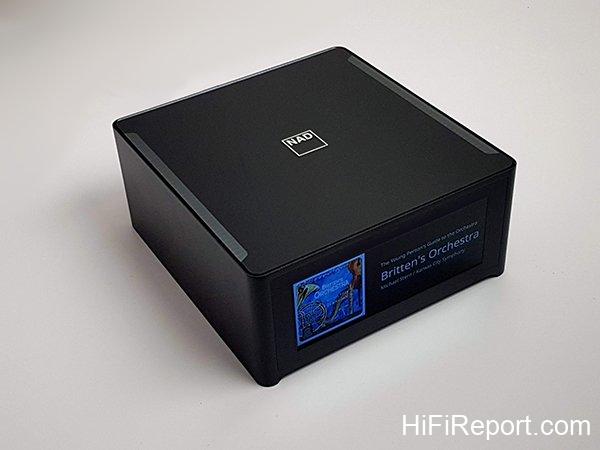
These are all traditional amplifier and DAC functions. Next, let’s discuss the M10’s smart network applications. The M10 uses a dual-core 1 GHz ARM Cortex A9 dual-clock processor, built on a Linux foundation. It integrates various network music services using BluOS from Bluesound, manages NAS music libraries, and supports various home automation control systems. It also connects with voice assistants Siri and Alexa.
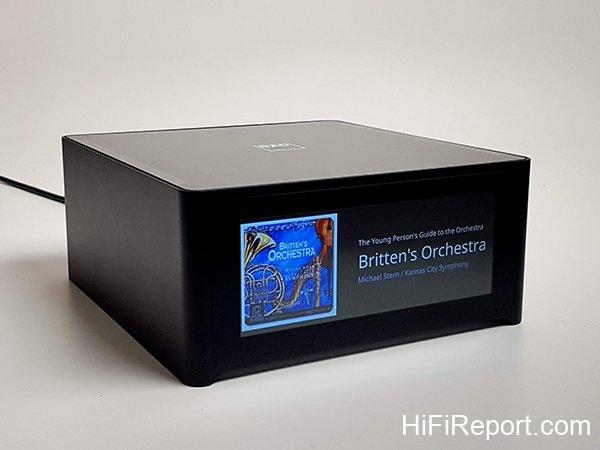
We can think of the M10 as a combination of an integrated amplifier and a single-chip touch tablet. The amplifier drives the speakers, while all network-related music services are handled by the single-chip touch tablet.
The architecture is clear. The M10’s innovation lies in combining an ARM single-chip processor, which can be upgraded via software and firmware, with traditional audio-specific amplifier and DAC components. This design caters to the network application logic of the “digital native” generation.
Hypex NCore Amplifier Module
In the traditional amplifier section of the M10, NAD has ensured ample power.
The factory specifications indicate 100 watts of output power per channel, which is the average output power at 8 ohms. Its maximum output power is 160 watts, and for 4-ohm speakers, the maximum output power reaches a staggering 300 watts. Considering the M10’s size, this is an impressive output power. The secret lies in the Hypex NCore amplifier module. You might have guessed it – it’s a Class D amplifier. Some audiophiles might frown upon Class D, deeming it inferior. However, Class D technology has evolved significantly over the years, especially the Hypex NCore module, which has garnered considerable attention.

Why is the inclusion of the Hypex NCore module in the M10 so noteworthy? Many renowned amplifier brands have unanimously chosen Hypex NCore modules, indicating a shared appreciation for its quality. However, amplifiers from other brands using this Class D module typically retail for over $6250 USD (200,000 NTD) and even exceed $9375 USD (300,000 NTD). NAD, however, has kept the M10’s price under $3125 USD (100,000 NTD) (official reference price of $3094 USD / 99,000 NTD). This reasonable price point alone deserves respect for NAD.
BluOS Ecosystem
The 5 kg M10 achieves a maximum output power of 300 watts thanks to the latest Hypex NCore module. Its powerful network music streaming capabilities and versatile applications are powered by BluOS. BluOS is feature-rich, and I won’t delve into operational details. You can visit the local distributor’s website, which provides detailed setup and operational instructions in Chinese, complete with illustrations. They have meticulously prepared guides covering M10 file sharing, M10 wireless network setup, and M10 Dirac Live space correction.
For detailed instructions, please refer to those documents on the distributor’s website. I will outline the setup sequence: start with wireless network configuration to connect the M10 to the internet, then set up music sharing folders to allow the M10 to integrate your NAS music library, and finally configure Dirac Live room correction.
Additionally, you’ll need to download two apps: BluOS Controller to remotely control and configure BluOS functions within the M10, and Dirac Live room correction software. Both Android and iOS versions are available for smartphones or tablets. Using a tablet is recommended due to the larger screen size, which makes operation easier. (Perhaps this is just my presbyopia speaking?)
BluOS is the operating platform for the M10. With it, the M10 can integrate your music library from authorized NAS devices and directly access various network music streaming services such as Spotify, KKbox, Tidal, and internet radio stations like TuneIn, Calm Radio, and Radio Paradise. Others like Amazon Music, Deezer, Napster, QoBuz, and many more can be configured and connected through BluOS.
For home automation control systems, BluOS supports major brands like Control 4, Crestron, and RTI.
Roon, the popular smart music library management system, is also supported by BluOS. Apple Airplay 2 support is expected after a firmware update (anticipated in the fourth quarter of 2019). Isn’t BluOS incredibly powerful?
iPhone-like User Interface
In terms of user interface, the M10 definitely meets the needs of the digital native generation. It’s like a smart tablet embedded in the M10, featuring a 7-inch TFT touch screen with touch sensitivity comparable to an iPhone, using the same Corning Gorilla Glass for enhanced durability.
If you get an M10, simply operate it like a smart tablet or phone. It’s entirely intuitive and straightforward.
Once the M10 is connected to the network and controlled via the BluOS app, virtually all of its functions are accessible within the app. However, another crucial setting related to sound is Dirac Live.

Dirac Live Room Correction
Dirac Audio is a company specializing in developing room acoustics correction software. The name Dirac is derived from Paul Dirac, a British theoretical physicist and one of the founders of quantum mechanics, who jointly won the Nobel Prize in Physics with Erwin Schrödinger in 1933. Perhaps the company aspires to win a Nobel Prize in the field of room acoustics, hence the name Dirac.
Room acoustics correction has broad applications. Dirac Audio collaborates with prestigious partners in various fields, including Bentley, Rolls-Royce, Volvo, and BMW in the automotive industry; Harman and NAD in audio; and Xiaomi and OPPO in mobile devices.
The M10 comes pre-installed with the latest Dirac Live. Related applications can be downloaded from the official website (https://live.dirac.com/), but software alone is insufficient without hardware processing capabilities.
Besides the M10, other NAD devices such as M17, T758v3, T777v3, and C658 also support Dirac Live.
Speakers operating in any room are inevitably affected by the room’s acoustics. Listeners hear a combination of direct sound from the speakers and reflected sound. These combined sounds constitute the room’s acoustic characteristics in both the amplitude domain (loudness related to frequency) and the time domain (timing related to phase). Room reflections can distort frequency response and time phase. These are well-known issues among audiophiles, but they are challenging to solve. The simplest approach is to adjust speaker placement, increasing direct sound and reducing disruptive indirect reflections. However, the optimal speaker placement might interfere with daily living. These room-induced frequency response irregularities and time phase errors are pain points for many audiophiles.

Multi-Point Measurement
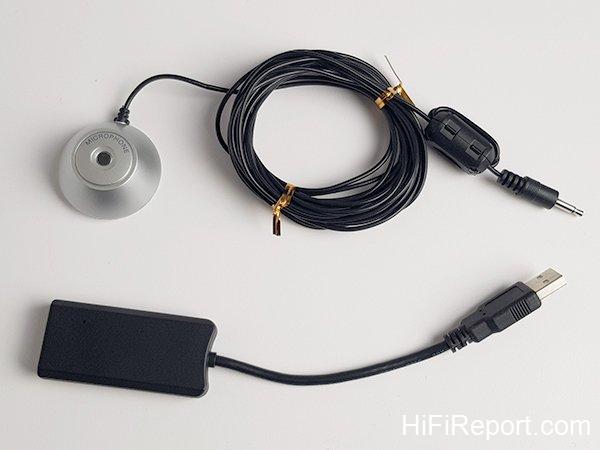
How does Dirac Live solve these problems? Through software and high-speed processing, it applies “real-time” compensation for distortions caused by room acoustics. But how does Dirac Live know what acoustic problems exist in the room? You need to use the Dirac Live App, connect to the M10, and use the included NAD circular microphone for measurements. The app guides you step-by-step to place the microphone at corresponding measurement points. Starting from the center of the “sweet spot,” you then measure around the listening position, vertically, horizontally, and front-to-back, for a total of 8 points. Additionally, measurements are taken horizontally outwards at listening height. At each point, the M10 plays three test tones. The Dirac Live system determines the required number of measurement points based on the collected acoustic information. Patience is needed to wait for each point to be measured completely before Dirac Live starts calculations.
In my measurements, a total of 15 points were measured before Dirac Live began calculation. The processing speed is fast, and test graphs appeared shortly. You can directly use the results calculated by Dirac Live and upload them to the M10. You can also manually adjust the frequency response and filter corrections to tailor the sound to your preference and save new files after recalculation.
Dirac Live Value
Dirac Live is a significant value proposition of the M10. If you were to purchase Dirac Live separately, the version built into the M10, which handles frequency response and time phase adjustments below 500Hz, costs $349 USD for a single-device license. Upgrading to the full-frequency range (20Hz~20kHz) room correction version costs an additional $90 USD. By purchasing the M10, you essentially receive the standard version worth $349 USD, and you have the option to upgrade to the full-frequency version for an extra $90 USD. Isn’t this a generous gift from NAD? Combined with BluOS for integrating local network music libraries, support for home automation control, multi-room setup capability, compatibility with numerous network music streaming services, and a practical 100 watts of power, the M10 is remarkably comprehensive. Despite its compact size, its functionality is exceptionally powerful.
However, examining the Corning Gorilla Glass-clad chassis of the M10, there’s no headphone jack. But the M10 includes Bluetooth, and BluOS can be configured for Bluetooth wireless headphones. NAD’s design philosophy truly follows the latest smartphone trends, even omitting the headphone jack and directly encouraging the use of Bluetooth wireless headphones.
Dirac Live Performance
Time to assess the M10’s sound performance! Before formal listening tests, I set up Dirac Live. The app provides reference points for measurement. I mounted the microphone on a camera tripod and adjusted it to different heights. The measurement process took about twenty minutes, paired with Dynaudio Contour 60 speakers.

Since BluOS and Dirac Live are separate apps, switching between them sometimes causes Dirac Live to automatically lower the M10’s volume. If you want to compare the difference with and without Dirac Live, it’s best to switch within the BluOS settings to avoid sudden volume changes.
With Dirac Live configured, I listened to Queen’s classic “Bohemian Rhapsody.” The opening a cappella section of the rhapsody has a sudden left-right channel shift. This is a deliberate effect in the recording, a dramatic panning from left to right. When I enabled Dirac Live on the M10, the left-right channel shifting effect was most pronounced. However, when Dirac Live was turned off, the separation and panning effect were less distinct. This indicates that Dirac Live, through frequency dip compensation, peak attenuation, and phase correction below 500Hz, further enhances the separation of the left and right channels, making the recording’s panning effect more noticeable.
However, the HiFiReport listening room is large, allowing me to position the Contour 60 speakers far from the back and side walls, and freely adjust the listening distance. With Dirac Live enabled, the sound becomes more focused, and the imaging is more precise. But the “sweet spot” becomes more concentrated. When I walked around other areas of the listening room, the sound felt somewhat unnatural and flatter. This might be because I specified “focused sweet spot” during Dirac Live App setup. Consequently, the sound is significantly better when sitting in the sweet spot, but less so in other positions.
The effect of Dirac Live adjustment is indeed quite noticeable and without apparent side effects, at least none that I could detect. Through repeated comparisons, I concluded that Dirac Live did not alter the Contour 60’s inherent timbre. The primary change is in spatial imaging. Our listening room, being large with a stairwell to dissipate excess low-frequency standing waves, mainly benefits from Dirac Live in terms of bass focus and definition. Bass density is slightly improved with Dirac Live.
If you must place speakers close to walls and suffer from low-frequency standing waves, Dirac Live is definitely a godsend. Get the M10 and save $349 USD on software costs while also enjoying a 100-watt BluOS integrated amplifier.
Powerful Drive
After comparing the differences with and without Dirac Live, it’s time to properly evaluate the M10. For objectivity, I turned off Dirac Live and the built-in digital EQ. I also disabled the subwoofer and low-frequency management (another highlight of the M10 – built-in digital bass management, fully digital). I paired it with three pairs of speakers: Dynaudio Contour 60, Chario Aviator Cielo, and C. C. Admonitor Silver Preference. The first two are floor-standing speakers, while for the Admonitor, I only used the bookshelf top section without the bass column, testing the M10’s driving power with lower-efficiency bookshelf speakers.
What were the differences when driving these three pairs of speakers with the M10? I must say, the 100-watt output power is more robust than I anticipated, with excellent control and a non-harsh, soft, and elastic sonic character. It possesses a pleasingly sweet timbre. However, the sound signature varies with different speaker pairings. Contour 60 has the widest bandwidth and a neutral sound. Admonitor Silver Preference is bright and lively while maintaining adequate sonic body. The Aviator Cielo excels in the midrange, delivering the most beautiful piano key strikes with rich and sweet timbre.
Ultimately, I chose to pair the Contour 60 with the M10.
High Volume Performance
Enjoying Queen, I continued with classic rock, selecting the pub anthem, Eagles’ “Hotel California,” the original old version. The M10 exuded a rich analog flavor. Crisp electric guitar arpeggios and chords were supported by slightly rough-edged rhythm guitar strumming. Don Henley’s energetic vocals and the old-school rock-flavored drums sounded solid and powerful.
The M10’s maximum volume is 0dB, with all settings in negative values. However, when listening to the M10, I often had to set the volume close to 0dB. In fact, I mostly listened at around -10dB, equivalent to about 90% of the output. Sometimes even higher. But don’t worry, this is normal. -50dB is definitely background music volume, -20dB is casual listening, and -10dB or higher is needed to really get the M10 singing. However, above -5dB, be cautious of exceeding the M10’s limits, as the sound starts to become slightly strained, indicating it’s approaching its maximum output capacity.
Piano Detail
Despite being a Class D amplifier, as mentioned earlier, Class D technology has advanced significantly over the years. Distortion has been greatly reduced, and sonic refinement has improved dramatically, leading more and more brands to embrace this path.
I listened to Glenn Gould’s “Bach Goldberg Variations,” specifically the later, slower version. From the Aria to Variation 2, Gould’s signature humming was clearly captured by the M10. The slow piano theme, interspersed with Gould’s humming, featured the piano as the protagonist, with large, clear note articulation. The humming was the supporting character, subtly placed behind the piano. Moving into Variation 2, the weight of the notes intensified. The M10 rendered full-bodied piano notes with a round and beautiful timbre. The subtle details of finger articulation, conveying controlled but varied tempo, and the nuanced changes in finger pressure were all subtly revealed, showcasing ample detail.
Dynamic Performance
Having assessed the finesse, it was time for some dynamic music! I chose the Reference Recordings (RR) release of Eiji Oue conducting the Minnesota Orchestra in Copland’s “Fanfare for the Common Man.” Even without owning the CD, I must have heard it countless times at audio shows. From the very beginning of the movement, the majestic timpani and cymbal crashes, and the bright, resonant brass theme were powerfully reproduced. The M10 delivered not only solid and firm bass but also rich and brilliant brass. I deliberately increased the volume, pushing it to -6dB, nearly 94% of the amplifier’s output, yet it remained composed. The timpani strikes were weighty, contrasting with the brilliance of the brass section, and the soundstage remained wide and expansive.
I listened quietly to this epic three-and-a-half-minute movement of Copland. NAD, even at near full power output, maintained its composure, solidly grounded, delivering the bass weight and highlighting the brass brilliance. I would say the M10’s sonic performance can definitely punch above its weight, just like the 3020 of yesteryear – affordable yet with extraordinary audio performance.
New Integrated Amplifier Trend
Having experienced the M10, I believe NAD has outlined the design trend for integrated amplifiers: integrating new computing platforms to accommodate diverse digital music applications and providing future upgradeability.
The M10 incorporates a high-speed ARM single-chip processor and utilizes BluOS as its “brain,” integrating all network music streaming services. It features a user interface tailored for the digital generation, a disruptive pricing strategy, and includes Dirac Live and digital bass management, all while maintaining a price point under $3125 USD (100,000 NTD). Whether the M10 becomes the new darling of digital natives, combining smart network music applications to recreate the NAD legend, remains to be seen!
Specifications
* Type: Digital Streaming Amplifier
* Continuous Power Output: >100W
* THD: <0.03% * Signal-to-Noise Ratio: >85 dB
* Peak Clipping Power: >130 W (at 1 kHz 8 ohms 0.1 % THD), >230 W (at 1 kHz 4 ohms 0.1 % THD)
* IHF Dynamic Power: 8 Ohms: 160 W, 4 Ohms: 300 W
* Damping Factor: >190 (ref. 8 ohms, 20Hz to 6.5kHz)
* Frequency Response: ±0.6 dB (20 Hz – 20 kHz)
* Tone Controls: Treble: ±6.0 dB at 20 kHz, Bass: ±6.0dB at 60 Hz
* Channel Separation: >75 dB (1 kHz), >70 dB (10 kHz)
* Input Sensitivity: Line In: 1.0 V, Digital In: -6.2 %FS
* Standby Power Consumption: 0.5W
* Supported File Formats: MP3, AAC, WMA, OGG, WMA-L, ALAC, OPUS, MQA, FLAC, WAV, AIFF, Supports converted DSD playback via the BluOS desktop app (only)
* Supported Sampling Rates: up to 32 bit/192 kHz PCM
* Bit Depths: 16 – 24
* BluOS Supported Operating Systems: Microsoft Windows XP, 2000, Vista, 7, 8 to current Windows Operating Systems and Mac OS X versions
* Mobile Device User Interface: BluOS – Free download from Google Play or Apple Store
* Supported Streaming Services: Amazon Alexa, Amazon Music, Spotify, TIDAL, Deezer, Qobuz, HDTracks, HighResAudio, Murfie, JUKE, Napster, Slacker Radio, KKBox, Bugs
* Free Internet Radio: TuneIn Radio, iHeartRadio, Calm Radio, Radio Paradise
* Bluetooth Quality: Bluetooth aptX HD built-in
* Bluetooth Connectivity Direction: Two-way (can connect directly to Bluetooth headphones)
* Network Connectivity: Gigabit Ethernet RJ45, Wi-Fi 5
* Price: $3500 USD (112,000 NTD)
* Importer: [Local Distributor Name]
* Phone: (02)2299-2777
* Website: www.audio-supply.com