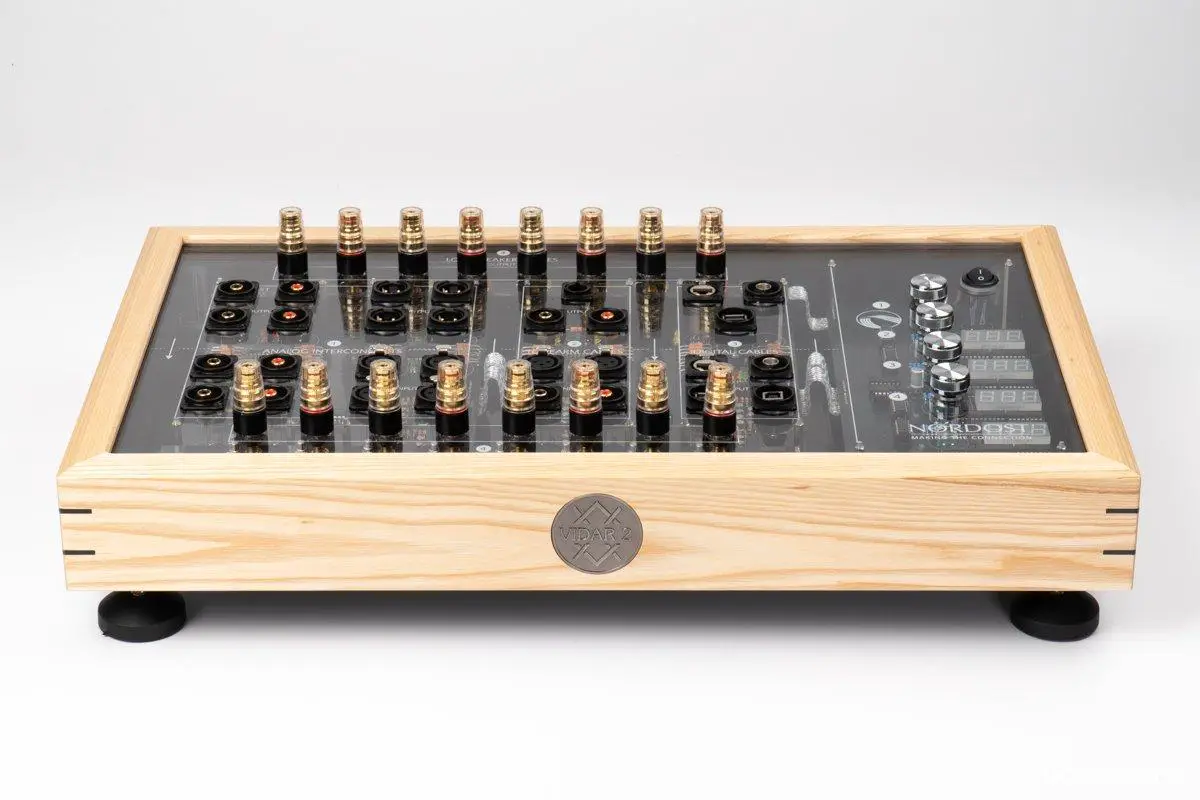
Nordost Vidar 2 Cable Burn-in Machine Review
Does cable run-in, or “burn-in,” actually improve sound quality? The answer is a definite yes. After a certain period of run-in, cables sound more open, lively, and smooth, ultimately leading to a better listening experience.
In fact, not only cables but also powered equipment and speakers, especially when new, benefit from run-in to reach their full potential.
However, the run-in process can be tedious. Are we really supposed to just leave our systems playing music day and night? Fortunately, there’s a more convenient solution: the Nordost Vidar 2. This machine utilizes a full-frequency signal for run-in, making the process faster, more effective, and hassle-free. Why not take advantage of that?
Broadband Frequency Cable Run-in
Vidar 2 is a dedicated device developed by the renowned cable manufacturer Nordost specifically for cable burn-in. Many Hi-Fi shops now offer cable run-in services using Vidar 2. For a small fee, you can have your new cables thoroughly run-in, enjoying the significant benefits of a dedicated run-in machine without actually purchasing one yourself.
The “content” of the run-in process with Vidar 2 differs from simply playing music through your audio system at home.
When you run-in cables with your own system, you’re using regular music signals as input current. Vidar 2, on the other hand, employs a combination of different frequencies and broadband complex signals. These specialized signals continuously flow through the cable, “bathing” the conductors, insulation, and shielding layers, achieving rapid burn-in.
What types of cables can Vidar 2 run-in? Quite a variety, including RCA interconnects, XLR balanced cables, phono cables, network cables, USB cables, BNC digital cables, and speaker cables – basically, any signal-carrying cable. The only exception is power cables. I suspect this is because running in power cables effectively requires high power and high current sustained over long periods. This would necessitate the machine operating under high load for extended durations, raising potential safety concerns. Therefore, power cable run-in is not included.
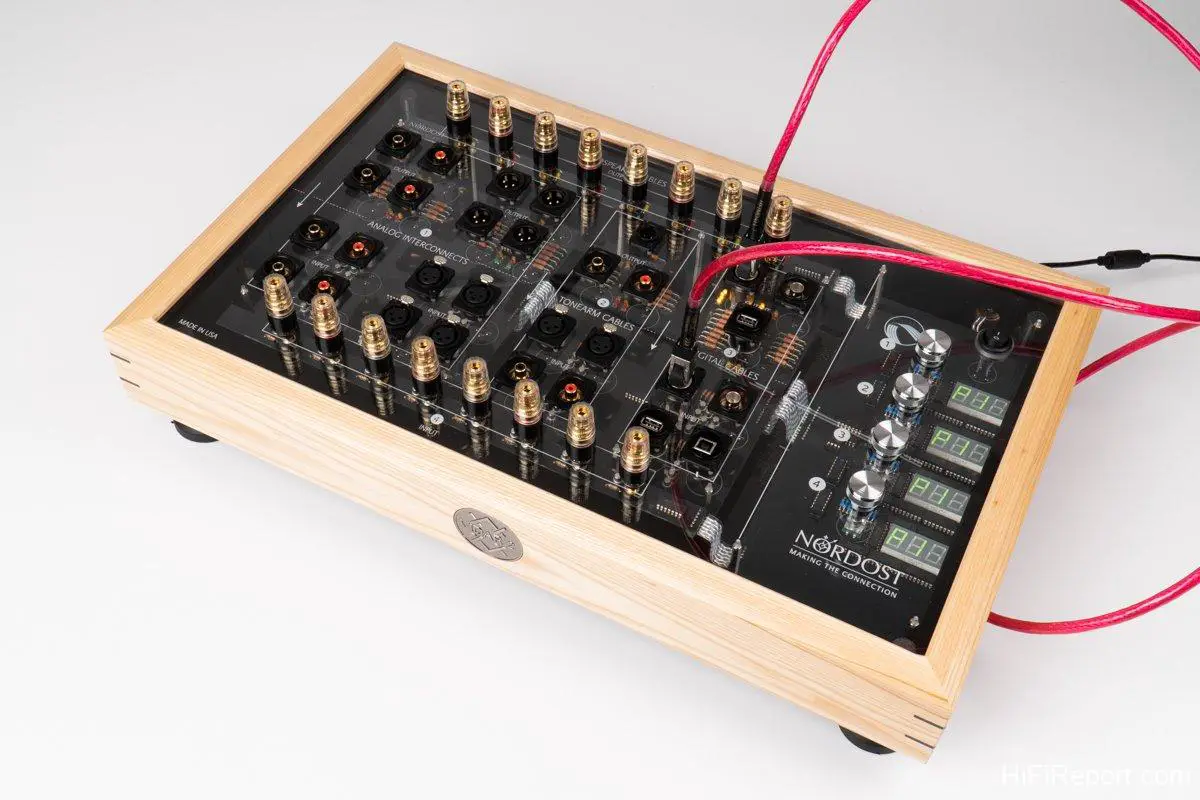
Let’s now take a closer look at how Vidar 2 performs cable run-in.
Even Phono Arm Internal Wiring Supported
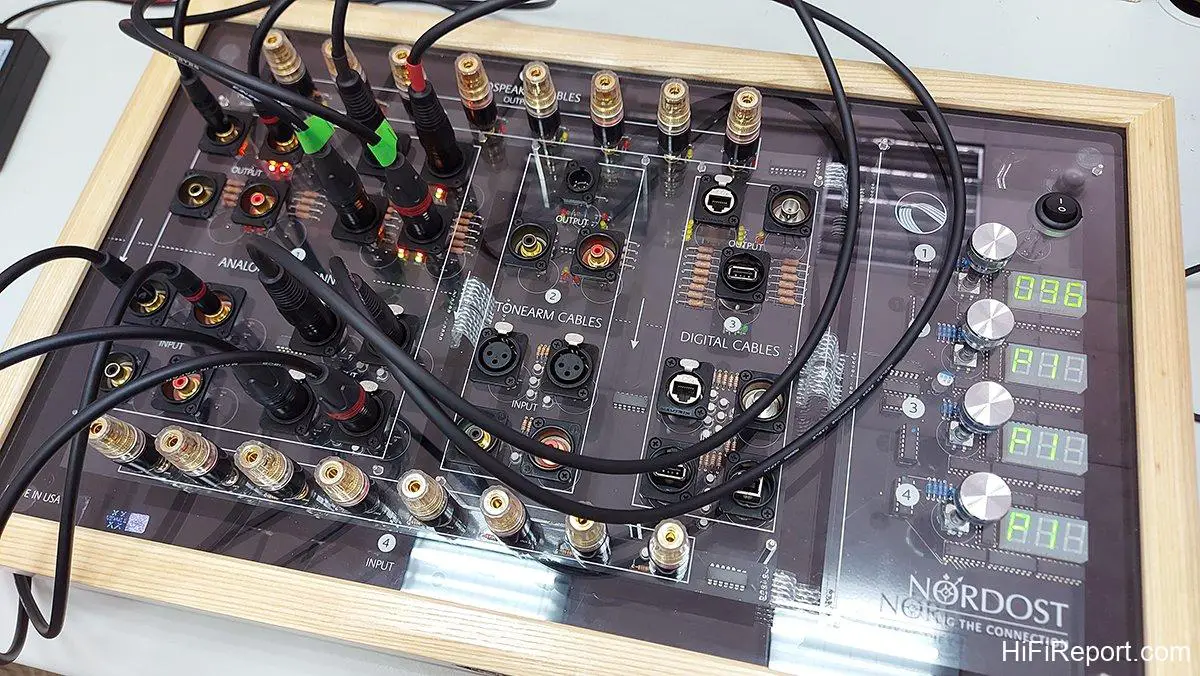
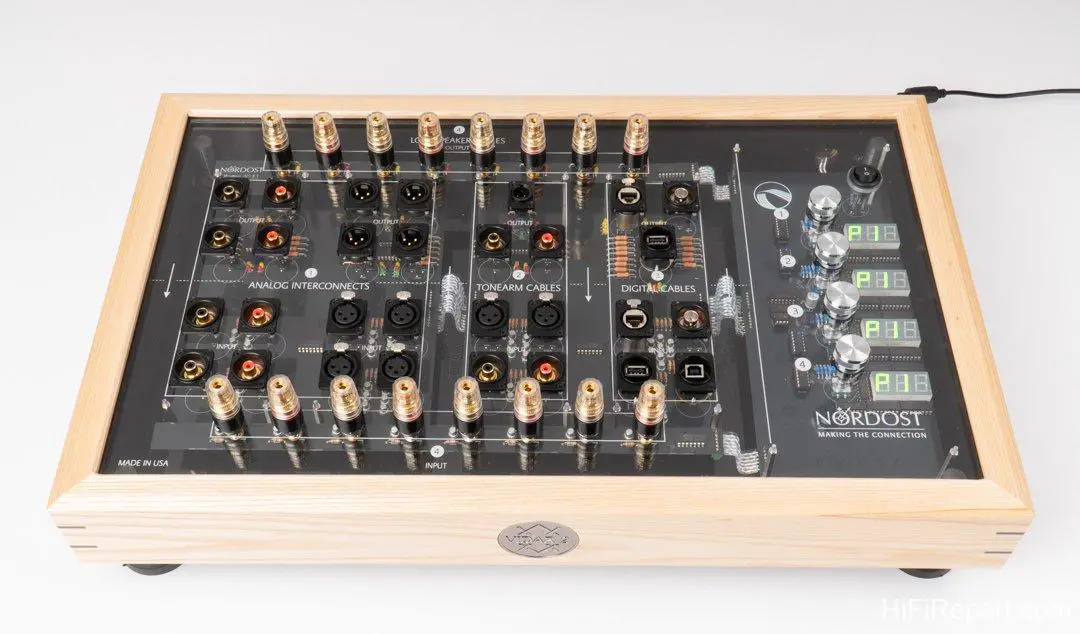
The Vidar 2’s appearance resembles a mini audio mixing console. All input/output jacks and control knobs are located on the top panel, divided into left and right sections. The left side houses all the jacks, while the right side contains knobs that also function as buttons, along with indicator lights.
The jack area of Vidar 2 is further subdivided into Zone 1, Zone 2, Zone 3, and Zone 4. Each Zone is divided into upper and lower halves. The upper half is the signal output, and the lower half is the signal input. This means the input end of the cable should be connected to the upper section and the output end to the lower section. Since cables are directional, it’s important to connect them correctly.
The jacks in each of the four Zones are different, each designed for specific types of cables.
Zone 1 is for analog signal cables. It can simultaneously run-in two pairs of RCA interconnects and two pairs of XLR balanced cables. Balanced cables are directionally foolproof due to different connector types at each end. However, RCA cables have identical connectors at both ends, so directionality must be carefully observed during connection.
Zone 2 is dedicated to phono cables. A key feature is that Vidar 2 can even run-in internal tonearm wiring. And it’s not necessary to disassemble the internal wiring; run-in can be achieved using the included 4-pin to DIN adapter cable.
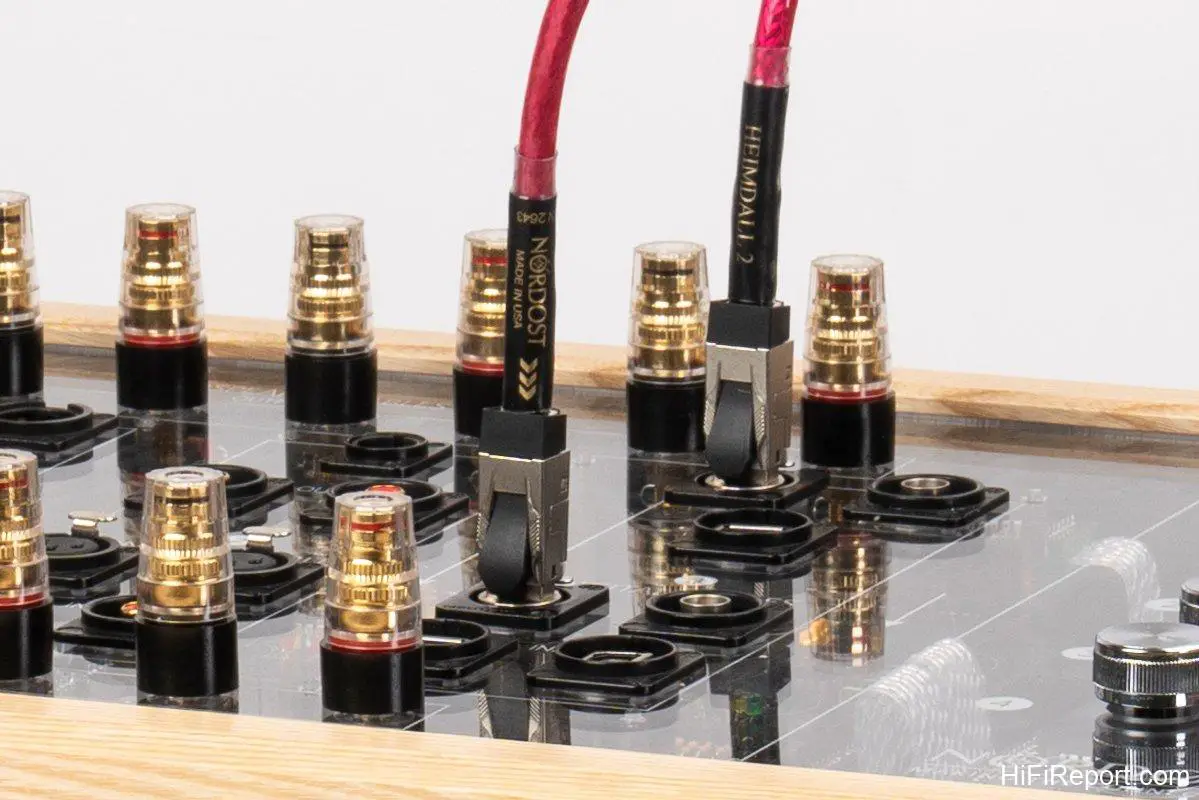
Zone 3 is for digital cables. It can run-in network cables, USB cables (both type A-A and type A-B), and BNC coaxial cables.
Zone 4 is for speaker cables, capable of running in two pairs of speaker cables simultaneously.
Once the cables are connected and the power is turned on, indicator lights next to the output jacks of the connected Zone will illuminate, indicating proper cable continuity. A red light indicates positive conductor continuity, a yellow light indicates negative conductor continuity, and a green light indicates ground conductor continuity. If a light that should be on is not illuminated, it indicates a problem with a connection point or conductor in that cable.
Automated Run-in Process
After connecting the cables and confirming continuity at each point, you can select a program and start the run-in process.
Vidar 2 provides four preset programs – P1, P2, P3, and P4 – for each Zone. The difference lies in the duration, with P1 being the longest and most thorough run-in, and P4 being the shortest for situations with limited time.
Although each Zone has four preset programs, the durations are not necessarily the same. For example, P1 for Zone 1 is 96 hours, while P1 for Zone 2 is 120 hours. This indicates that not only are the frequency, bandwidth, current, and voltage combinations different for running in different cable types, but also the optimal run-in times vary. Vidar 2 has precise settings for each type, treating each cable appropriately rather than uniformly.
Of course, Vidar 2 also allows for custom run-in time settings, up to a maximum of 336 hours, or 14 days, ensuring a very thorough burn-in.
After selecting a program, simply press the start button for the corresponding Zone. Vidar 2 will then begin running in the cables connected to that Zone. The digital LED display on the right side will count down in hours until the set time is reached, at which point it will stop automatically. The entire process is fully automated and requires no further intervention.
Improved String Instrument Tone
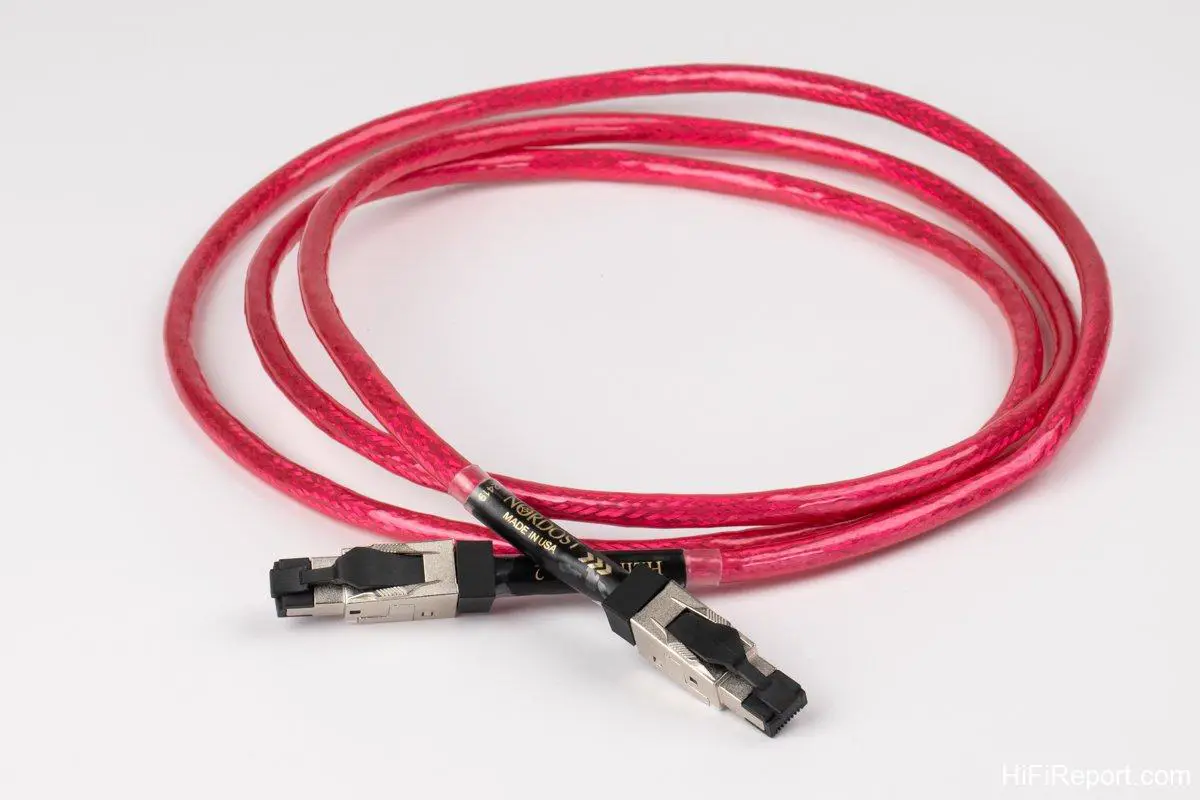
To clearly demonstrate the effectiveness of Vidar 2 in cable burn-in, Alpha Audio, the distributor, provided two Nordost Heimdall 2 network cables along with the Vidar 2 unit. One cable was brand new, and the other had been run-in using the Vidar 2’s P1 program (120 hours). This allowed for immediate A/B comparison listening tests, eliminating the need to rely on memory after a 5-day waiting period.
The listening tests were conducted in the HiFiReport listening room, using equipment including a NuPrime Stream-9 streaming transport, Merging NADAC, Soulnote P-3 preamplifier, EAR 509 MKII vacuum tube monoblock power amplifiers, and Wilson Audio Alexia 2 loudspeakers. The Heimdall 2 network cables were connected to the Stream-9.
Upon receiving the Vidar 2, I initially had some doubts, as the provided cables were network cables rather than analog interconnects or speaker cables. Could network cables really benefit significantly from run-in? After listening, I understood the thoughtful arrangement. Firstly, network cables do indeed require run-in. Secondly, Vidar 2 can also run-in network cables, which is incredibly convenient! I began by using the Zemtsov Viola Quartet’s performance of “Verano Porteno” from the “Dali CD Volume 4” test disc to assess changes in timbre and texture.
After several comparisons, the differences became apparent quickly.
The brand new, un-run-in Heimdall 2 network cable made the string instruments sound relatively dull, lacking in brilliance, and the airiness in the background was weaker, diminishing the overall atmosphere of the recording. Furthermore, the string texture was drier, somewhat sticky, and less smooth.
In terms of soundstage, the un-run-in cable seemed to constrict the soundstage, making its shape less defined, with reduced height and depth. The three-dimensionality of the sonic images also suffered.
What about the run-in Heimdall 2 network cable? In direct comparison, the texture exhibited a higher level of sophistication. It was hard to believe they were the same model of network cable. The string instrument timbre was not only smoother and more liquid but also more mellow.
Moreover, in addition to enhancing textural refinement, the run-in cable made the sound more vibrant and dynamic, with improved subtle nuances, and the soundstage noticeably became taller and more open. Reverberation and the sense of air movement were also richer.
In contrast, the un-run-in network cable sounded comparatively flat and lifeless, with a somewhat hazy atmosphere, less distinct sonic outlines, and less precise localization. Simply put, the sonic images were less clearly defined.
Clear Sonic Images and Excellent Separation
Using another track from the “Dali CD Volume 4” test disc, “Crying” by the James Blood Ulmer Blue Experience, a live-recorded jazz-blues song with a simple ensemble of James Blood Ulmer on guitar and vocals, electric bass, and drums. The recording quality is excellent, easily revealing clear sonic images and good separation.
Without comparison, it sounded quite good. However, a direct A/B comparison revealed a significant difference. The run-in network cable sounded more live and immersive, with a clearer musical presentation, more like a real live performance.
The sonic images of the guitar, bass, and drums were all well-defined and solid. The separation and localization of each sound were precisely rendered. The overall soundstage also seemed elevated, with a higher stage position, and the high, mid, and low frequencies were more organized and distinct. The front-to-back layers of the soundstage were also more clearly delineated.
In short, it offered a strong sense of sonic imagery.
The un-run-in network cable lacked the same level of tonal richness and sounded more monotonous. The difference between the two was akin to comparing network cables of different quality tiers.
Simple, Fast, and Thorough
In addition to comparing the provided Nordost Heimdall 2 network cables, I also had two new pairs of Canare balanced interconnects on hand. I connected one pair to Zone 1 of the Vidar 2 and ran them in for 96 hours (P1 program). This allowed me to compare them with the un-run-in pair, conducting another A/B comparison.
What were the differences? The difference between the run-in and un-run-in Canare balanced cables was not as dramatic as with the Heimdall 2 network cables, but it was still audible. Aspects including transparency, tonal density, outline clarity, sonic image focus, dynamic contrast, brightness contrast, soundstage depth, and layering all showed improvements with the run-in cables. The run-in balanced cables exhibited better brightness, more effortless and natural extension at both high and low ends, and clearer nuances in quieter passages, resulting in a more vibrant overall listening experience. In comparison, the un-run-in cables sounded less transparent, with a slightly hazy atmosphere, and a more constricted, less open soundstage, which limited the overall vibrancy and sonic imagery of the music.
Is cable run-in necessary? This listening test provides a clear answer.
According to Vidar 2’s built-in programs, signal cables and speaker cables that carry relatively higher current require 96 hours of run-in time, while digital cables and phono cables that carry relatively lower current require a longer 120 hours. And this is achieved using specialized broadband signals across different frequency ranges to complete the burn-in within these timeframes. If we were to run-in cables using our own audio systems, the process might take even longer.
If you are an audiophile who enjoys experimenting with cables, you may not have so much time to dedicate to cable run-in. No problem, let Vidar 2 do the work for you. It’s simple, fast, and thorough. Most importantly, you no longer need to second-guess whether the run-in is sufficient.
Specifications
**Nordost Vidar 2**
* **Type:** Cable Burn-in Machine
* **Cable Types Supported:** RCA interconnects, XLR balanced cables, phono cables, network cables, USB cables, BNC digital cables, speaker cables