
Panasonic TH-55FX600W Review
Every year, I review the absolute cutting-edge, newly released Japanese 4K TVs. However, some readers have called to express their hope that I might review more affordable options. The reality is, budget 4K TVs have become so inexpensive that most consumers can afford them, but the sheer variety makes choosing a difficult task.
I’ve accepted this challenge and will conduct the review from the perspective of an enthusiast who prioritizes picture quality.
Naturally, affordable 4K sets have lower production costs than high-end models, and there will inherently be differences in picture performance. Therefore, my aim is to select models that stand out relative to their peers and perhaps even incorporate key technologies typically found in higher-end sets. The Panasonic TH-55FX600W, which I’m introducing here, fits these criteria perfectly.

Model Details and Smart Features
Panasonic’s new-for-2018 “FX600” series comprises four models: 65, 55, 49, and 43 inches. The 55FX600W is the 55-inch variant, with pricing and size well-suited to the needs of most family buyers. While the FX600 is an entry-level 4K television, its feature set is far from basic. It’s equipped with a “Quad-Core Pro” processor and Wi-Fi, offering quite comprehensive smart TV functionality. Users can choose to install various types of apps from the “Apps Market” based on their needs.
Regarding online video capabilities, this TV supports YouTube and Netflix, fully handling 4K content from both services. I’ve confirmed that this includes YouTube’s 4K HDR videos, which display correctly in HDR mode whenever the online content supports it.
The 55FX600W also functions as a DLNA playback device, capable of playing video files (including 4K), music files, and JPEG photos from networked portable devices, PCs, or NAS drives within the home. Supported video formats include AVI, HEVC, MKV, WMV, MP4, M4v, FLV, 3GPP, VRO, VOB, TS, and PS. Audio formats cover MP3, AAC, WMA Pro, FLAC, Apple Lossless, and WAV. Furthermore, you can plug in a USB hard drive or flash drive to play these file types and even record video onto a USB hard drive.
For inputs, the set features three HDMI 2.0 terminals, fully compatible with 4K/60p and HDR (including HDR10 and HLG). Considering the 55FX600W’s functionality, file compatibility, and video signal support, it’s actually quite close to mid-range and high-end models.
Picture Panel and Backlighting
This TV uses a direct-lit “Super Bright Panel Plus” for its display. The LCD panel itself is an IPS type with a resolution of 3840×2160, granting it wide viewing angles. Whether watching from an angle or standing, the picture doesn’t suffer from “washout” and maintains good color saturation and contrast.
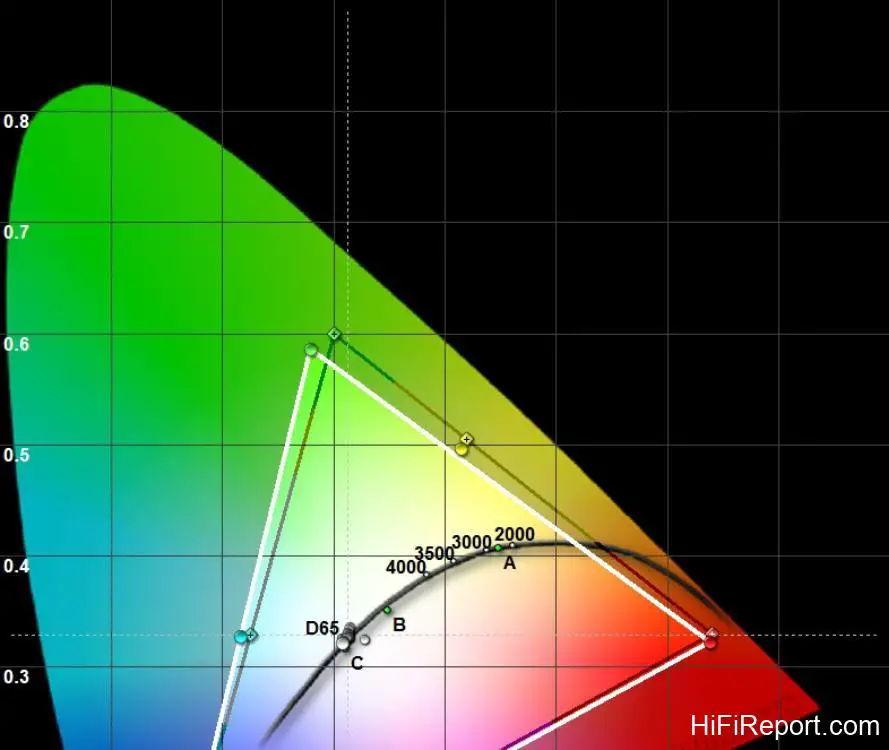
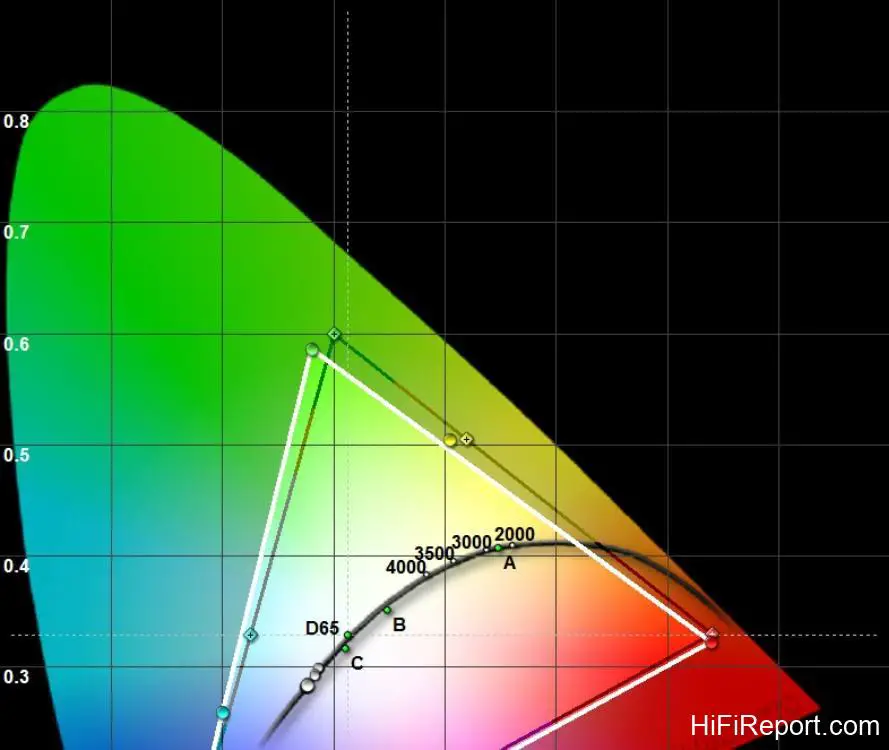
Let me be upfront: the quality of panels (including backlight modules) used in 4K TVs within a similar price range is generally comparable. Affordable models (including this one) have a color gamut (roughly equivalent to the HDTV standard) that isn’t as wide as higher-end models (which approach the DCI color space), and their brightness and contrast are also lower. However, those in the know understand that comparing panel specifications among comparable products isn’t particularly meaningful.
The true determining factor in picture quality lies in the image processing technology and the skill in calibration.
Upscaling and Fine Detail Processing
All 4K LCD TV panels have a resolution of 3840×2160. To fully showcase the panel’s resolution, you need to play high-quality 4K source material. However, most consumers spend the majority of their viewing time watching non-4K TV channels or online videos. If a 4K TV displays standard definition video and TV programs looking similar to a Full HD TV, users might question the point of buying a 4K set.

Most 4K TVs simply perform pixel scaling or add sharpening when dealing with non-4K video sources, which doesn’t significantly help improve detail and texture. The method that truly makes picture quality more refined is the application of super-resolution technology. Super-resolution is further divided into “database-based” and “block analysis comparison” types.
Database-based super-resolution involves the image processing circuitry instantly recognizing “what’s in the picture” from the input video and immediately finding related objects from a built-in database of tens of thousands of high-resolution reference images. This adds details and textures that were missing from the original image.

Because this technology is very challenging to develop, currently only two brands apply database-based super-resolution in their 4K TVs, and Panasonic is one of them.
Panasonic’s current mid-range to flagship 4K TVs use the “4K Fine Remaster Engine,” which first applies database-based processing followed by block analysis comparison. The affordable FX600 series, however, is equipped with one of these: database-based super-resolution. The “Resolution Remaster” option in the 55FX600W’s menu relates to this super-resolution processing.
During my testing, I played videos of various resolutions and observed the effectiveness of the TV’s super-resolution processing. With 480p, 720p, and 1080p sources set to “Auto” for Resolution Remaster, the picture quality was elevated by one level compared to the “Off” setting. This is equivalent to boosting 720p content closer to 1080p and improving Full HD content to be closer to the quality of 4K video.
Even when inputting 4K signals or playing 4K videos directly on the TV (including online videos), “Resolution Remaster” still provides optimization. The 55FX600W’s super-resolution processing isn’t simple sharpening, so object outlines don’t become unnaturally hard. What significantly improves is the “texture.”
By observing the finest textures on things like tree bark, fabrics, or skin surfaces, you can see that with “Resolution Remaster” enabled, details that were originally “too blurry to almost see” become very clear, and the subtle grooves and spatial separation of adjacent areas are clearly displayed.
Therefore, if you see this TV on display in a store showing the same content as other affordable 4K TVs, and it appears much more detailed, even better than many mid-range sets from other brands, it’s thanks to its database-based super-resolution processing.

Motion Handling Performance
Mid-to-high-end LCD TVs typically employ motion interpolation and backlight control to enhance clarity in dynamic scenes (affordable models don’t always have this). This TV’s “Intelligent Frame Creation” performs motion interpolation with four settings: Strong, Medium, Weak, and Off. I examined 24p dynamic clips. The “Strong” setting resulted in smooth and clear motion, almost completely eliminating the native judder of film content.
The “Medium” setting felt similar to “Strong,” with only very slight judder. The “Weak” setting showed little interpolation and, like the “Off” setting (which performs no interpolation), clearly displayed the judder inherent in film sources.
Next, I played the “Resolution Pattern: 6.5ppf” clip from the FPD Benchmark BD test disc to examine dynamic resolution. Switching between the four settings, the difference in dynamic resolution was quite limited, ranging from approximately 550 to 650 lines. However, by changing the “Motion Clarity” setting to “On,” the dynamic resolution can be boosted to 850 to 900 lines.
“Motion Clarity” essentially turns the backlight module off and on for a very brief moment between frames, a technique known as “black frame insertion,” which helps to break up motion blur. With this feature enabled, the picture only becomes slightly dimmer, and the human eye doesn’t perceive screen flicker. Therefore, I recommend that owners of this TV use this function when watching sports programs and action movies to make moving images clearer.

Color Performance Analysis
In terms of color, the 55FX600W utilizes Panasonic’s Hexa Chroma Drive technology (known as “6-Color Processing” in Taiwan). Unlike standard models that only manage colors using the primary RGB colors, this adds Cyan, Magenta, and Yellow for more precise automatic color correction. Many affordable products deliberately boost color saturation to grab attention with intense colors.
However, Panasonic’s color calibration for this TV is not about “enhancing” colors but rather aiming to accurately display subtle differences in hue and color density between similar color ranges at different brightness levels. This allows viewers to see richer color gradation and layering.

When I examined test patterns like Colorscale and Subtle Colorchart, I could see that this TV makes it easy to distinguish colors even in the extremely dark areas below 5 IRE. It also effortlessly renders “1% density extremely pale colors” for R, G, B, C, M, and Y, based on 20% versus 19% gradation differences in RGB.
This level of color rendering capability surpassed my expectations for an affordable model; in fact, many mid-range 4K TVs don’t perform as well in rendering extremely pale colors and dark scene colors.

Contrast and HDR Capabilities
In normal usage, the 55FX600W can use its built-in sensor to measure the ambient light level of the viewing environment and automatically adjust the backlight intensity. Its backlight control doesn’t stop there; it can also instantaneously change screen brightness based on the brightness of the input video signal. Furthermore, the LCD panel can perform “local contrast adjustment” based on the brightness of different areas of the input image.
These are all methods used to increase dynamic contrast.
Compared to other 4K TVs, the latest generation Panasonic products have an additional feature: automatic dimming specifically for HDR. Most products boost the backlight to maximum when handling HDR content. If the viewing environment is dimly lit, overly bright screens can easily cause eye fatigue.
The 55FX600W, however, can automatically adjust the backlight intensity in HDR mode based on the ambient light level of the room. This ensures that whether watching during the day (high ambient light) or at night (low ambient light), the “perceived” HDR picture brightness and color characteristics remain consistent. Users can also manually adjust the overall brightness of the HDR picture, balancing the high-contrast characteristics of HDR’s “high dynamic range” with visual comfort.
Conclusion and Recommendation
Considering the overall picture quality of the 55FX600W, I believe two aspects are particularly outstanding. Firstly, the calibration’s focus on color and brightness gradation makes colors closer to the density and tonality of real-world objects, giving this new TV a refreshing and transparent picture quality rarely seen in affordable models.
Secondly, the “Resolution Remaster” feature significantly differentiates its fine picture detail from most other affordable 4K TVs. Although its color gamut, black level depth, and dynamic resolution are not as good as Panasonic’s own mid and high-end products, it holds a clear relative advantage among the numerous affordable 4K TVs and can even compete with some mid-range 4K models from other brands.
Therefore, I believe the Panasonic TH-55FX600W is one of the most value-for-money affordable 4K TVs and deserves our “Best Recommendation.”
Key Features and Specifications
* Displays using a new 4K Super Bright IPS panel
* Correctly supports 4K HDR display for YouTube and Netflix
* Can automatically adjust HDR picture brightness based on the viewing environment
* Uses “Hexa Chroma Drive” for automatic color correction
* Enhances contrast with dynamic dimming and local contrast control
* Improves image detail with “Remaster Super Resolution”
* Includes smart TV functions, allowing online video viewing and app installation
* Features DLNA, capable of playing video, music, and photo files
* Supports external USB hard drive recording
* Type: 55-inch 4K LCD TV
* Aspect Ratio: 16:9
* Panel Resolution: 3840×2160
* Maximum Digital Video Compatibility: 4K/60p
* Terminals: HDMI 2.0 input ×3, USB 3.0 ×1, USB 2.0 ×1, RJ-45 network terminal ×1, Headphone output ×1
* Speaker Drivers: Full-range ×2
* Audio Output Power: 10 watts ×2
* Dimensions: 1460×910×345mm (WHD, with stand), 1460×844×78mm (WHD, without stand)
* Weight: 26.5 kg (with stand), 26 kg (without stand)