
Wadia M330 Media Server Review
Digital playback has gradually become mainstream, and various audio brands are racing to develop digital sources to avoid being overwhelmed by this torrential flow.
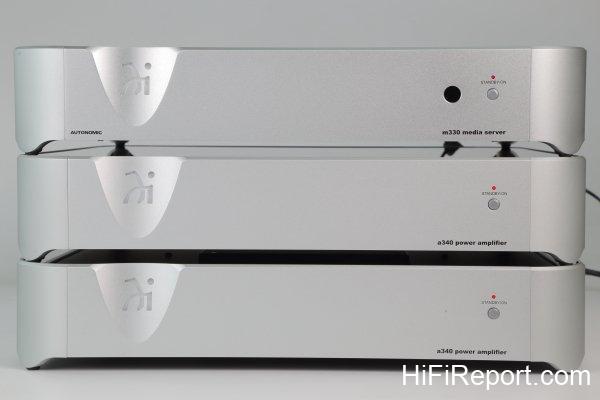
In the early days, Wadia was considered a top-tier brand in the digital domain. In recent years, they have extended their reach into the lifestyle segment, offering comprehensive product lines that provide complete home listening solutions. Therefore, the launch of the m330 music server can be seen as a natural progression.
However, what exactly is a music server? What is a streaming player? And how do they differ from a USB DAC? Simply put, a USB DAC requires a computer to act as a player, with music coming from either files stored on the hard drive or network streaming services (such as Spotify).
A streaming player can connect to the network and play music files stored on a NAS or directly use network streaming services, thus eliminating the need for a computer. If you’re not listening to music files, you don’t even need a NAS.
As for a music server, it has a built-in hard drive that can store music files and can also use network streaming services, so you don’t even need a NAS.
From this, we can see that among these three options, the music server has the most powerful functionality, capable of handling many tasks with just one unit.
The m330 is a product developed with convenience as its premise. How convenient is it? Let me explain in detail.
The m330 is not only a streaming music server but also comes with preamp functionality. Therefore, it can be directly paired with their a340 mono power amplifier to form a complete playback system. This review uses such a configuration, and since they share the same dimensions, they look quite aesthetically pleasing when stacked together.
Silent Solid-State Drive, Zero Vibration
First, the m330 comes with a built-in 1TB SSD. Besides storing the operating system, its most important function is storing music files, allowing you to build your music library without requiring network storage devices like NAS.
Large-capacity SSDs are still quite expensive currently, with 1TB costing a considerable amount. Why did the m330 choose SSD over traditional hard drives with larger capacity? There are three advantages: First, faster reading speed, significantly reducing boot and response times; second, silence – solid-state drives have no mechanical structure, producing absolutely no sound or vibration, satisfying the demands of discerning users; third, greater stability and durability – without mechanical structures, it’s naturally less prone to failure, reducing future maintenance or replacement hassles.
Using an SSD is appropriate for equipment at the m330’s price point.
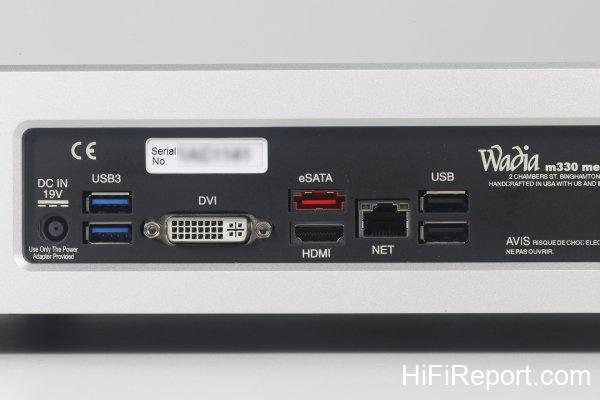
However, 1TB capacity isn’t particularly large. What if your music library exceeds this capacity? No worries – the m330 comes equipped with USB, USB 3.0, and eSATA interfaces, allowing you to connect additional USB or eSATA large-capacity hard drives. That should be enough storage for music! Besides your own music files, network music streaming services are now the hottest music source, and these services are built into the m330, including Pandora, SiriusXM, Spotify, Rhapsody, TIDAL, and TuneIn internet radio. All can be played on demand, though there’s one prerequisite – you need to have an account for the respective service.
Built-in Volume Control Functionality
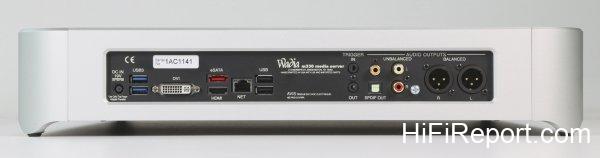
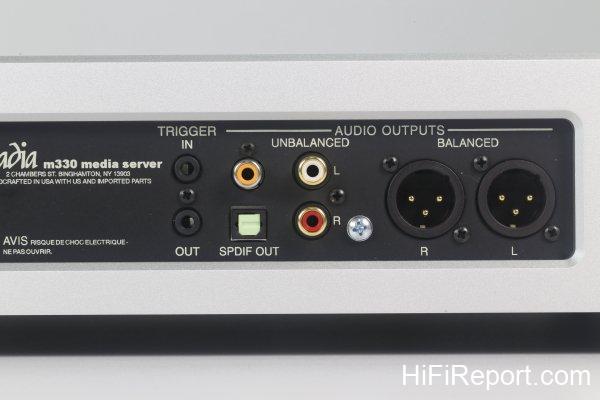
For outputs, the m330’s back panel includes both analog and digital output terminals.
The analog section includes one set each of RCA and XLR outputs, and you can configure them for either fixed or variable volume output. This means the m330 also features volume control functionality, allowing direct connection to power amplifiers like their own a315 stereo power amp or a340 mono power amp.
Digital outputs include RCA coaxial and optical.
You might ask, if someone chooses the m330 for its convenience and simplified system configuration, why would they use digital output to connect to another DAC? That’s for connecting to their own 321.
The Wadia 321 is a preamp with only digital inputs, capable of integrating all digital sources in your home, including the m330.
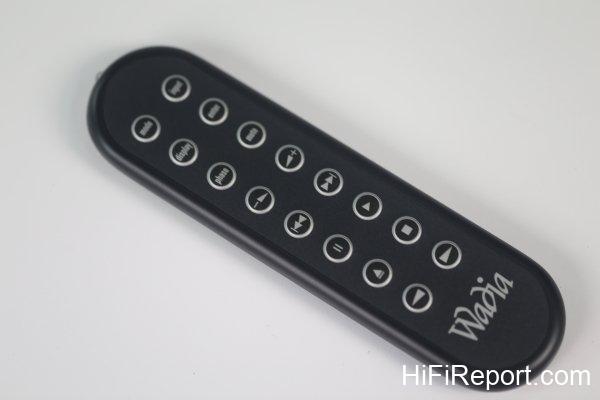
Speaking of integration, the m330 has another feature – it’s compatible with certain automatic control systems, making it convenient to integrate the m330 into your system. This allows you to “command” everything through a tablet without needing an additional remote control app.
The m330’s detailed settings must be accessed through a computer browser’s settings page. Let me explain using computer screen captures.
Before logging into the settings page, you must first know the m330’s IP address.
There are two ways to find this: First, through the rear HDMI or DVI interface video output, where the IP address appears in the upper left corner of the initial screen; second, using the computer’s file explorer network neighborhood function, which usually can locate the m330.
Let’s say the IP address found is 192.168.0.192. Next, enter 192.168.0.192/config in your computer browser’s address bar to access the Server Setting page of the settings interface.
You can change the server name and set up user accounts and passwords.
Display Setting allows you to set the output resolution to match your TV or display.
The m330 also has a screen saver featuring beautiful images, with selectable transition effects.
Source Setting lets you configure whether the output is fixed or variable volume – Variable Gain for adjustable volume, Fixed Gain for fixed volume.
You can also select the bit depth and sampling rate for digital output to match your DAC specifications.
Moving to the Content tab, you can make various settings like importing music files, linking external music libraries, and adding various music streaming services such as Spotify and TIDAL accounts.
Comprehensive Source Performance
The most convenient way to use the m330 is to directly play music files stored on the SSD. However, since the drive comes empty, you’ll need to import music through an external USB drive (either flash drive or large-capacity hard drive).
There’s a slight inconvenience – before importing music, you must first power off the m330, insert the external USB drive, then power on again to import.
The convenience, however, lies in not having to select songs during the import process. The m330 will automatically search for all music files on the external drive, import them, and organize the data independently.
The m330’s output volume is adjustable, so during testing, I had two options: either connect directly to their a340 mono power amp or use the m330 purely as a player, connecting through a preamp to the a340.
As I happened to have an Audio Research GSPre tube preamp on hand, I decided to configure a complete source, preamp, and power amp system to get the best performance from the reference speaker, the Dynaudio Confidence C4 Platinum.
Playing track 2 of the 2015 Kaohsiung Audio Show commemorative CD, featuring Temirkanov conducting the St. Petersburg Philharmonic performing “The Young Prince and Princess” from Rimsky-Korsakov’s “Scheherazade,” which begins with violin solo and accompanying harp before building to a grand orchestral climax.
From this single piece, one can discern that the m330 is a source component with comprehensive performance. It delivers rich detail, wide and flat frequency bandwidth, effortless high and low frequency extension, precise soundstage positioning, spatial representation, front-to-back layering, etc., fearlessly handling the challenges of large pieces and grand musical scenes.
Wandering Through an Infinite Musical World
Track 3, the theme from “Cinema Paradiso,” features Caroline Campbell’s violin and Chris Botti’s trumpet, quite suitable for testing tonal performance.
The m330 handles subtle vibrato changes with ease, possessing appropriate sweetness and softness, striking an excellent balance between firm and soft. Importantly, the m330 maintains good thickness from mid to high frequencies, never sounding thin even at low volumes, while the bass shows great elasticity with appropriate quantity, making even small pieces entertaining to listen to.
However, the m330’s more attractive quality lies in its handling of grand, sweeping music, such as track 9 featuring Lin Chia-Ying performing the piano solo arrangement of “Firebird’s Infernal Dance.” The soundstage reveals a massive piano presence, with stable and weighty bass, precise keystrokes combining both power and decisiveness, making for a thoroughly enjoyable listening experience.
Moving on to vocals, I selected the “Oriental Jazz” album featuring collaborations between Chinese female singers Zheng Kewei, Feng Xinhui, Yu Siling, and others.

Within its conventional framework, the m330 delivers excellent midrange thickness, pleasant warmth, and appropriate heat, giving these young female singers’ clear voices clear outlines and physical presence rather than thinness, demonstrating first-class balance.
From these musical selections, I’ve found the m330 to be quite versatile, handling various types, styles, and arrangements of music, as well as recordings from different periods and methods, all with easy-going accuracy. I can’t pick out any flaws or shortcomings. Evidently, the m330’s purpose is to let you sit comfortably on your sofa, tablet in hand, freely wandering through an infinite musical world, no longer constrained by “equipment.”
Equipment Specifications
- Format: Music Server
- Distortion: 0.005%
- Frequency Response: 2Hz – 22kHz
- Maximum Output: Balanced 4V RMS, Unbalanced 2V RMS
- Signal-to-Noise Ratio: 102dB
- Digital Output: Coaxial, Optical, USB
- Digital Input: USB, eSATA
- Video Output: DVI, HDMI (for GUI only)
- Dimensions: 454×86×508 mm (W×H×D)
- Weight: 11.3 kg