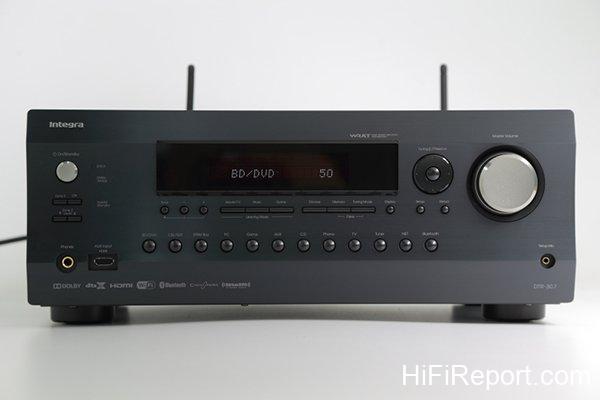
Integra DTR 30.7 Surrounding Amplifier Review
The Integra surround amplifier can be described as having complete and powerful functionality, with strong performance – the most appropriate words to describe the Integra surround amplifier, which is a brand that emphasizes custom installation and is suitable for professional enthusiasts.
However, from another perspective, if I am not a professional audio-visual enthusiast, and just want to use a surround amplifier to meet my normal needs for watching movies, listening to music, or playing some multimedia, then a unit with so many functions, will it be overkill? This time, I will pretend to be an ordinary user (actually I am), and use the most intuitive way to operate this Integra entry-level DTR-30.7 surround amplifier, and see how much fun I can get in my audio-visual life.
The DTR-30.7 has a 7.2-channel output capability, supporting Dolby Atmos and the newly released DTS:X.
On the video side, the DTR-30.7 supports 4K Ultra HD playback, such as 4K/60Hz, 4:4:4 chroma, and HDCP 2.2, all of which can be played through HDMI.
Powerful Network Connectivity
First, let me briefly introduce some of the basic functions and related specifications of the DTR-30.7.
The DTR-30.7 has a 7.2-channel output capability, supports Dolby Atmos audio, and the 7.2 channels can be configured as 5.2.2, which means it can connect 2 height channels. As for the DTS:X audio format that was just introduced this year, the DTR-30.7 also supports it.
On the video side, the DTR-30.7 supports 4K Ultra HD playback, such as 4K/60Hz, 4:4:4 chroma, and HDCP 2.2, all of which can be played through HDMI.
It has 8 HDMI inputs and 2 HDMI outputs, with one of the inputs on the front panel for easy connection of various mobile devices.

In addition, the HDMI also supports playback of DVD-Audio, SACD, or multi-channel PCM, provided that your player can play them.
On the network side, the DTR-30.7 also provides very complete connectivity capabilities, including both wireless Wi-Fi and wired LAN. Users can use the network to access various streaming audio and video services or internet radio, such as Spotify, TuneIn, Pandora, SiriusXM, Slacker, Deezer, etc.
Through the local network connection, you can even transmit music files stored on your mobile phone or mobile device to the DTR-30.7, without having to use Bluetooth transmission.
Of course, if you are still used to using Bluetooth or AirPlay functions, the DTR-30.7 also has them all.
The DTR-30.7 also supports high-resolution music file playback. In this case, you can choose to play it on a computer and use the DTR-30.7 as a USB DAC, or access the music files stored on the NAS through the network connection, with support up to 32-bit/384kHz PCM and DSD128.
You don’t need to worry that the DTR-30.7 has so many functions, making it difficult to operate, because you can download a remote control app to control it with your mobile phone or tablet.
Next, I’ll use some mobile screenshots to explain.
The front panel has one HDMI port for easy connection of personal devices or other signal sources.
On the left: My phone is an Android system, and I can find the free Integra Remote app in the Google Play store.
On the right: Before remote control, you must first let the DTR-30.7 connect to the network.
I usually use a network cable to connect the DTR-30.7, because network cables are more stable and the transmission quality is better than Wi-Fi, and there’s no need for configuration, just plug in the network cable, and the local network will find the DTR-30.7. So when I open the Integra Remote app, it will see that DTR-30.7 right away.
On the left: Through the app, you can very conveniently adjust the equalizer of the channels, the screenshot shows the adjustment of the high and low frequencies of the main channels.
The options below can directly switch the sound field modes, with Movie, Music, Game, and Stereo four modes.
On the right: The volume of each channel can also be adjusted through the app, which is much more convenient than having to take out the remote control, layer by layer into the setting menu to adjust.
On the left: The app can also switch the signal sources, and one of the options is NET, which represents the signal sources that can be used through the network connection, including various streaming services, AirPlay, DLNA, and Home Media options.
I selected DLNA, and the right picture appeared.
On the right: The app will display the storage devices currently available on the local network, including NAS and Windows computers.
Just select where you store the music.

On the left: I can see the music albums stored on the NAS, and I selected the second one, Queen’s A Night at the Opera album.
On the right: If you have built the album covers in the database, the app will also display them when playing.
On the left: The DTR-30.7 has a great feature that can directly wirelessly play the music files stored on your mobile phone.
In the past, to play music files from the phone, you had to use Bluetooth transmission, or your playback device had to have Play-Fi function, but the DTR-30.7 can also do it.
Just select the “My Smart Phone” option in the app, and the app will immediately find the music albums already on my phone.
From the screen, you can see that I don’t have many songs on my phone, because I mostly listen to internet radio.
On the right: Now it’s playing the MP3 music files from my phone.
On the left: The DTR-30.7 has built-in several internet radio and music streaming services, such as Tunein, Pandora, Spotify, SiriusXM, Slacker, Deezer, etc., not all of which can be used in Taiwan, I mostly use Tunein.
On the right: From Tunein, you can find radio stations from all over the world, classified by category or by region.
There are always endless radio stations around the world, and the music never stops.
The Preferred Choice for Custom Installation
The DTR-30.7 also provides a convenient second zone function.
In addition to the extra 2-channel amplifier that can be used to drive the speakers in the second zone, it can also be output via RCA to connect another more powerful amplifier in the second zone.
In addition, the second zone of the DTR-30.7 is also equipped with a DAC, so you can play various music streaming services, internet radio, or other digital input signals in the second zone.
The control of the second zone is also through the remote control app, which is very convenient to operate.

Speaking of integration, it is impossible not to mention Integra, and I think this is the reason why it is named Integra.
Integra has positioned itself in the field of system integration and custom installation from the very beginning, and in the US this is a very large market. Integra can seamlessly integrate into the home automation system, becoming the control center for audio-visual entertainment and music playback, so the DTR-30.7 has very strong compatibility, and it has been a partner with several automation control systems for a long time, supporting certain control device protocols, which is the biggest difference between Integra and other surround amplifier brands.
Of course, the setting and installation of this part can be assisted by a qualified Integra dealer, and consumers only need to sit back and enjoy the movies.
Before formally starting the listening test, let me have the DTR-30.7 auto-configure it first.
The DTR-30.7 is equipped with Integra’s own AccuEQ automatic room calibration system. With the included microphone, it can automatically measure the position, distance and frequency response of each speaker, and then set the volume, delay, crossover point, equalization, etc. parameters to achieve a balanced and consistent sound field.
It is worth mentioning that the DTR-30.7’s crossover point setting is very fine, with 14 crossover points from 40Hz to 200Hz that can be set for each channel pair (e.g. left surround and rear surround as a pair), so it can be finely adjusted for different sizes and brands of speakers.
The second zone of the DTR-30.7 has a 2-channel amplifier, or it can also be output via RCA to connect another more powerful amplifier in the second zone.
In addition, the second zone is also equipped with a DAC, so you can play various music streaming services, internet radio, or other digital input signals in the second zone.
The control of the second zone is also through the remote control app, which is very convenient to operate.
Hearing a Sound I’ve Never Heard in a Surround System Before
For the listening test, I initially used Admonitor Preference Plus as the main channels, one KEF LS-50 as the center, Klipsch B-10 as the surrounds, and the Earthquake Sound MKVII-12P as the subwoofer.
The sound is vivid, gorgeous, and full of energy, but it’s a bit too stimulating and not very comfortable to listen to.
So I started to manually fine-tune the speaker placement and toe-in angle, and there was some improvement, but the extent was limited.
At this time, I noticed the Martin Logan ESL hybrid electrostatic speaker next to me, and thought, why not try it? So I replaced the main speaker with the ESL.
After the swap, it hit the spot! The sound is soft and transparent, the sound image is large and full, and the surround sensation is greatly enhanced.
However, at this time the center channel was still a bit prominent, so I replaced the center with the Elac 310 Crystal Edition with a ribbon tweeter, and let the LS-50 become the surround channels.
With this adjustment, the sound is really amazing! I’ve never heard this kind of sound in a surround system before.

What kind of sound? It has very good resolution, but also smooth and comfortable; the sound is transparent and clean, but not lacking in moisture and softness; the sound image is huge, with outlines and layers, and the surrounding sensation is also very good.
I almost only listen to music, and don’t watch many multi-channel test discs, because I’m completely attracted by the music, and I really don’t have the interest to watch the surround effect.
For example, the “The Spirit of Turtle” Blu-ray + SACD demonstration disc from Turtle Records, track 6 is Michael Gees’ improvised performance of Satie’s piano piece, where I can see a very large, very natural, and very vivid piano right in front of me, indicating that the center channel and the main channels have perfectly blended together, otherwise the physical presence of the piano would not be so natural.
You can feel that the DTR-30.7 does not particularly emphasize the crisp feel or force of the keyboard, but the contrast between strong and weak and the ups and downs are very smooth and free, with a soft texture, allowing the piano to also have a certain degree of singability, which is the Integra sound I am familiar with.
To be honest, I have never thought of using a surround amplifier with an electrostatic speaker before, because they don’t seem to be equipment that the same user would own at the same time, but they turn out to be so compatible and harmonious, which is amazing.
Track 7 is the first movement of Beethoven’s Symphony No. 5 performed by the Netherlands Symphony Orchestra conducted by Jan Willem de Vriend. The DTR-30.7 and the ESL sing out a broad and expansive sense of scale, with a steady and majestic atmosphere, yet also appropriate dynamics and fluency.
I don’t need a particularly stirring Beethoven’s Fifth, but the DTR-30.7 easily expresses good contrast and ups and downs, with the music rising from weak to strong smoothly, and naturally able to express the dynamics that a symphony should have, making me listen in admiration.
Track 8 is the “Dies irae” from Britten’s “War Requiem” performed by the Netherlands Radio Philharmonic Orchestra conducted by Jaap van Zweden, where the brass instruments scatter without any restraint, radiating a bright luster without any pressure.
The DTR-30.7 can clearly present the texture of the instruments, and the ESL presents it without any tension or suppression, both realistic and comfortable.
Perhaps this is the advantage of Martin Logan’s electrostatic speakers, but I think the resolution of the DTR-30.7 must also play an important role! The combination of DTR-30.7 and ESL has the advantages of an open and expansive sound field, clear layering, a huge sound image, and a full sound, but on the other hand, the sound field is not very deep, which I think is one of the characteristics of planar speakers.
However, I don’t mind this shortcoming at all, and I don’t even think it’s a shortcoming, because for most spaces, the main speakers and the center channel can’t be placed too far away from the back wall, the sound field is naturally shallow, but the ESL can present an open, relaxed, precise, and high-resolution listening experience, what’s wrong with that? Finally, going back to the movie, I played a few test clips, and it’s obvious that if the music plays well, the movie will not be bad, especially the DTR-30.7 has excellent low-frequency handling, which can express the complex low-frequency effects in movies, further enhancing the atmosphere and ambience.

In addition, the details with the DTR-30.7 and ESL are very rich, the sound field is large, the surround sensation is first-class, but there is not the slightest bit of harshness or pressure, it is not easy to fatigue even when listening to movies or music at high volume, and after getting used to it, it will be hard to go back to the traditional system.
More importantly, although the DTR-30.7 is a professional model, it also takes into account the ease of setting and convenient usability, so audio novices should be able to get the hang of it easily.
Specifications
Integra DTR-30.7
- Type: 7.2-channel surround amplifier
- Output power: 100W/channel (8Ω)
- Total harmonic distortion: 0.08% (20Hz–20kHz, Half Power)
- Frequency response: 5 Hz–100 kHz / +1 dB -3 dB
- Signal-to-noise ratio: 106 dB (LINE, IHF-A)
- Speaker impedance: 6Ω – 16Ω
- Supported audio formats: Dolby Atmos, Dolby Surround, Dolby TrueHD, DTS:X, DTS Neural:X (after future firmware update), DTS-HD Master Audio
- Supported audio sampling rates: 32-bit / 384kHz, DSD128
- HDMI: 7 in, 2 out
- Dimensions: 435 × 173.5 × 329 mm (W×H×D)
- Weight: 10 kg
- Suggested retail price: $1,450 USD