
Yamaha MusicCast Wireless Surround System Review
Have you ever faced the dilemma of wanting to install a multi-channel home theater system in your living room, only to realize that speaker wires weren’t pre-installed during renovation? Perhaps you didn’t want to run unsightly wires across the room and settled for a compromised 3.1 channel setup.
Those days of compromise are over. Yamaha’s latest generation of MusicCast wireless streaming system now supports wireless surround sound. Even without pre-wiring for surround speakers, simply placing two MusicCast wireless speakers at the rear of your room allows you to effortlessly set up a basic 5.1 channel system. Remarkably, even the subwoofer can connect wirelessly.
In this review, I will demonstrate how Yamaha’s MusicCast system can enhance your home entertainment experience using the Yamaha RX-A880 AV receiver, NS-F700 floorstanding speakers, NS-C700 center channel speaker, MusicCast 20 wireless speakers, and MusicCast SUB 100 wireless subwoofer.
MusicCast 20 & SUB 100: Wireless Freedom
Yamaha’s MusicCast technology continues to evolve, offering more features, greater ease of use, and support for higher resolution audio formats.
The MusicCast 20, featured in this review, is a two-way, single-unit wireless speaker. A simple setup process connects it to your home Wi-Fi network, granting access to music files on your NAS or computer, music from your smartphone, and streaming services like Spotify, Tidal, and Qobuz, as well as internet radio.
You can also pair two MusicCast 20 speakers for stereo, creating a simple yet comprehensive two-channel wireless audio system.
Even better, the latest MusicCast now features MusicCast Surround. You can designate two MusicCast 20 speakers as wireless surround channels in a 5-channel theater system. Paired with a MusicCast-enabled Yamaha AV receiver, surround sound signals are transmitted wirelessly to the MusicCast 20s. This newfound freedom allows you to place or mount the MusicCast 20 speakers wherever you desire, unconstrained by wires and eliminating cable clutter.
MusicCast Surround extends its wireless capabilities to subwoofer signals as well. Using the MusicCast SUB 100 wireless subwoofer, you can eliminate the subwoofer cable entirely. Since low frequencies are omnidirectional, the subwoofer doesn’t need to be placed at the front of the room, offering greater placement flexibility without needing to be close to the AV receiver.
The Yamaha MusicCast 20 wireless speaker can be used as a standalone unit, in a stereo pair, or as surround speakers.
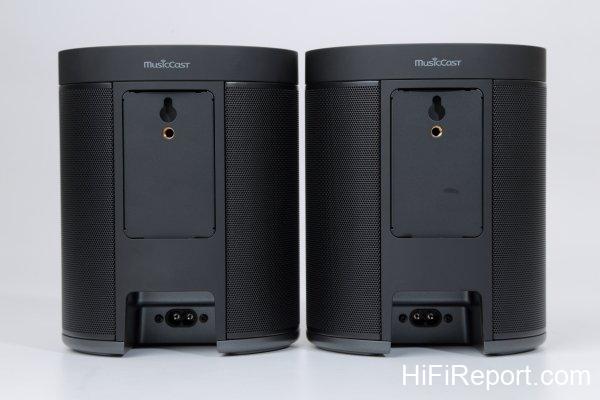
The MusicCast 20 boasts a compact cylindrical design, approximately 15cm wide and 18cm tall. Internally, it houses a 30mm soft dome tweeter and a 90mm mid-bass driver, supplemented by two passive radiators to enhance bass performance. Dedicated power modules, 15W for the tweeter and 25W for the mid-bass driver, provide amplification.
Power is supplied via a standard figure-8 power cord, plugging directly into a wall outlet, avoiding bulky external power adapters.
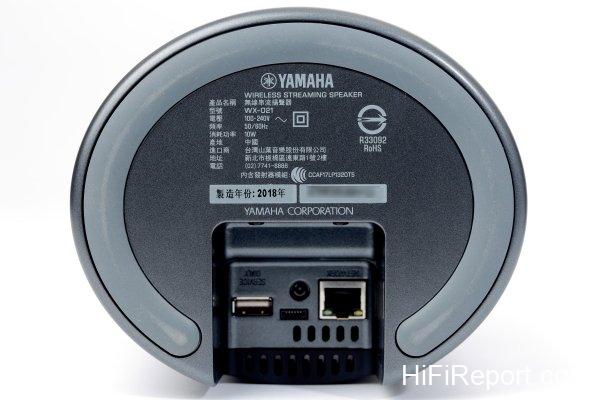
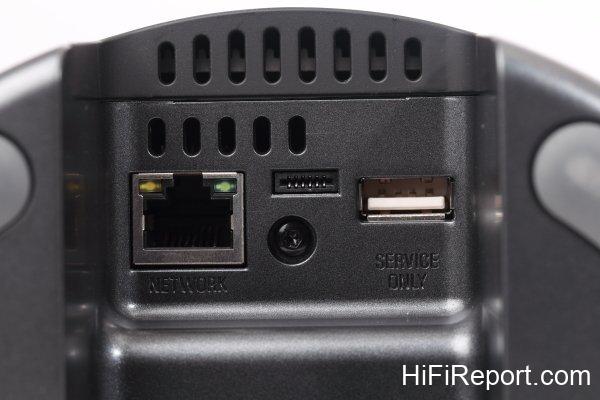
The MusicCast 20 supports dual-band 2.4GHz and 5GHz Wi-Fi for stable wireless transmission. For wired connections, an RJ45 network port is available. It supports high-resolution audio formats up to 24bit/192kHz PCM.
Bluetooth and AirPlay are also integrated for direct streaming from smartphones.
The MusicCast SUB 100 similarly features dual-band 2.4GHz and 5GHz Wi-Fi.
Its built-in 8-inch woofer and 130W amplifier deliver a low-frequency response down to 28Hz.
Beyond wireless connectivity, the MusicCast SUB 100 also provides a 3.5mm analog stereo input for wired connection to amplifiers.
The MusicCast 20 offers versatile placement options, suitable for shelves or wall mounting.
The recessed cable connectors on the MusicCast 20 ensure flush wall mounting.
Ethernet connectivity provides a stable wired option for the MusicCast 20.
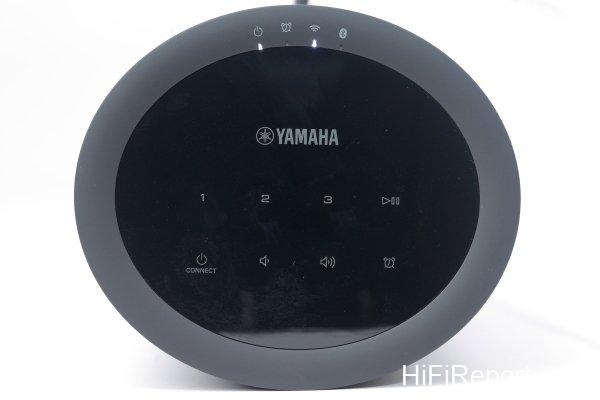
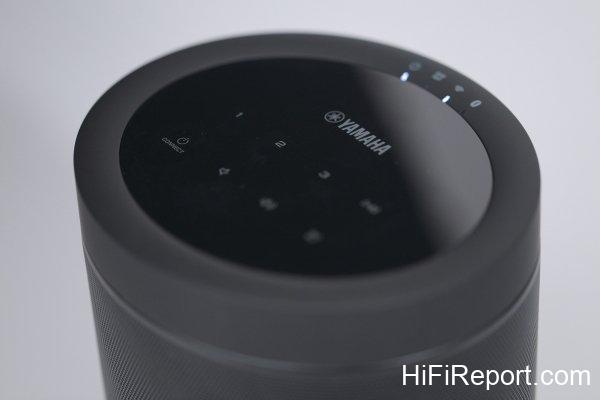
Touch-sensitive controls on the top panel allow operation even without the app.
RX-A880 AV Receiver: Core of the System
The RX-A880 is a 7.2 channel AV receiver with support for the latest immersive audio formats, Dolby Atmos and DTS:X. It allows for easy setup of 5.1.2 or 5.2.2 systems to experience the realism of overhead sound effects.
The RX-A880 also incorporates MusicCast Surround, enabling the use of two MusicCast 20 speakers as wireless surround channels and the MusicCast SUB 100 as a wireless subwoofer, eliminating cable clutter.
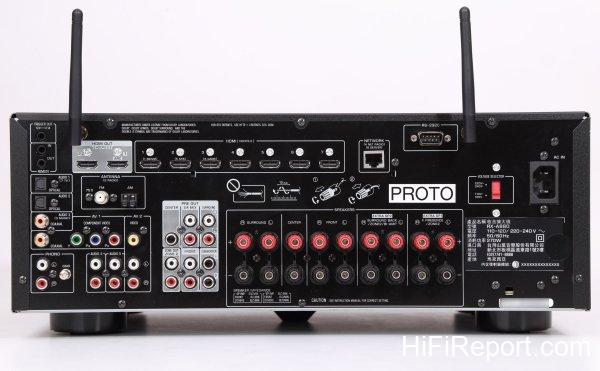
Network connectivity is comprehensive, including RJ45 Ethernet, 2.4/5GHz Wi-Fi, AirPlay, and Bluetooth.
Yamaha’s proprietary YPAO-R.S.C. (Reflected Sound Control) automatic room calibration is included. This system analyzes room acoustics and speaker placement, distance, and angles. Using the included microphone, room optimization is easily achieved.
Yamaha’s exclusive Cinema DSP 3D feature is also present in the RX-A880. This technology utilizes acoustic data collected from renowned concert halls worldwide to create immersive 3D sound field simulations, enhancing the listening experience for music and movies.
For HDMI connectivity, the RX-A880 offers 7 inputs and 2 outputs. This allows simultaneous connection of a TV and projector without needing to swap cables. One HDMI output supports ARC (Audio Return Channel), enabling audio from your TV to be routed back to the RX-A880 and your sound system, significantly improving upon the TV’s built-in speakers.
The HDMI ports support the latest video standards, including HDR, Dolby Vision, HLG, and 4K/60p passthrough.
The RX-A880 even provides 7.2 channel pre-outs, allowing connection to external power amplifiers for further sonic upgrades.
The Yamaha RX-A880 AV receiver features 7.2 channel output and supports Dolby Atmos and DTS:X immersive audio.
Comprehensive network features include RJ45 Ethernet, 2.4/5GHz Wi-Fi, AirPlay, and Bluetooth on the RX-A880.
NS-F700 & NS-C700: Wired Front Stage
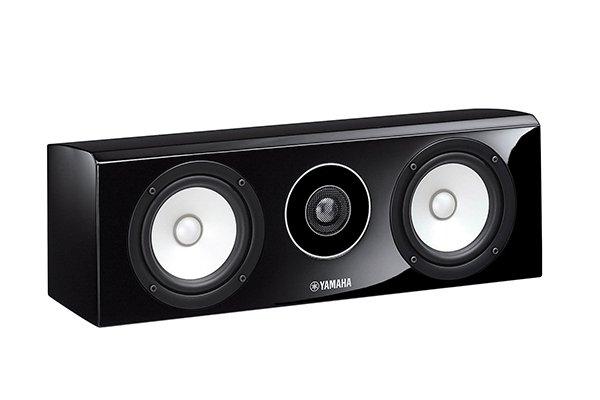
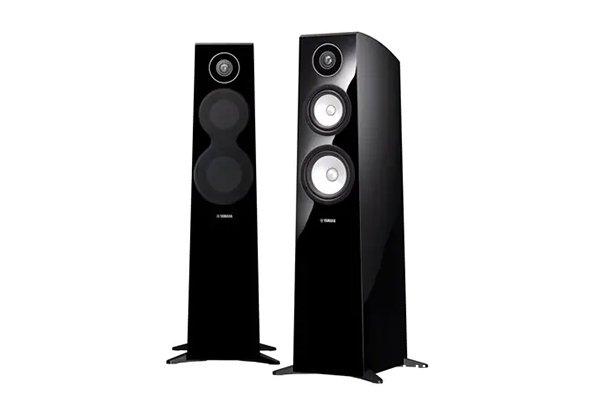
The NS-F700 floorstanding speakers and NS-C700 center channel speaker utilize Yamaha’s patented PMD (Polymer-injected Mica Diaphragm) cones for their mid-bass drivers. This material is a lightweight yet rigid polymer-injected mica, offering excellent responsiveness and controlled damping characteristics, resulting in clear midrange and good bass response.
The tweeters are 3cm DC aluminum dome designs with powerful neodymium magnets, extending high-frequency response up to 50kHz.
The finish of the NS-F700 and NS-C700 is noteworthy. Their black piano finish uses the same materials and process as Yamaha’s grand pianos, providing a level of quality and sophistication rarely seen in this class.
Internal cabinet construction is equally refined. Drawing inspiration from Yamaha’s flagship Soavo speaker series, the woofer and midrange drivers are mounted with slanted partitions and vertical ladder bracing, enhancing cabinet rigidity and minimizing unwanted resonances. Three-way mitered joints at cabinet edges ensure tight construction and contribute to solid bass reproduction.
Yamaha NS-F700 floorstanding speaker.
Yamaha NS-C700 center channel speaker.
Wireless Surround Setup: Step-by-Step
I will now walk you through the app-based setup process for configuring the MusicCast 20 and MusicCast SUB 100 as wireless surround and subwoofer channels. Initially, I anticipated a complex setup requiring detailed manual consultation, but I was pleasantly surprised by its ease. A few attempts within the MusicCast app were all it took.
Let’s follow the image guide:
[Image: MusicCast app download]
Download the MusicCast app on your smartphone or tablet.
The first step is to have the app recognize all devices – RX-A880, two MusicCast 20s, and MusicCast SUB 100 – to integrate them into a multi-channel system.
Initiate the “Add New Device” function in the app. Then, press and hold the “Connect” button on each device (one at a time, connecting one before moving to the next). Release the “Connect” button once the indicator light flashes.
[Image: MusicCast SUB 100 in app]
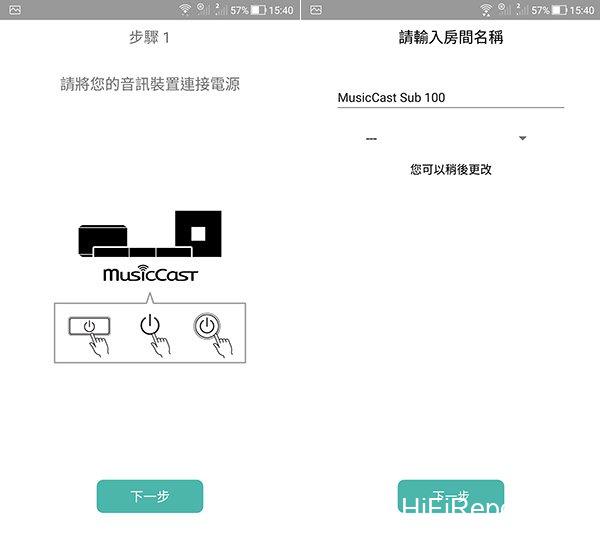
Using the MusicCast SUB 100 as an example, you can see it appear in the app. You can assign a recognizable name or keep the model number.
[Image: MusicCast SUB 100 photo selection]
Next, choose a photo for the MusicCast SUB 100 for easy identification.
[Image: MusicCast SUB 100 on home screen]
The MusicCast SUB 100 is now visible on the app’s home screen.
To add more devices, tap the gear icon in the top right corner to access the settings page.
[Image: Add device in settings]
In the settings page, tap “Add New Device” at the top. This time, we’re adding a MusicCast 20. Go to the MusicCast 20 and press and hold its “Connect” button until the light flashes.
[Image: MusicCast 20 in app, named “Left Surround”]
The MusicCast 20 will appear in the app. For easy identification, I named it “Left Surround.” Tap “Next.”
[Image: “Left Surround” on home screen]
Returning to the home screen, “Left Surround” is now added below.
Repeat the process to add the right surround MusicCast 20.
[Image: All devices in settings]
Back in the settings page, you can see that the RX-A880, MusicCast SUB 100, and two MusicCast 20s are all recognized.
Now, to integrate them into a multi-channel system, tap the gear icon in the top right corner again.
[Image: Surround/Stereo settings]
In the settings page, tap “Surround/Stereo Settings” in the middle.
[Image: Speaker Settings]
Tap “Speaker Settings.”
[Image: Surround Speakers – Left/Right]
Tap “Surround Speakers – Left/Right.”
[Image: Surround Speaker-Left: Select Speaker]
Tap “Surround Speaker – Left: Select Speaker.”
[Image: Select “Left Surround” speaker]
Since we named the MusicCast 20s earlier, they both appear. Tap “Left Surround.”
[Image: Surround Speaker-Right: Select Speaker]
Next, tap “Surround Speaker – Right: Select Speaker.”
[Image: Select “Right Surround” speaker]
Tap “Right Surround.”
[Image: Surround speakers selected]
Both surround speakers are selected. Tap “OK” at the bottom.
[Image: Creating wireless surround speakers]
The app is now establishing the wireless surround speaker connection.
[Image: Subwoofer: Select Speaker]
Next, to set up the wireless subwoofer, tap “Subwoofer: Select Speaker” at the bottom.
[Image: Select MusicCast SUB 100]
The MusicCast SUB 100 subwoofer will appear. Simply tap it to select.
[Image: RX-A880 on home screen, multi-channel system established]
Finally, returning to the app’s home screen, only the RX-A880 is visible. The other devices are now grouped under it as a single multi-channel system.
Versatile Listening for Modern Homes
With the NS-F700 main speakers and NS-C700 center channel already wired, listening commenced immediately after the MusicCast 20 and MusicCast SUB 100 setup was complete.
The convenience of this RX-A880-based 5.1 channel system is remarkable.
A single tap on the MusicCast app on your smartphone controls the entire system’s power, turning it on or off. This unified control is possible because the MusicCast 20 and MusicCast SUB 100 are integrated into a single zone.
Even more impressive is the stability of the MusicCast system. Whether streaming music from a phone, Spotify, NAS, or watching Blu-ray movies, no lag or signal instability was encountered. The new generation of MusicCast hardware’s support for 2.4GHz/5GHz Wi-Fi undoubtedly contributes to this reliability.
For home theater, multi-channel audio performance is paramount. How does wireless surround sound transmission perform? Does it fall short compared to traditional wired passive speakers? Based on my experience with this system, if you weren’t told the surround channels were wireless, you likely wouldn’t notice any issues.
The soundstage movement and immersive surround effect are excellent. With proper room calibration, I detected no disjointedness or imbalance in the sound field. This demonstrates the high quality of the wireless transmission, free from delays, with detail retrieval on par with wired systems, creating a seamless and enveloping sound field.
The addition of wireless surround functionality to MusicCast is excellent news for many households. Wiring limitations no longer need to dictate channel configurations.
Furthermore, the MusicCast 20’s attractive design and versatile placement options – shelf, wall-mounted, standalone music playback, stereo or surround channels – offer exceptional flexibility, meeting the diverse listening needs of most modern homes.
Specifications
**Yamaha RX-A880**
* Type: 7.2 Channel AV Receiver
* Output Power: 100W per channel (8 ohms, 0.06% THD)
* Surround Sound Support: Dolby Atmos, DTS:X, Dolby Surround, Dolby TrueHD, Dolby Digital Plus, DTS-HD Master Audio
* HDMI: 7 in / 2 out (HDR 10, Dolby Vision / HLG)
* Network Functions: MusicCast, Ethernet, Wi-Fi (2.4/5 GHz), AirPlay, Bluetooth
* Dimensions: 435 × 171 × 382 mm (W×H×D)
* Weight: 11 kg
**Yamaha MusicCast 20**
* Type: 2-way Single Wireless Speaker
* Built-in Amplifier Power: 40W (15W Tweeter, 25W Woofer)
* Drivers: 30mm Soft Dome Tweeter × 1, 90mm Woofer × 1, Passive Radiator × 2
* Inputs: Wi-Fi (2.4/5 GHz), AirPlay, Bluetooth 4.2, RJ45 Ethernet
* MusicCast Surround: Yes
* MusicCast Stereo: Yes
* Supported File Formats: MP3/WMA/MPEG-4 AAC (up to 16bit/48kHz), ALAC (up to 24bit/96kHz), FLAC/WAV/AIFF (up to 24bit/192kHz)
* Dimensions: 150 × 186 × 130 mm
* Weight: 2.2kg
**Yamaha MusicCast SUB 100**
* Type: Wireless Subwoofer
* Built-in Amplifier Power: 130W
* Driver: 8-inch Woofer × 1
* Inputs: Wi-Fi (2.4/5 GHz)
* MusicCast Surround: Yes
* MusicCast Stereo: Yes
* Frequency Response: 28Hz – 300Hz
* Dimensions: 252 × 373 × 418 mm
* Weight: 12.5kg
**Yamaha NS-F700**
* Type: 3-driver 3-way Bass Reflex Floorstanding Speaker
* Drivers: 30mm Aluminum Dome Tweeter, 130mm PMD Midrange, 160mm PMD Woofer
* Frequency Response: 45Hz – 50kHz
* Sensitivity: 86dB
* Impedance: 6 ohms
* Dimensions: 1012 × 354 × 374 mm
* Weight: 25kg
**Yamaha NS-C700**
* Type: 3-driver 2-way Acoustic Suspension Center Channel Speaker
* Drivers: 30mm Aluminum Dome Tweeter × 1, 130mm PMD Midrange × 2
* Frequency Response: 60Hz – 50kHz
* Sensitivity: 89dB
* Impedance: 6 ohms
* Dimensions: 500 × 170 × 170 mm
* Weight: 7kg