
Innuos Pulsar Review
Frankly, it’s becoming increasingly difficult to find audio products with truly “pure” manufacturing lineage these days. A chassis might be made in China, the circuit board in Taiwan, and assembly in Germany – and yet, it’s still marketed as a German brand. As audiophiles, there’s no need to be fixated on manufacturing origins; the key factors are quality, price, and performance.
Who would argue that an iPhone assembled in Zhengzhou, China, is inferior or not genuinely American, and thus refuse to buy it?
Innuos: Origins and Philosophy
Innuos was founded by two individuals: Nuno Vitorino, a software engineer, and his wife, Amelia Santos, who trained at INSEAD and previously held a senior management position at a major UK supermarket chain, Tesco. Nuno handles R&D, while Amelia manages marketing and finance. The company is currently based in Faro, Portugal, and employs over forty people. Notably, ten of these are dedicated to research and development, six of whom specialize in software development.
This heavy investment in software underscores Innuos’s strong focus on operating systems and user control.
From its inception, Innuos has specialized exclusively in digital sources. Their R&D team comprises experts in computer and network hardware and software. Consequently, they don’t build amplifiers, CD players, or speakers; their sole focus is on digital playback systems.
Understanding the Innuos Product Lineup
Their current product line includes the top-tier Statement ($16,700 – $24,500), the ZEN MK3 series, the Pulse series, and the Phoenix series.
The Statement is their single, flagship model – a two-box music server and streamer capable of ripping CDs. It’s crucial to note that this is purely a “player” or “transport”; it contains no internal DAC and therefore requires an external DAC to produce sound.
Why have I listed the prices for all of Innuos’s products? This isn’t just for readers to understand international pricing; it was necessary for me as well, as I was initially unclear about their product hierarchy and differentiation. So, I decided to list them all out. Thankfully, Innuos’s pricing is transparent and clearly listed on their official website, which gave me a complete overview of their product range.
Interestingly, among all Innuos products, only the most affordable Pulsemini and ZENmini MK3 have built-in DACs. None of the others do. This product planning clearly indicates Innuos’s focus: they specialize in creating high-performance “transports” and music servers, with no current intention of building DACs. If you need to rip CDs, the ZEN MK3 series is for you. If you primarily listen to streaming music, the Pulse series is the choice.
Both the ZEN MK3 and Pulse series also function as music servers, allowing you to organize and manage music files stored on your computer or NAS.
Why do only the most affordable Pulsemini and ZENmini MK3 have built-in DACs? My guess is that these are specifically designed for entry-level users. Someone just starting out wants simple, integrated operation and isn’t necessarily looking to separate the “transport” and DAC functions. Therefore, if you’re new to the world of high-end streaming, the Pulsemini or ZENmini MK3 would be excellent choices.

Innuos’s DAC implementation in these models is a collaboration with the Italian brand M2Tech, which is well-regarded in the DAC field. Leveraging the strengths of others is a smart strategy.
The concept of a “server” is ubiquitous. Anyone with a bit of computer knowledge can buy components and build their own PC-based server. The issue is that general-purpose computer servers aren’t designed with noise reduction, jitter minimization, or user-friendly control apps in mind. More critically, they lack optimized power supplies and chassis designs for audio performance. Innuos exists precisely to address these shortcomings by focusing on audiophile-grade music servers.
Don’t dismiss the difference between standard PC-level and audiophile-grade equipment as just marketing hype. Even simple network switches from these different categories sound different. If you believe they sound the same, then this article might not be for you.
So, what sets Innuos products apart? They develop all the necessary software in-house, including their own operating system and control app. Does this really impact the final sound quality? Absolutely! If a manufacturer lacks these development capabilities, they are forced to use generic platforms or collaborate with others, adopting their systems.
This can result in unnecessary functions running in the background or the inability to implement unique features, and both desired and undesired functionalities ultimately influence sound performance. Remember, a music server is essentially a computer internally. Having a processor handle ten tasks simultaneously versus focusing its power on just five results in different performance levels.
The Innuos Pulsar: Hardware and Design
The Pulsar can control Innuos Music Servers, as well as Logitech Media Server-based Servers (though these seem discontinued) or HQPlayer Server.

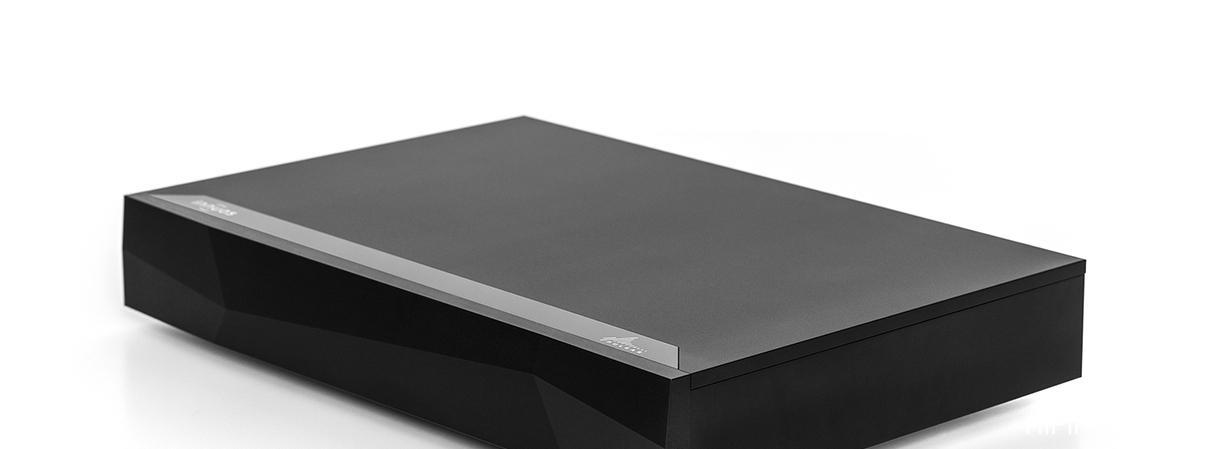
In terms of price, the Innuos Pulsar is second only to the flagship Statement. In other words, if you don’t need CD ripping capabilities, the Pulsar is arguably their top-tier streaming-only option. From an external perspective, the Pulsar’s chassis is also meticulously constructed. The front panel is a substantial 15mm thick, while the top and side panels are 10mm thick, all machined from solid aluminum.
The front panel features their signature triangular sloping design, adding a touch of modern aesthetics. You won’t find the brand or model name on the front; they are located on the top panel, towards the front on the left and right sides. Is there no power switch on the front? No!
Moving to the rear panel, I must admit I was momentarily bewildered, even as an editor. I knew the Pulsar has no internal DAC, so analog outputs were expectedly absent. However, I didn’t see any AES/EBU or RCA digital outputs either! There was only a single USB DAC port. This means the Pulsar connects to an external DAC solely via this USB port to produce sound. This struck me as odd – don’t we usually say that the 5V power signal within a USB cable can compromise signal purity?
Why did Pulsar specifically choose a USB connection?
This particular USB port is actually an integrated module known as the Integrated PhoenixUSB Lite Reclocker, essentially the same technology found in their standalone $3,749 Phoenix USB reclocker. A reclocker utilizes highly precise crystal oscillators to re-synchronize the clock timing between the Pulsar’s internal clock and that of the external DAC, significantly reducing overall system jitter.
This USB module not airbags only employs a precision crystal oscillator but also features a custom DC4 CX voltage regulator module, populated with high-quality Audio Note Kaisei capacitors. Furthermore, modern USB interfaces are capable of handling a wide range of specifications, which Innuos believes makes it the optimal method for external digital transmission.

This single USB output can handle PCM up to 32bit/768kHz and DSD512 (Native) or DSD256 (DoP), which is more than sufficient for contemporary high-resolution audio.
Opening the Pulsar’s top cover reveals a substantial 300VA toroidal transformer, accompanied by 130,000 µF of German Mundorf filter capacitors. Even more impressively, the output stage capacitors are Mundorf Silver Gold Oil – clearly, no expense was spared. Rectification is handled by a custom ARC6 active rectifier. The power supply design is exceptionally robust. This power supply system independently feeds the main circuit board, the solid-state drive, and the PhoenixUSB Lite Reclocker.
As it functions as a server, the Pulsar incorporates a Single-Level Cell (SLC) solid-state drive, which also has its own dedicated custom CX regulator module. Compared to typical Triple-Level Cell (TLC) SSDs, the SLC used in the Pulsar offers significantly longer lifespan and lower electrical noise.
The rear panel also features two Ethernet ports. The one closer to the USB port connects to your home router, while the other can be used to connect to a NAS drive. There are also four standard USB ports grouped together; these are for future use and are not currently active. A single HDMI port on the rear is strictly for service and maintenance purposes and is unrelated to audio playback.
User Experience: Setup and the Sense App
In fact, to use the Pulsar, you simply connect an Ethernet cable from your router to the Pulsar and a USB cable from the Pulsar to your external DAC. That’s all you need to get sound.
So, is it truly that simple to get sound? I thought so. After flipping the main power switch on the rear panel, I downloaded the Innuos Sense App from the App Store. However, the app wouldn’t open, constantly displaying a “player not found” message. This was perplexing. I had turned the power on, so why couldn’t the app find the Pulsar? After a day of troubleshooting without success, I gave up and decided to call the distributor, Taifu, the next day.
As it turns out, I was outsmarted – or rather, I was too arrogant to consult the manual (which was sitting in the box). The manual was just a small sheet of paper illustrating a small On/Off button at the bottom center of the front panel. The switch on the rear panel is indeed the main power cut-off, but the small button underneath the front panel is the standby switch, which must be pressed for the unit to truly power on.
Once I pressed the switch underneath, the pale blue LED illuminated, and the app immediately connected to the Pulsar. From that moment on, I happily enjoyed the music.
The Innuos Sense App is incredibly comprehensive. If you use Tidal, Qobuz, ROON, or have experience with streamers from brands like Aurender or Lumin, you’ll find that the various displays and functions within the Sense App are essentially a synthesis of the best features from all of them. It has everything you need and almost everything you can think of, including MQA decoding (with InnuOS version 2.3).
You can listen to internet radio stations from around the world (with presets), access music files stored on your computer or NAS, and perform various operations with Tidal and Qobuz streaming platforms. If you subscribe to multiple streaming services, you can even merge their data, presenting rich background information such as artist biographies, related musicians, most frequently played tracks, and more.
You can also combine albums from streaming platforms and your NAS into a single, integrated music library.
Furthermore, while playing music, you can perform various searches. What’s even more interesting is that the Sense App, much like the Tidal homepage, can create Smart Mixes for you. In short, my assessment is that the Innuos Sense App was developed by researching the approaches of various competitors and cherry-picking their best features. It is exceptionally user-friendly, highlighting Innuos’s strong software expertise.
However, I did notice that the Sense App currently doesn’t support Spotify playback. Reportedly, this is due to ongoing negotiations, but the official website’s FAQ does explain how to enable Spotify via the back-end settings.
Listening Impressions: Performance and Sound Quality
I listened to the Pulsar in my open-plan living space, paired with a Weiss DAC502 ch4 DAC, which fed directly into a Classe Delta Stereo power amplifier driving the latest B&W 801 D4 Signature speakers. The distributor advised me that the Pulsar requires at least two weeks of break-in before its sound quality stabilizes. However, after only two or three hours of burn-in, I began comparing it against the Weiss DAC502’s internal streaming capabilities.
Without needing extensive, rigorous comparison, I could immediately perceive an overall improvement when using the Pulsar as the “transport.” The first impression was improved sound quality. The second was that the positioning and focus of instruments and vocals became sharper and more defined. The third was enhanced soundstage transparency, making it easier to “see” into the depth and layers of the sonic image.
How can simply changing the playback front-end, while keeping the DAC the same, result in such improvements? With a CD transport, improved performance comes from enhanced reading systems and power supplies. A streaming “transport” relies on computer software for playback, leading me to ponder whether the Pulsar’s internal software also contributes to sound quality.
While I cannot definitively prove this, I suspect it does have an impact; well-written software should optimize processor efficiency. Of course, the Pulsar uses an Intel 4-core CPU N4200, which is common in such products. Beyond the software, the Pulsar’s hardware design plays a significant role. It provides a more stable and cleaner power supply, and the USB output incorporates clock regeneration. These two factors undoubtedly contribute significantly to the improvement in sound quality.
This concludes my review of the Innuos Pulsar. I cannot describe the listening experience in the granular detail I typically would in a component review, because the primary sound signature is still dictated by the Weiss DAC502 ch4. If I had paired the Pulsar with a different DAC, the sound I heard would have been completely different.
Therefore, I can only state that using the Pulsar resulted in improved sound quality, sharper and more focused instrument and vocal imaging, enhanced soundstage transparency, and a greater ability to resolve details within the sonic field. These are the areas where the Pulsar made a noticeable difference.
Final Thoughts: Value and the DAC Debate
Is it worth the price to buy a “transport” at this level? Consider the analogy of purchasing a separate CD transport and DAC. If you currently use a separate CD transport and DAC, then using the Pulsar in the streaming domain makes perfect sense. Furthermore, many audiophiles likely already own high-quality external digital-to-analog converters.
If you purchase a streaming player with a built-in DAC, you face a dilemma: do you use the built-in DAC, or bypass it via a digital output to use your existing DAC? Bypassing the built-in DAC feels wasteful. But is the built-in DAC as good as your existing external one? Increasingly, streaming players are being released without internal DACs, a trend Innuos is simply at the forefront of.
Specifications
* **Type:** Streaming Player / Music Server (No DAC)
* **Release Date:** 2023
* **Digital Output:** USB (utilizing integrated PhoenixUSB Lite Reclocker)
* **MQA Support:** Yes (with InnuOS 2.3)
* **Supported PCM:** Up to 32bit/768kHz
* **Supported DSD:** Up to DSD512 (Native), DSD256 (DoP)
* **Supported Audio Formats:** WAV, AIFF, FLAC, ALAC, AAC, MP3, MQA
* **Endpoint Modes:** Innuos Music Servers, Logitech Media Server based Servers, or HQPlayer Server
* **Dimensions (WHD):** 420 × 76 × 290 mm
* **Net Weight:** 10.17 kg