
Roon Nucleus Titan Review
Initially, Roon Labs collaborated with audio manufacturers like Sooloos and Meridian to develop their software. Later, they established their own brand, Roon Labs. Thanks to its robust music file management capabilities, Roon quickly swept across the audio market, attracting numerous manufacturers to support Roon Ready streaming products.
Not only has the number of compatible devices grown, but so has Roon’s user base. While the Roon App is free to download, its use requires a subscription. Users can opt for a monthly payment or purchase a lifetime membership. The monthly subscription is priced at \$12.49 USD, while a lifetime membership costs \$829.99 USD.
A monthly subscription is comparable to what we pay for video streaming services. However, \$800+ USD for a lifetime membership is certainly not a small sum. At \$829.99 USD, Roon is considerably more expensive than any other music playback software on the market.
Roon’s Core Strengths
Roon, however, asserts that its price is justified. Its functionalities surpass those of any other music playback software available. I will list just three of Roon’s most potent features:
1. **Comprehensive Music Database:** Roon’s most crucial feature is its incredibly powerful music database. It aggregates all your music data into a systematic, organized library. Furthermore, it boasts an expansive cloud database, providing rich information about albums and artists. While other music players might offer some degree of music file organization, Roon functions more like a comprehensive music library, not only cataloging your collection but also offering detailed artist and album introductions. If you take the time to explore, Roon delivers not just music playback, but a wealth of musical knowledge. To call it the most powerful music data and playback platform on the market is no exaggeration—not in the slightest.
2. **Multi-Room Playback & Control:** Roon supports multi-room playback, allowing control over multiple audio systems within your network. It not only supports UPnP-based streaming but also enables AirPlay and Chromecast control. In this aspect, it outshines many other playback software solutions.
3. **Advanced DSP Capabilities:** Roon features robust DSP functionalities, such as sample rate conversion, parametric EQ adjustments, and more, offering advanced users a multitude of customizable options. Moreover, it includes specific DSP adjustments for headphone users, including Crossfeed and Headphone EQ. Crossfeed can help early stereo recordings sound more cohesive and less spatially separated when listened to on headphones. Headphone EQ offers a list of various headphone brands, allowing for compensatory EQ adjustments tailored to each headphone’s sonic signature. These extensive DSP functions are rarely found in other playback software, yet Roon includes them all.

Core and Bridge Architecture
Because Roon’s capabilities are so extensive, it demands significant computational resources. Consequently, unlike other playback platforms, Roon requires a computational core. This core essentially acts as Roon’s operating server. Previously known as Roon Core, it is now simply referred to as Roon Server.
This Roon Core or Roon Server functions as the central brain of the entire Roon system, responsible for storing, organizing, and accessing data, as well as relaying commands and performing complex calculations. While the Roon Server can directly output digital music signals to a DAC for decoding, Roon Labs advises against this due to the server’s high computational load and resulting digital noise, which can compromise sound quality.
The standard Roon playback architecture involves using a separate Roon Bridge to handle digital playback. As long as the Roon Server and Roon Bridge are within the same network and the Bridge device is certified, the Roon Server will “discover” it. After a simple setup, the device can be enabled for playback. The Roon Bridge can be a dedicated digital streaming transport, a streaming player with a built-in DAC, or even a computer, barebones PC, or Raspberry Pi configured as a Roon Bridge. If the Bridge has a built-in DAC, it’s convenient—simply connect its analog output to an amplifier to enjoy music. If it’s a purely digital transport or computer-based Bridge, an external DAC will be required.

To configure a computer, barebones PC, or Raspberry Pi as a Roon Bridge, you’ll need to download and install the official Roon Bridge software. Thus, the complete Roon operational structure involves a Roon Server, ideally paired with a Roon Bridge. If the Bridge is a purely digital device, connect it to a DAC, and the rest, I trust, you understand. This constitutes Roon’s fundamental architecture.
Roon Server Setup Considerations
Regarding the Roon Server, Roon’s initial approach was to allow users to download the Roon Core operating system software, which could be installed on a computer (Windows, Mac, Linux) or a NAS. This method remains viable in the current Roon Server era. However, users choosing to self-install the operating system software should be aware of two key points:
First, Roon Core/Server operations consume significant resources, so the hardware’s CPU and memory capacity have basic requirements. Higher-spec hardware will result in smoother system performance.

Second, while Roon Core/Server can be installed on a computer or NAS, dedicating the hardware specifically for Roon’s computational core can significantly enhance overall sound quality.
Roon’s Own Nucleus Servers
Based on these considerations, Roon took the initiative in 2018 to launch its proprietary Roon Core: the Nucleus. Alongside the standard Nucleus, they introduced the higher-end Nucleus Plus, catering to users with greater demands for database capacity and control over more audio systems.
After years of sales, Roon unveiled the all-new Nucleus Titan at CES 2024, designed to replace the original high-end Nucleus Plus server. Simultaneously, they introduced the Nucleus One, which shares a similar exterior to the Titan but features an ABS plastic casing and slightly scaled-down specifications and functionalities. These two models are positioned similarly to their predecessors, with one targeting entry-level users and the other catering to advanced audiophiles.
Nucleus Titan: Design Evolution
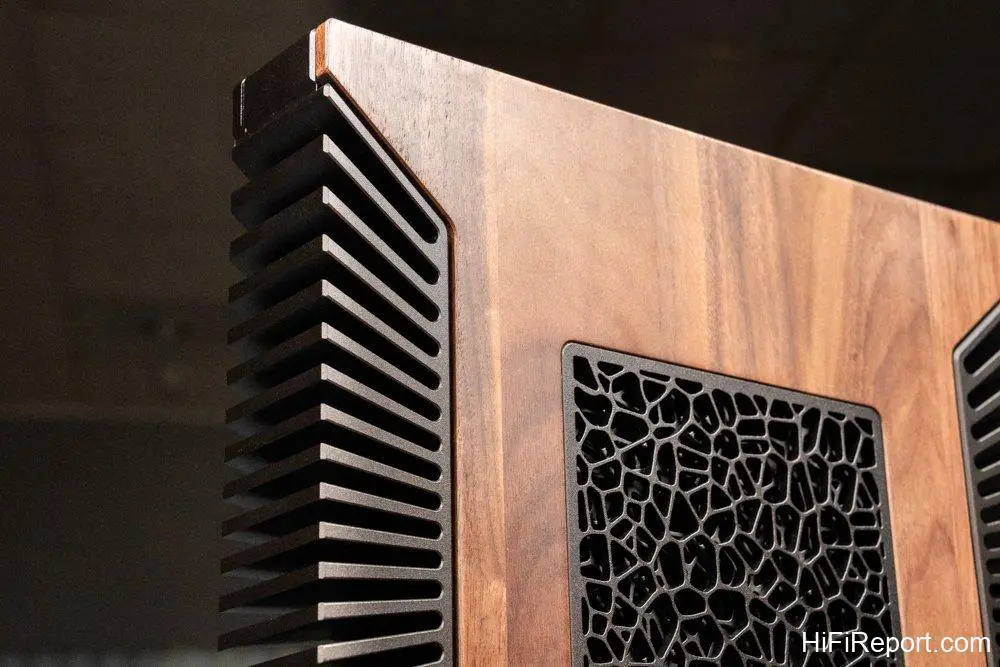
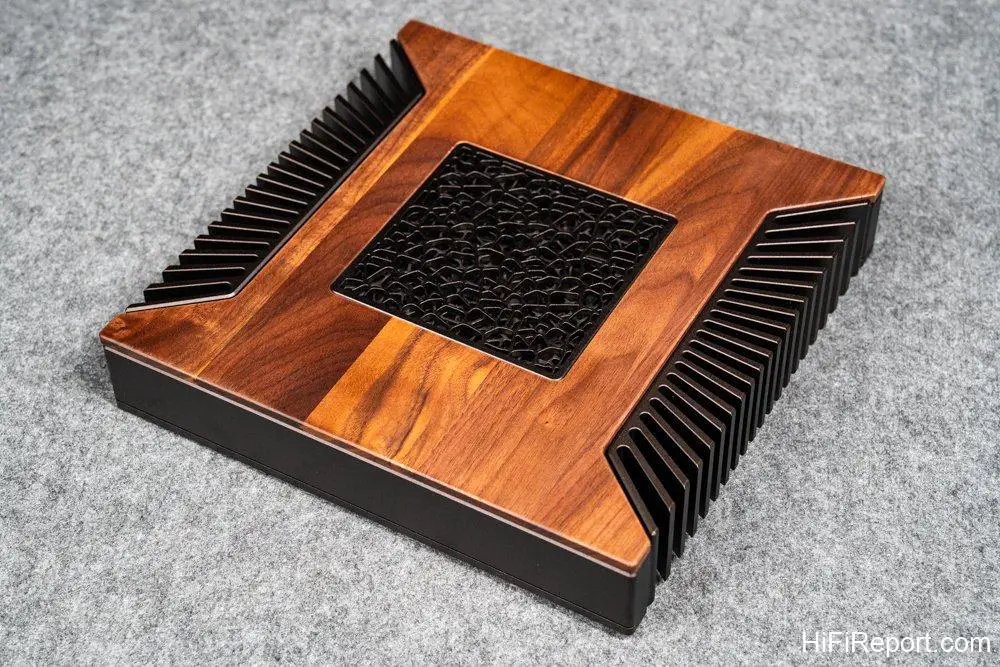
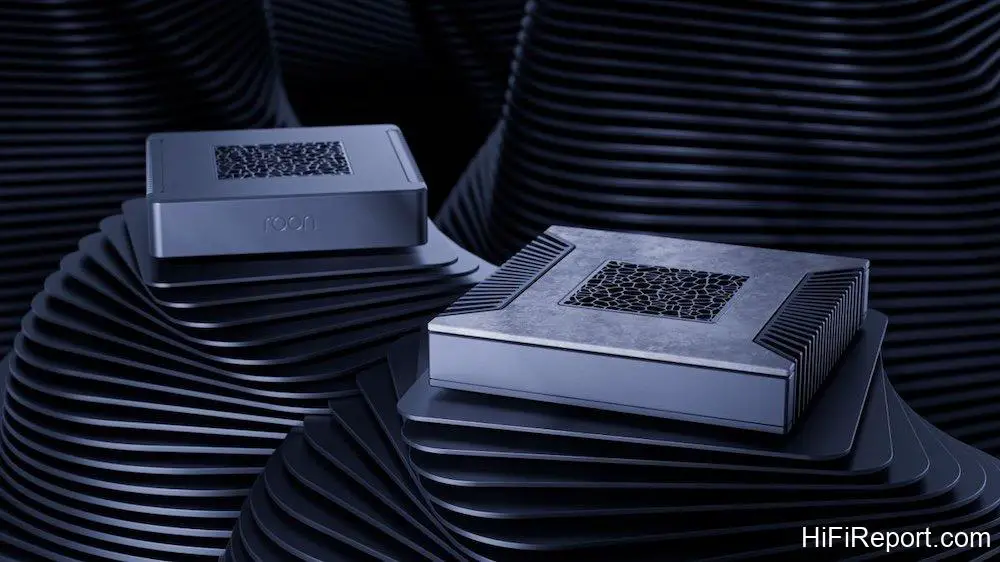
Compared to the previous Nucleus and Nucleus Plus, the Nucleus Titan boasts significant advancements in its external design. While the older Roon Nucleus Plus was well-built, its minimalist design and pervasive heat sinks lent it an industrial aesthetic. The new generation Nucleus Titan is a different story.
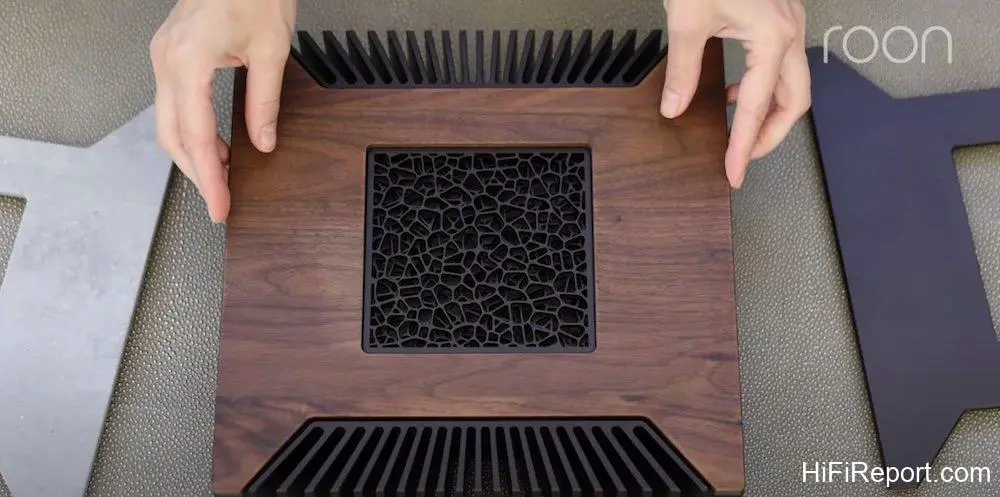
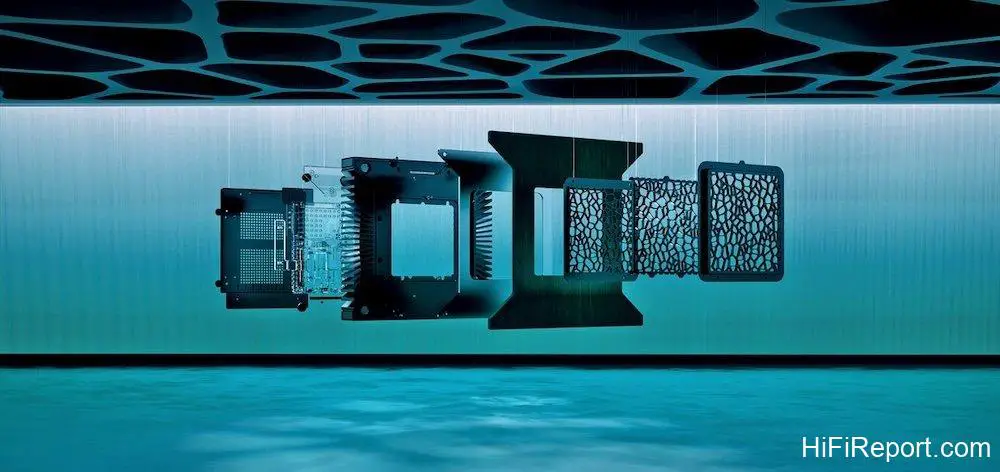
The metal chassis features radial heat sinks on both sides, a departure from the straight, parallel fins of the Nucleus Plus. The top center of the chassis displays an abstract, interwoven mesh pattern, reminiscent of dividing cells. This design alludes to the name “Nucleus,” imbuing the listening experience with an added layer of organicism, much like how Roon can continually extend its listening reach through connections—a profound design concept.
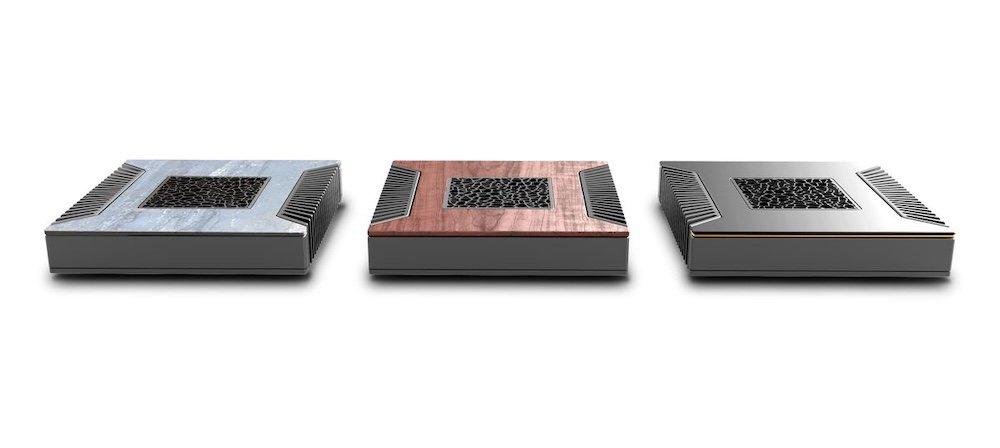
Beyond this, Roon incorporated a clever design detail: the Nucleus Titan’s top surface features a replaceable decorative plate. My review unit came with a wood-grain plate, whose natural texture exudes warmth and a humanistic touch. Two other options are available: a stone-patterned plate and a metal cover, each presenting a distinct style. The Roon Nucleus Titan demonstrates a more premium feel than its Nucleus/Nucleus Plus predecessors. Indeed, since Roon joined the Harman Group, its hardware design resources have expanded, and the product’s aesthetic has clearly transformed.
Enhanced Connectivity & Performance
Next, let’s examine the Nucleus Titan’s specifications. In terms of I/O, the Nucleus Titan offers two USB Type-C ports, both 3.0 specification (with Thunderbolt support), and two USB Type-A ports, one 2.0 and one 3.2. This configuration conveniently allows users to connect external storage devices or an external USB DAC for music playback. The previous Nucleus only had Type-A ports, so the addition of Type-C ensures faster and more convenient data transfer.
It also features two HDMI outputs, designated “audio only” for digital output. If your music library includes multi-channel audio files, these can be routed via HDMI to an AV receiver for playback through a multi-channel system. Such features are quite forward-thinking for a Hi-Fi component.
The RJ45 Ethernet input enables it to run Roon’s proprietary RAAT network protocol, allowing the Roon Server to act as the core, directing other Roon Ready devices for playback and controlling the entire Roon system. RAAT, or Roon Advanced Audio Transport, operates by transmitting audio data in roughly 10-second units using the relatively stable TCP protocol. This data is buffered by the backend audio equipment, which then uses its internal clock to correct and play the digital information. If playback is paused, RAAT immediately halts transmission, and backend buffering also stops. When playback resumes, it restarts instantly. This ensures that Roon can stop and start music playback precisely in response to user commands, avoiding any playback delays caused by buffer processing.

Internally, the Nucleus can accommodate one 2.5-inch SATA hard drive. When purchasing, you can choose to buy the unit without a hard drive or with a pre-installed one (Roon offers 2TB, 4TB, and 8TB options). Installing your own drive is also possible by simply removing the bottom cover. Roon provides installation tutorials on YouTube for those who prefer DIY.
Performance Upgrades
Naturally, the new generation Nucleus Titan’s hardware specifications are an improvement over the Nucleus Plus. While detailed specifications aren’t on the official website, I’ve gathered from external media reports that its CPU performance is 36% higher than the Nucleus Plus, energy efficiency is 37% greater, and memory capacity and computational bandwidth are 80% higher. This is coupled with a newly designed fanless cooling system. As the Nucleus Titan is both an audio component and an information device, these performance enhancements are quite significant.
However, to be frank, with my personal digital album collection amounting to only a few thousand tracks (including those from streaming services), the user experience difference between the Nucleus Plus and Nucleus Titan is not markedly noticeable. Purely for music playback, the previous generation Nucleus Plus also offered a very smooth experience, and its sound performance was not significantly inferior. Based on my usage, a Roon Nucleus unit can last a considerable time, so there’s no fear of it becoming obsolete in just a few years. Yet, if one were to pinpoint differences between the two generations, the CPU and memory performance disparities would become apparent when handling very large music libraries.
Titan vs. Nucleus One
The Nucleus Titan’s specifications are superior to those of the concurrently released basic Nucleus One. The Nucleus One has database capacity limitations, allowing a maximum of 10,000 albums and 100,000 tracks; the Nucleus Titan, however, has no such restrictions. For multi-room playback, the Nucleus One supports up to 6 playback zones, whereas the Nucleus Titan can support more than 6 simultaneous playback zones.
As for Roon’s powerful MUSE DSP functions, the Nucleus One only provides partial access, but on the Nucleus Titan, all functions are “unlocked,” giving users full DSP capabilities. Given these comparisons, for serious music enthusiasts or audiophiles who prioritize sound quality, it is advisable not to skimp on the Roon Server cost and to prioritize purchasing the Nucleus Titan. Currently, Roon only offers global sales for the Nucleus Titan, while the basic Nucleus One is sold exclusively through their official website, with after-sales support managed directly by the user.
Power Supply Upgrade Crucial
If you plan to use the Roon Nucleus Titan, I strongly recommend purchasing a high-quality external power supply. While the factory-supplied switching power supply is from a reputable manufacturer and offers guaranteed quality, you will notice a significant difference once you switch to a premium linear power supply—the background will become darker, lines will be sharper, dimensionality will improve, separation will be better, bass impact will increase, and dynamic performance will be more outstanding.
I very, very, very strongly advise consumers to allocate an additional budget for a power supply upgrade. The Ferrum Audio Hypsos linear power supply, sold by HiFiReport Audio, is an incredibly practical power supply. Its advantage lies in its adjustable output voltage, and if you have other devices that require power (such as a phono preamplifier or network switch), Ferrum also offers a splitter accessory, allowing you to upgrade step by step.
Sonic Leap Over PC/NAS
What was the real-world usage like? I brought it home and spent a month slowly appreciating it. Normally, at home, my Roon Server setup is simple: either running the Roon Server OS on a dedicated hard drive in a NAS, or using an idle MacBook Pro as the server. The former generally yields slightly better sound than the latter, but the laptop offers the convenience of a screen to view the current playback status without needing to look at a mobile device or a separate computer tab—just a glance up.
However, after connecting the Roon Nucleus Titan, the sonic improvement was immediately noticeable. Regardless of whether I used my NAS or laptop setup, the Nucleus Titan delivered a comprehensive upgrade. The most apparent sensation was a significantly cleaner sound, which, in turn, led to sharper lines and more dimensional soundstaging.
To draw a visual analogy, using the Nucleus Titan as a Roon Server felt like increasing the resolution of a video—what was previously lower resolution and slightly blurry now becomes incredibly clear. Or, imagine drawing with a fountain pen on paper; water-based ink can cause feathering on paper fibers. When I used my NAS or laptop as a server, it was like using paper with coarser fibers, where feathering was evident, and ink bleed was visible at the edges of lines. But with the Nucleus Titan, it was as if I switched to paper with a higher fiber density, where the ink adhered better, the ink spread was more contained, and consequently, the lines became much sharper.
Cleaner Sound, Clearer Image
The Nucleus Titan’s more refined sound presentation, offering a cleaner sonic image, genuinely clarified the musical structure. Playing the final movement of Tchaikovsky’s “Swan Lake Suite,” conducted by Mstislav Rostropovich with the Berlin HiFiReport Orchestra—a section of high drama and tension, where the princess returns to the lake heartbroken by the sorcerer’s deception, and the prince battles to break the spell. The crisp image provided by the Nucleus Titan meticulously disentangled the intricate and interwoven threads within this music, giving the listener a profound sense of comprehension.
Subtlety and Impact
Another orchestral piece that exemplifies its excellence is Rimsky-Korsakov’s “Dance of the Tumblers” from the opera “The Snow Maiden.” I listened to the version from Reference Recordings’ “Tutti” compilation, performed by Eiji Oue conducting the Minnesota Orchestra. RR recordings are renowned for their clean and transparent sound, offering excellent resolution alongside robust bass, which makes the music exceptionally impactful.
With the Nucleus Titan, the whimsical and varied main melody sounded more alive, while the percussion was sharper, more energetic, and more impactful. The subtle metallic shimmer of the cymbals was more delicately rendered, and the nuanced decay of their resonance was more clearly perceptible. In contrast, the same track from the same source, when played with the NAS or laptop serving as the Roon Server, sounded less lively—comparatively duller.
Solid Imaging, Better Separation
Consider the audiophile classic “Belafonte at Carnegie Hall.” Harry Belafonte isn’t static on stage; he moves and interacts with the audience while performing. This album wonderfully captures the live atmosphere, not only with a stereo soundstage but even with a sense of height. With so many elements, it’s easy for the music to sound chaotic when it intensifies. This chaos isn’t always the amplifier’s fault; the source can also be the culprit.
After switching to the Nucleus Titan, I clearly perceived better image separation. The contours of instruments and vocals became more distinct, their forms more cohesive and solid, and the nuances of vocal lines and timbres more vivid. Does this album sound chaotic? How could it be a classic if it did? The better your source is optimized, the more you’ll appreciate the quality of this album.
Sharper Contours, Higher Resolution
Because the sound became cleaner and the sonic image more transparent, many details also became clearer. Taking Shelby Lynne’s “Just a Little Lovin'” as an example, the subtle drum beats in the background, under the “servitude” of the Nucleus Titan, each drum hit was clearer, more focused, and more defined, with a noticeable sense of texture and bounce. While it wasn’t a case of “I couldn’t hear it before, but now I can,” I can confidently say, “It wasn’t as clear before, but now it is.” Shelby Lynne’s vocals were also tighter, with significantly less vocal fuzz, leading to sharper, clearer contours and the emergence of a more pronounced three-dimensional quality. Vocals are what we are most accustomed to, and changes in vocal perception are often the easiest to discern. The Nucleus Titan, replacing self-configured Roon Server setups, allows for an easy appreciation of the overall performance improvement through vocal tracks.
Hardware for Software Excellence
For Roon users, the Nucleus Titan is undoubtedly an excellent solution. Especially for serious audiophiles who heavily use Roon and have already invested significantly in their audio systems, this Roon Nucleus Titan is definitely worth considering. Roon Labs is a software company, and the brilliance of the Roon system lies in its formidable software development capabilities. However, even the best software requires appropriate hardware support to truly shine. If you prefer not to spend time on “self-assembly,” the Roon Titan—a plug-and-play Roon Server that you can buy, unbox, and use—is the most time-saving and effortless choice. Furthermore, its compact and refined chassis makes it both practical and aesthetically pleasing, adding to its high “Wife Acceptance Factor.”
Versatile, Mid-Tier Roon Server
Are there other Roon Server options besides “building your own”? While not abundant, they do exist. In a similar price range to the Nucleus Titan, there are the NuPrime Evolution Stream and the Rockna Wavelight Server. I’ve used both, and their sound quality is notably superior to a computer-based setup, but as Roon Servers, their sonic signatures differ slightly.
Choosing among these three is straightforward: Rockna is ideal for pairing with their own source components, NuPrime suits users looking to upgrade their clocking, while the Nucleus Titan offers the broadest compatibility and is uniquely capable of multi-channel audio playback. As for higher-priced options like the Pink Faun 2.16 Ultra or Taiko Audio Extreme Stream, they belong to an entirely different league of products with different consumer rationales, so a direct comparison is not meaningful.
For those who haven’t yet ventured into the Roon ecosystem, I encourage you to visit a dealer and experience it firsthand. There are many ways to stream music, but once you’ve experienced Roon, you may find it difficult to go back. And the Nucleus Titan is the perfect gateway, helping you unlock a new world of streaming playback.
Specifications
**Roon Nucleus Titan**
* **Type:** Music Server
* **Connectivity:**
* USB 3.2 Type-A x1
* USB 2.0 Type-A x1
* USB Type-C 3.0 x2
* HDMI x2 (for audio)
* Ethernet (RJ45)
* **Internal Storage:** 2.5” SATA
* **Dimensions:** 10.875” x 10.875” x 2.25”
* **Weight:** 7 lbs